Flock-You Detection: Counter-Surveillance Setup Guide
Table of Contents
Complete Technical Guide to Building and Using Flock-You Detection Devices
Introduction: Open Source Counter-Surveillance
The Flock-You project is an open-source, community-driven initiative to detect and map Flock Safety’s ALPR surveillance infrastructure. Hosted on GitHub at colonelpanichacks/flock-you, this project uses affordable ESP32-based hardware to identify Flock cameras through their WiFi network signatures.
Flock-You detects one thing: Flock Safety cameras over WiFi. It does not detect Stingray-style cell site simulators, and it does not alert you to personal trackers (AirTags, Tiles, unknown Bluetooth devices) moving with you. For those, see Rayhunter for IMSI catcher detection and Eye Spy for AirTag and follower detection. All three run on the same class of cheap ESP32-family hardware.
This comprehensive guide covers everything from the technical methodology behind Flock detection to step-by-step setup instructions for three hardware platforms, firmware installation, and purchasing information from authorized vendors. Whether you’re a privacy advocate, security researcher, or concerned citizen, this guide will enable you to build or purchase your own detection device.
Flock Safety hardware is deployed almost entirely in the United States, with a smaller footprint in Canada. Outside North America, the OUI list and probe signatures below won’t match anything nearby. The hardware is still useful for research, but it won’t find infrastructure that isn’t there.
For context on why this technology matters and the scale of ALPR deployment, read our companion article: Flock Safety Camera Surveillance: Prevalence, Privacy Concerns, and Protection Strategies .
Want to see where Flock cameras have already been mapped? Flock Finder is an open-source tool that plots 40,000+ suspected Flock Safety cameras worldwide using WiGLE WiFi data and OUI fingerprinting, updated daily. Source on GitHub .
At a Glance: Three Platforms
| Platform | Price | Setup | Best For |
|---|---|---|---|
| DIY ESP32 | $5-12 | Solderless breadboard, 10-15 min | Budget builds, learning how detection works |
| M5 Atom Lite (pre-flashed) | $49.99 | Plug in and go, zero setup | Instant use, no DIY tolerance |
| OUI-SPY | $85 | Flash once, pick a mode from a WiFi menu | Multi-mode detection (ALPR + drones + BLE) |
Full specs, pros, and cons for each platform are below. Jump to Setup Instructions if you already know which one you want.
Understanding the Flock-You Detection Methodology
The Technical Foundation
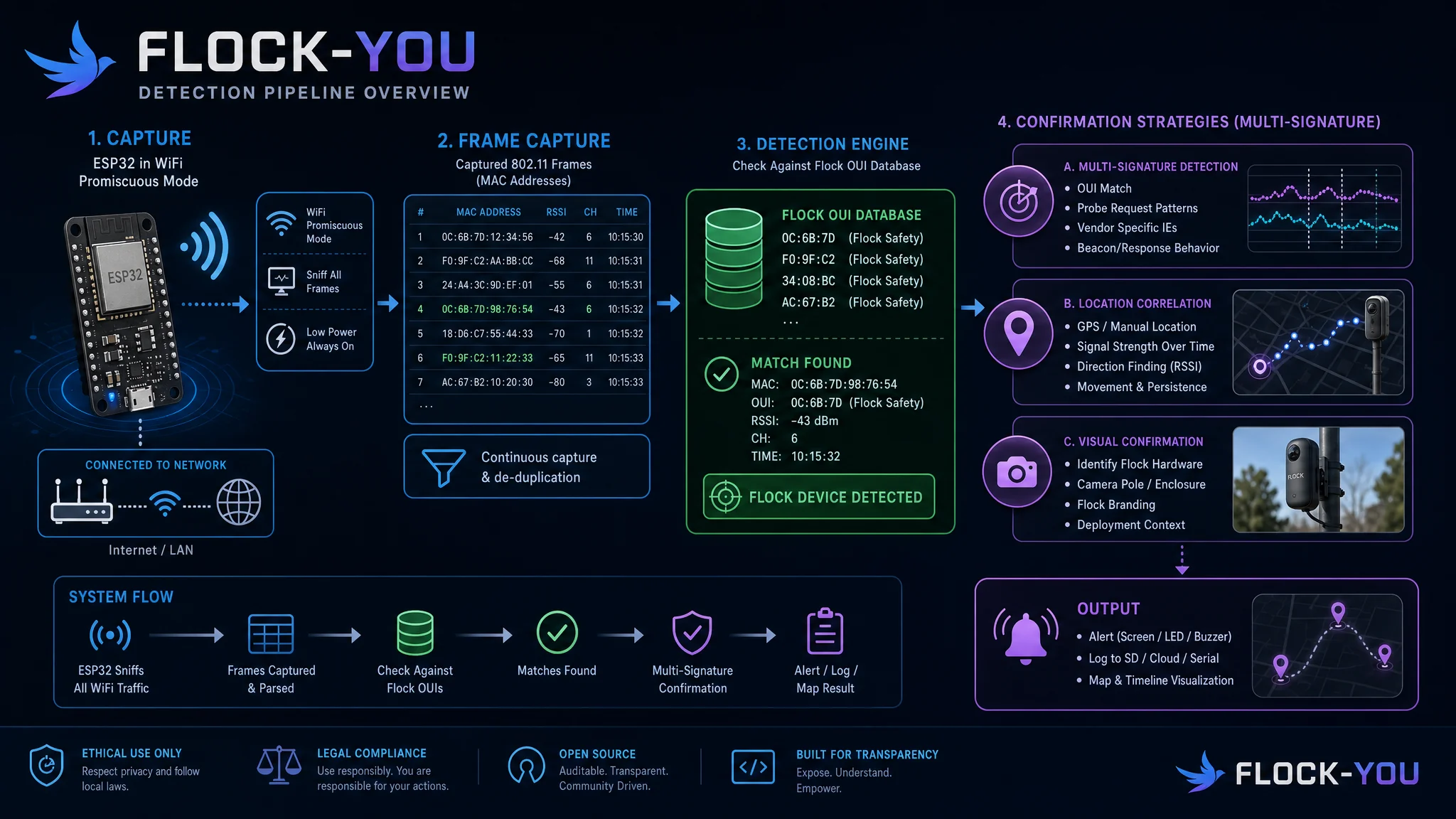
Flock Safety cameras contain embedded WiFi modules for connectivity and remote management. These modules broadcast identifiable network signatures detectable by devices operating in promiscuous WiFi monitoring mode. The Flock-You project exploits this characteristic through:
1. WiFi OUI (Organizationally Unique Identifier) Detection
Every network interface has a MAC address consisting of:
- First 3 bytes (24 bits): OUI, which identifies the manufacturer
- Last 3 bytes: Device-specific identifier
Researchers @NitekryDPaul and the DeFlockJoplin community discovered 31 specific OUIs consistently present in Flock Safety camera deployments:
Primary Espressif OUIs (ESP32-based modules):
D4:AD:FC - Espressif Inc. (Common ESP32-S3)
AC:67:B2 - Espressif Inc. (ESP32-WROOM)
84:F3:EB - Espressif Inc. (ESP32-S3 variants)
B4:E6:2D - Espressif Inc. (ESP32-C3)
CC:DB:A7 - Espressif Inc. (ESP32-based)
24:0A:C4 - Espressif Inc. (ESP32-SOLO)
30:AE:A4 - Espressif Inc. (ESP32-WROVER)
94:B9:7E - Espressif Inc. (ESP32-based)
A4:CF:12 - Espressif Inc. (ESP32-S2)
C0:49:EF - Espressif Inc. (ESP32-C6)

Additional OUIs identified in Flock deployments:
[... 21 additional manufacturer OUIs ...]
When a detection device scans WiFi traffic in promiscuous mode, it identifies any device broadcasting frames with these OUIs.
2. Wildcard Probe Request Detection
Flock cameras periodically send wildcard probe requests searching for available networks. These have distinctive characteristics:
- 802.11 Management Frame: Type=0, Subtype=4
- SSID Information Element: Length=0 (empty/wildcard)
- Frame structure: Predictable pattern in probe timing
- Vendor-specific IEs: Additional indicators in frame payload
Detection firmware analyzes these probe request patterns to increase confidence in Flock camera identification beyond simple OUI matching.
3. Promiscuous Mode WiFi Monitoring
Standard WiFi operation only receives frames addressed to your device. Promiscuous mode captures all WiFi frames within range:
- 802.11 frame structure: Analyzing addr1, addr2, addr3 fields
- Management frames: Probe requests, beacon frames, association requests
- Data frames: Reveal network behavior patterns
- Control frames: ACKs, RTSs, CTSs provide timing information
ESP32 microcontrollers support promiscuous mode through the esp_wifi API, enabling low-cost detection hardware.
4. Signal Strength Analysis
Detection devices measure RSSI (Received Signal Strength Indicator) to:
- Estimate distance to detected cameras
- Triangulate locations with multiple measurements
- Filter false positives based on expected signal characteristics
- Create heat maps of camera density
Detection Accuracy and False Positives
Accuracy depends heavily on environment, but one documented field test gives a concrete baseline. The DeFlockJoplin community drive-tested this detection approach and caught 11 of 12 known Flock cameras with only 2 false positives along their test route.
- Field-tested baseline: 11/12 confirmed cameras detected, 2 false positives (DeFlockJoplin drive test)
- Detection Range: 50-300 feet depending on obstacles and antenna
- Confidence Scoring: Multi-factor analysis (OUI match, wildcard probe signature, RSSI threshold) reduces false alarms
- Your results will vary: signal environment, antenna choice, and firmware version all affect real-world accuracy
Common False Positive Sources:
- ESP32 development boards used in other IoT devices
- Commercial ESP32-based products (smart home, sensors)
- Other surveillance cameras using similar components
- WiFi testing equipment operated by technicians
Mitigation Strategies:
- Multi-signature detection: Combining OUI + probe pattern + physical verification
- Location correlation: Cross-referencing with known camera locations
- Visual confirmation: Physical inspection after electronic detection
- Community database: Crowdsourced validation of detections

Hardware Platform Comparison
Three primary platforms are available for Flock-You detection, each with distinct advantages. All three run the same underlying detection method: passive WiFi promiscuous-mode scanning for known Flock camera OUIs and wildcard probe signatures. None of them detect Bluetooth. The Flock-You firmware dropped BLE detection support in spring 2026 after it stopped reliably working, so every platform here is WiFi-only.
Platform Overview Table
| Feature | DIY ESP32 | M5 Atom Lite (Pre-Flashed) | OUI-SPY |
|---|---|---|---|
| Manufacturer | DIY / Multiple vendors | STS Collective | Colonel Panic Tech |
| Price | $5-12 | $49.99 | $85 |
| Processor | ESP32-WROOM | ESP32-PICO | ESP32-S3 |
| Ready-to-Use | No (DIY build) | Yes (pre-flashed) | Yes (multi-mode) |
| Display | Optional | RGB LED (5×5 matrix) | None |
| Battery | Optional | External recommended | None included |
| GPS | Optional | No | No |
| Alerts | Buzzer + LED | RGB LED (blue=detect) | Integrated buzzer |
| Data Logging | Optional | No | No |
| Enclosure | 3D print or none | Compact plastic module | None (bare PCB) |
| Firmware | Flash manually | Pre-loaded FlockYou | Multi-mode (4 firmwares) |
| Best For | DIY enthusiasts, learning | Budget ready-to-go | Multi-purpose detection |
| Setup Difficulty | Moderate-Advanced | Plug-and-play | Plug-and-play |
| Weight | 20-50g (varies) | 18g (bare) | ~40g |
| Dimensions | Varies | 24×24×14mm | PCB board |
Detailed Platform Analysis
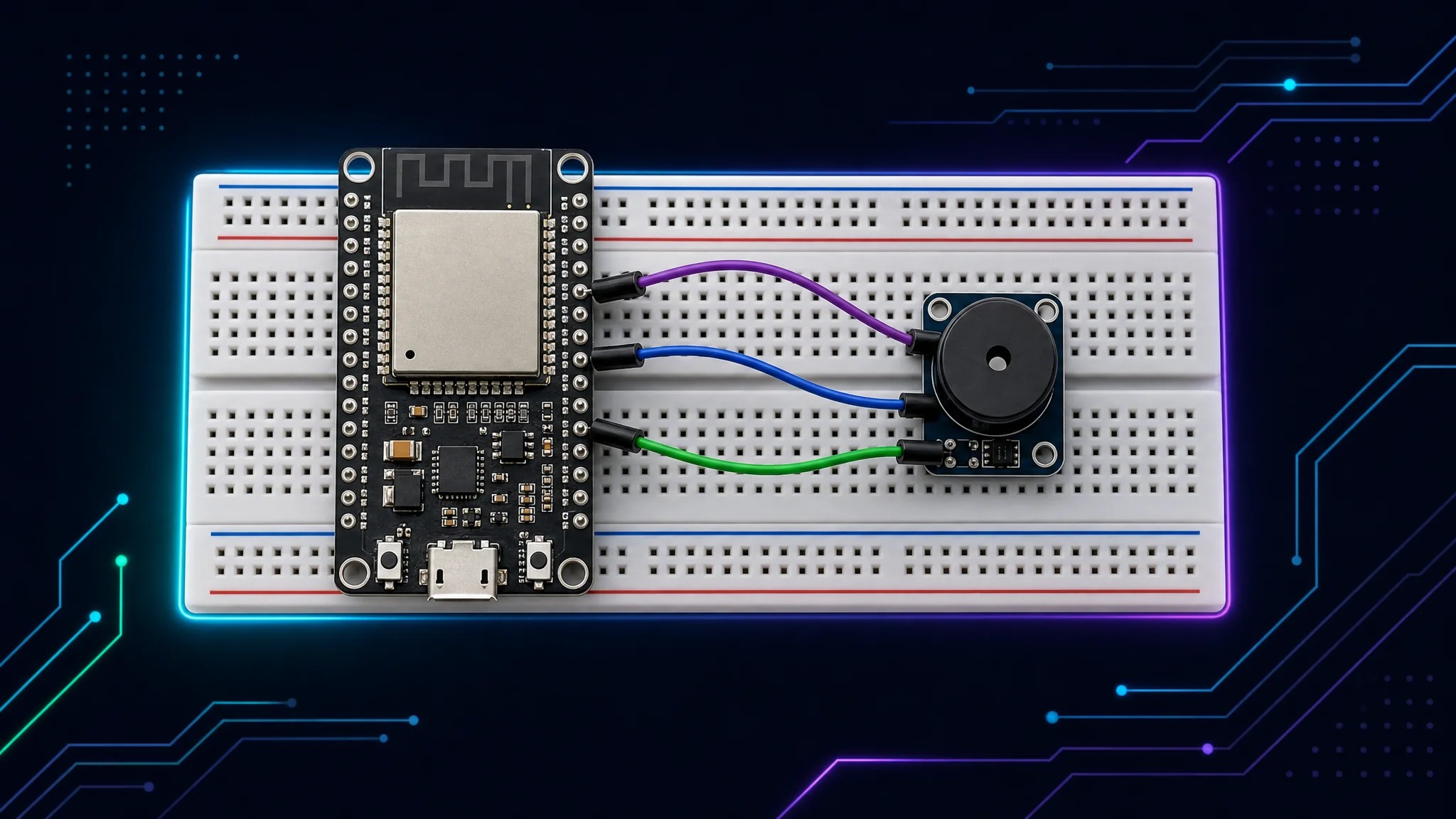
1. DIY ESP32 Build ($5-12)
Overview: Most affordable option using standard ESP32 development boards with open-source firmware.
Hardware Specifications:
- Microcontroller: ESP32-WROOM-32 or similar (dual-core, 240MHz)
- WiFi: 802.11 b/g/n, promiscuous mode capable
- Memory: 520KB SRAM, 4MB+ Flash
- Display: Optional (onboard LED sufficient)
- Power: USB-powered or battery pack
- Buzzer: Optional passive buzzer module (KY-006)
- Indicators: Onboard LED + optional buzzer
- Expandability: Breadboard-friendly, easy modifications
Firmware: Open-source fork at simeononsecurity/flock-you-esp32:
- Modified for standard ESP32 hardware (GPIO 25, 2, 17)
- Super Mario Bros. startup tune (confirms buzzer working)
- Two fast ascending beeps on new detection
- 10-second heartbeat beeps when tracking active
- Flask dashboard support for GPS wardriving
- Export to JSON, CSV, KML formats
Build Options:
- LED-Only ($5): Bare ESP32 + USB cable, visual feedback only
- Breadboard ($9-11): Add passive buzzer + breadboard + jumpers, audio alerts
- Enclosed ($10-12): Add 3D printed case with snap-fit lid
Pros:
- ✅ Cheapest option (85-95% cost savings vs OUI-SPY)
- ✅ Completely open-source and modifiable
- ✅ Uses widely available ESP32 boards
- ✅ Educational, teaches embedded systems
- ✅ Extensive documentation and guides
- ✅ 3D printable case files available
- ✅ Same detection accuracy as premium devices
Cons:
- ❌ Requires DIY assembly (solderless breadboard or 3D case)
- ❌ Manual firmware flashing needed
- ❌ No integrated battery (USB power or external pack)
- ❌ Basic audio feedback only (no display)
- ❌ Takes time to source components
Best For: Makers, students, privacy advocates on a budget, anyone wanting to learn how detection works, those who enjoy DIY projects.
Purchase Components:
- Amazon: Search “ESP32 DevKit” or “ESP32 Breadboard Kit”
- AliExpress/eBay: Bulk discounts available
- Adafruit: Curated quality parts with tutorials
Setup Resources:
- GitHub Repo: github.com/simeononsecurity/flock-you-esp32
- Build Guide: Solderless assembly in 10-15 minutes
- Case Files: OpenSCAD parametric design + STL files
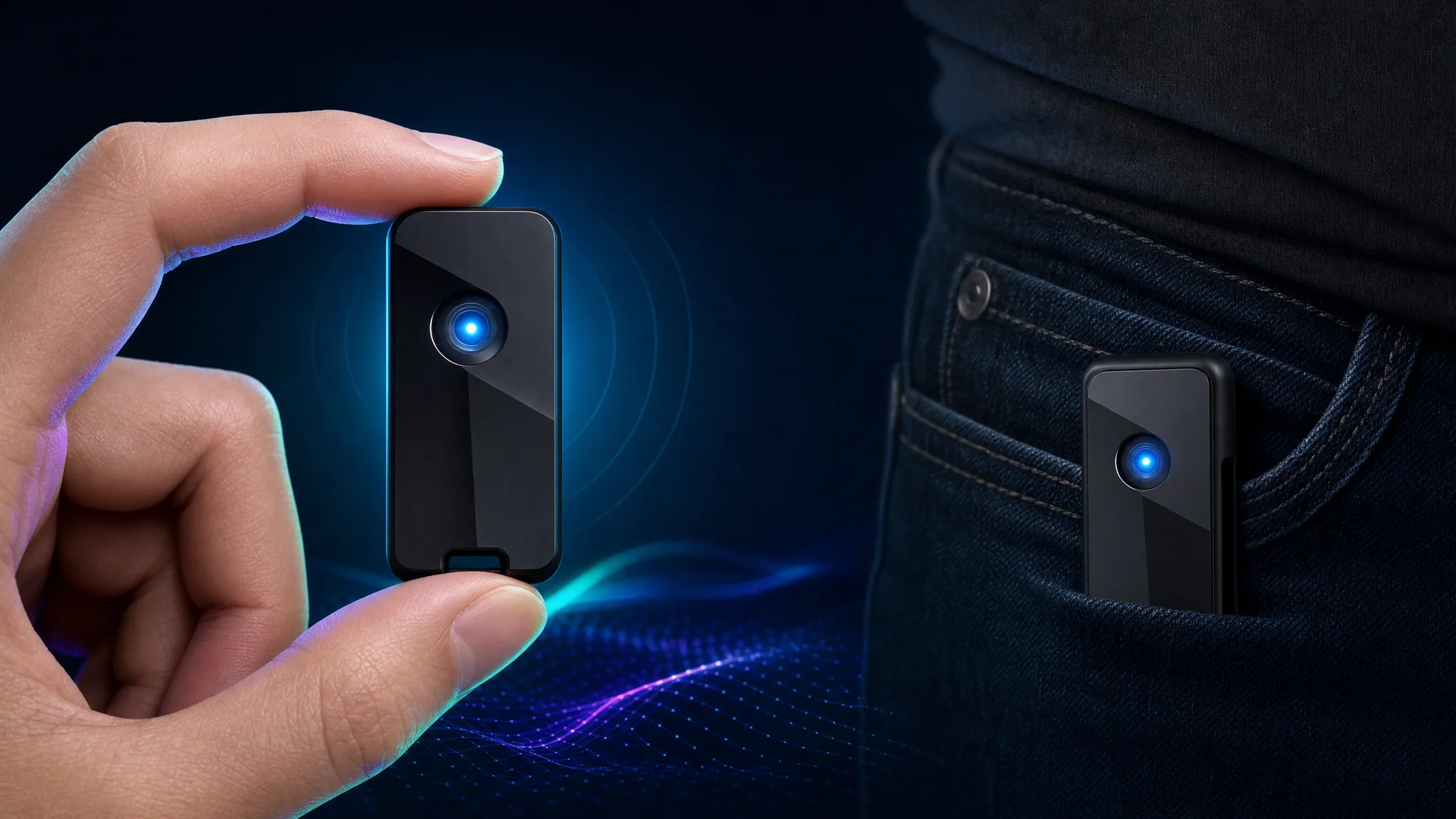
2. M5 Atom Lite Pre-Flashed by STS Collective ($49.99)
Overview: Pre-flashed compact detection device, ready to use out of the box.
Hardware Specifications:
- Microcontroller: ESP32-PICO-D4 (dual-core, 240MHz)
- WiFi: 802.11 b/g/n, promiscuous capable
- Memory: 520KB SRAM, 4MB Flash
- Display: 5×5 RGB LED matrix (WS2812C NeoPixel)
- Power: 5V via USB-C or Grove connector
- Battery: None included (external USB power bank recommended)
- Indicator: Programmable RGB LED (blue=detection)
- Buttons: 1 programmable button
- I/O: Grove connector for expansion
- Size: Ultra-compact 24×24×14mm
- Enclosure: Durable plastic module
Firmware: Custom FlockYou port by STS Collective (proprietary):
- Pre-loaded and ready to use
- Blue LED alert on Flock camera detection
- Based on colonelpanichacks FlockYou research
- No setup or flashing required
- Simple plug-and-play operation
- Optional dashboard support
Pros:
- ✅ Pre-flashed, no technical setup required
- ✅ Affordable ready-to-go solution
- ✅ Extremely compact and portable
- ✅ Proven hardware platform
- ✅ Simple blue LED = detection
- ✅ USB-C powered (car, power bank, laptop)
- ✅ Quality vendor support
- ✅ Regular price $99.99, on sale $49.99
Cons:
- ❌ No integrated battery (needs USB power)
- ❌ Limited display (RGB LED only, no screen)
- ❌ Firmware is proprietary, not open-source for the moment
- ❌ No data logging without computer connection
- ❌ Single button limits functionality
Best For: Users wanting instant detection without DIY work, portability priority, those comfortable with simple LED feedback, budget-conscious buyers wanting ready-made solution.
Purchase: stscollective.com/products/flockyou-m5-atom-lite-flock-camera-detector
💰 Exclusive Discount: Save up to 20% on STS Collective products. Use code SIMEONONSECURITY at checkout, or click here to shop with the discount applied .
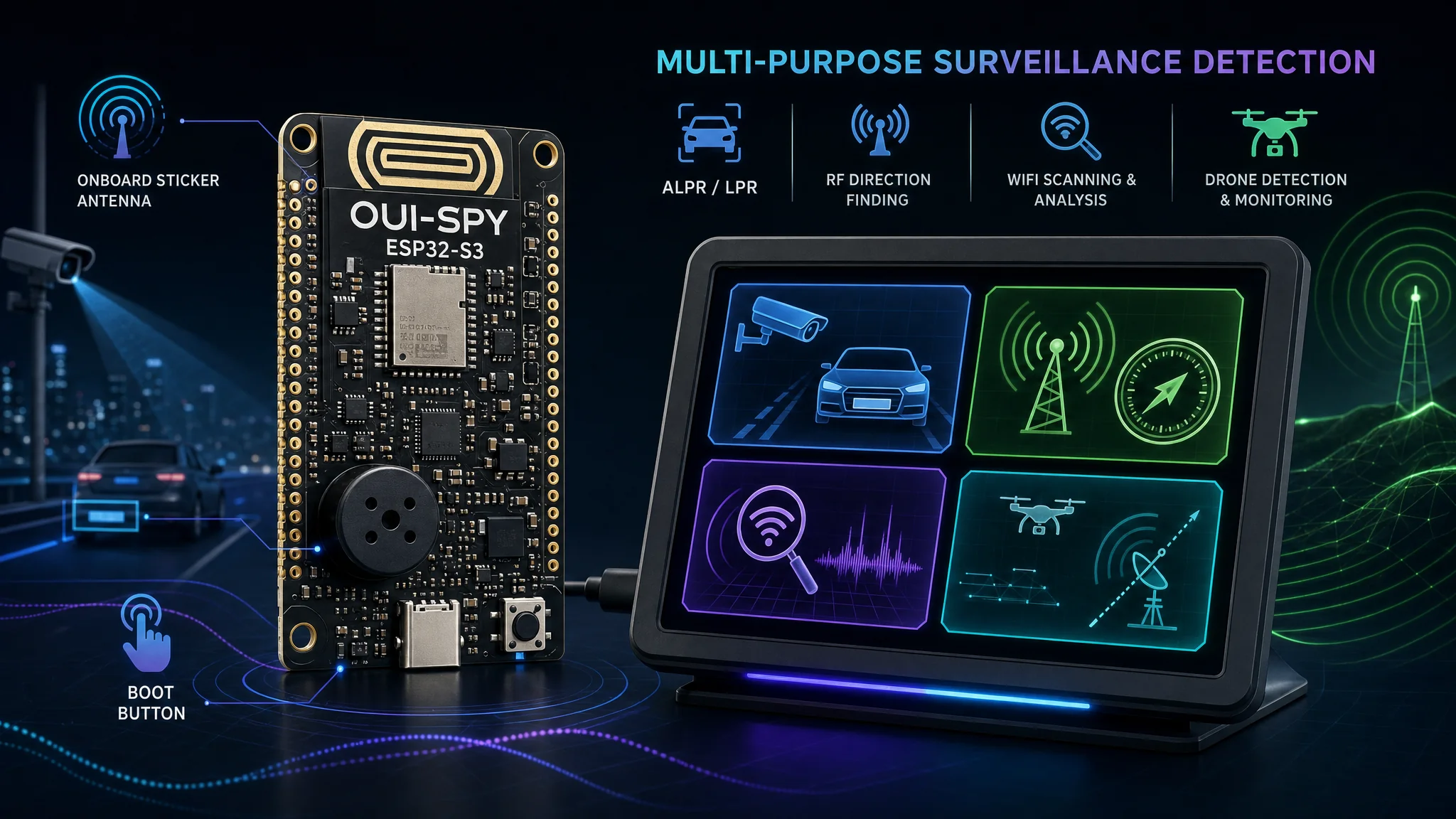
3. OUI-SPY by Colonel Panic Tech ($85)
Overview: Multi-mode surveillance detection board with four different firmware modes selectable via WiFi menu.
Hardware Specifications:
- Microcontroller: ESP32-S3 dual-core Xtensa LX7, 8MB flash
- WiFi: 802.11 b/g/n, promiscuous mode capable
- Memory: 8MB Flash
- Display: None (bare PCB with LED indicators)
- Battery: None included
- Charging: USB-C power & programming
- Storage: None (detection-only modes)
- Indicators: Integrated PWM buzzer with mode-specific tunes
- Buttons: Boot button for mode switching
- Antenna: Onboard 2.4GHz sticker antenna (stock), swap in your own for more range
- Enclosure: None (bare PCB with PCB art)
- Unique Feature: MAC randomization on every boot
Firmware: OUI-SPY Unified Blue with 4 selectable modes:
- Detector Mode: Multi-target BLE scanner with OUI filtering + web config portal
- Foxhunter Mode: Single-target RSSI-proximity tracker for radio direction finding
- Flock-You Mode: Flock Safety & Raven camera detection with GPS wardriving, JSON/CSV/KML export
- Sky Spy Mode: Drone RemoteID (OpenDroneID / ASTM F3411) detector with multi-drone tracking
Mode Selection:
- WiFi boot menu at 192.168.4.1
- Hold BOOT button 2 seconds to return to selector
- Last-mode memory across power cycles
- Per-mode boot tunes (retro chiptune alerts)
- Detection-only operation (nothing transmitted)
Pros:
- ✅ Four firmware modes in one device
- ✅ Swappable antenna (stock sticker antenna, replace it for more range)
- ✅ Integrated buzzer with custom boot tunes
- ✅ Professional-grade PCB design
- ✅ Multi-purpose: ALPR, drones, BLE, RF direction finding
- ✅ From original Flock-You project creator
- ✅ Active development and updates
Cons:
- ❌ Highest price for single-purpose Flock detection
- ❌ No enclosure included (bare PCB)
- ❌ No built-in battery
- ❌ No display (audio-only feedback for most modes)
- ❌ Complexity unnecessary for basic detection
- ❌ External GPS required for wardriving features
Best For: Multi-purpose surveillance detection, users wanting drone + ALPR + BLE detection in one device, RF direction finding applications, those who want a swappable antenna and advanced features.
Purchase: colonelpanic.tech
Step-by-Step Setup Instructions
Setup Guide 1: DIY ESP32 Build
For complete detailed instructions, visit the GitHub repository: github.com/simeononsecurity/flock-you-esp32
Quick Start Overview
Hardware Required:
- ESP32 DevKit board ($5-6)
- USB cable (Micro-USB or USB-C depending on board)
- Optional: Passive buzzer module (KY-006), breadboard, jumpers
- Optional: 3D printed case
Software Setup:
# Install PlatformIO
pip install platformio

# Clone repository
git clone https://github.com/simeononsecurity/flock-you-esp32.git
cd flock-you-esp32

# Flash firmware
pio run -t upload
pio device monitor
Hardware Assembly (if using buzzer):
- Buzzer positive → GPIO 25
- Buzzer negative → GND
- LED indicator → GPIO 2 (onboard)
- Power via USB
Startup Confirmation:
- Super Mario Bros. 1-2 tune plays (if buzzer connected)
- LED blinks to indicate scanning
- Serial monitor shows “Flock-You ESP32” initialization
Detection Alerts:
- New detection: Two fast ascending beeps (2000→2800 Hz)
- Heartbeat: Two beeps every 10 seconds while tracking
- LED: Flashes on every detection
GPS Wardriving (optional):
- Connect to computer via USB
- Run Flask dashboard:
cd api && python flockyou.py - Open http://localhost:5000
- Connect GPS device or use browser location
- Export detections to JSON/CSV/KML
Full build guide, case files, and troubleshooting: See the GitHub README
Setup Guide 2: M5 Atom Lite Pre-Flashed (STS Collective)
Quick Start
Unboxing:
- M5 Atom Lite device (pre-flashed with FlockYou firmware)
- Check product listing for USB-C cable inclusion
Power On:
- Connect to USB-C power source (power bank, car USB, wall adapter, computer)
- Device boots automatically
- RGB LED matrix initializes
Operation:
- Idle/Scanning: LED displays scanning pattern
- Detection: LED turns BLUE when Flock camera detected
- Button: Press to manually re-scan or reset
Portable Use:
- Connect to USB battery pack (5000mAh = ~20 hours)
- Place in cup holder, bag, or pocket
- LED visible through translucent case
Dashboard Connection (optional):
- Connect device to computer via USB-C
- Install FlockYou dashboard per STS Collective instructions
- View live detections in browser interface
Warning: This is proprietary firmware. Reflashing with open-source versions will delete the STS firmware permanently.
Setup Guide 3: OUI-SPY Multi-Mode Board
Initial Setup
Package Contents:
- OUI-SPY bare PCB board
- USB-C cable
- Quick start guide
First Power-On:
- Connect USB-C power (computer, wall adapter, or power bank)
- Device broadcasts WiFi network:
OUISPY-[ID] - Buzzer plays mode-specific boot tune
WiFi Mode Selection:
- Connect phone/computer to OUI-SPY WiFi network
- Open browser to:
http://192.168.4.1 - Web interface displays 4 firmware modes:
- Detector - Multi-target BLE scanner
- Foxhunter - RF direction finding
- Flock-You - ALPR camera detection
- Sky Spy - Drone RemoteID detector
- Select desired mode and click “Activate”
Flock-You Mode Operation:
- Device reboots into Flock-You mode
- Buzzer plays Flock-You startup tune
- Begins scanning for 31 known OUIs
- Detection alert: Buzzer chirps with unique pattern
- Last mode remembered across power cycles
Switching Modes:
- Hold BOOT button for 2 seconds
- Device returns to WiFi mode selector
- Reconnect to WiFi and choose new mode
Advanced: Antenna Swap
- Antenna Swap (for extended range):
- By default: Uses the stock onboard sticker antenna
- Higher-gain replacement antennas can be soldered on for extended range
- This is a hardware modification, not a software toggle, so check colonelpanic.tech for the current connector spec before ordering a replacement antenna
Mounting
- Vehicle/Fixed Installation:
- No case included, bare PCB needs protection before mounting
- Options:
- 3D print custom enclosure
- Velcro mount to dashboard
- Use double-sided tape
- DIY project box
- Keep USB-C port accessible for power
Data Export (Flock-You Mode)
- GPS Wardriving:
- Connect external GPS module (not included)
- Device logs detections with coordinates
- Download data files via web interface
- Export formats: JSON, CSV, KML
Note: Check colonelpanic.tech for firmware updates and documentation specific to OUI-SPY Unified Blue.
Purchasing Guide and Vendor Information
Authorized Vendors
Colonel Panic Tech (colonelpanic.tech)
Products Offered:
- OUI-SPY ($85): Ready-to-use Flock detection device
- DIY Kits ($55): Components + PCB + assembly guide
- GPS Module Add-on ($18): Compatible GPS-6M module
- Accessories: Antennas, cases, battery upgrades
Why Buy from Colonel Panic:
- ✅ Direct from developer of OUI-SPY hardware
- ✅ Latest firmware pre-installed
- ✅ Technical support included
- ✅ Open-source ethos (schematics available)
- ✅ Active community forum
Shipping:
- US Domestic: 3-5 business days
- International: 7-14 business days
- Free shipping on orders >$100
Warranty: 90-day hardware warranty, lifetime firmware updates
Website: https://colonelpanic.tech
STS Collective (stscollective.com)
Products Offered:
- M5 Atom Lite Pre-Flashed ($49.99): Ready-to-go Flock detection device
- Accessories: Compatible with various ESP32 platforms
Why Buy from STS Collective:
- ✅ Pre-flashed ready-to-use devices
- ✅ Quality assurance and testing
- ✅ Affordable pricing
- ✅ Customer support
Shipping:
- US Domestic: 2-4 business days (Priority Mail)
- International: 7-21 business days
- Expedited options available
Warranty: Standard warranty on hardware
Website: https://stscollective.com
💰 Reader Discount: Use code SIMEONONSECURITY for up to 20% off STS Collective products at stscollective.com/discount/SIMEONONSECURITY .
Other Sources for M5 Atom Lite
Official M5Stack Store:
- Website: shop.m5stack.com
- Price: $9.95 for bare Atom Lite
- Accessories: Battery modules, Grove sensors, cases
- Shipping: International, 7-14 days
Amazon: Search “M5Stack Atom Lite”
- Price: ~$12-15 (varies by seller)
- Prime shipping available
- Bundle options with accessories
Adafruit: adafruit.com
- Curated electronics retailer
- Excellent learning resources
- US-based fast shipping
Note: When purchasing a bare M5 Atom Lite, firmware must be installed separately following the DIY guide above. The pre-flashed STS Collective version is a different product.
Pricing Comparison Summary
| Device | Base Price | Optional Add-ons | Total Investment | Setup Time |
|---|---|---|---|---|
| DIY ESP32 | $5-12 | 3D case, battery | $5-20 | 15-30 min |
| M5 Atom Lite | $49.99 | Battery pack $10 | $50-60 | Plug-and-play |
| OUI-SPY | $85 | External antenna $20, enclosure | $85-115 | Plug-and-play |
Using Your Detection Device: Practical Scenarios
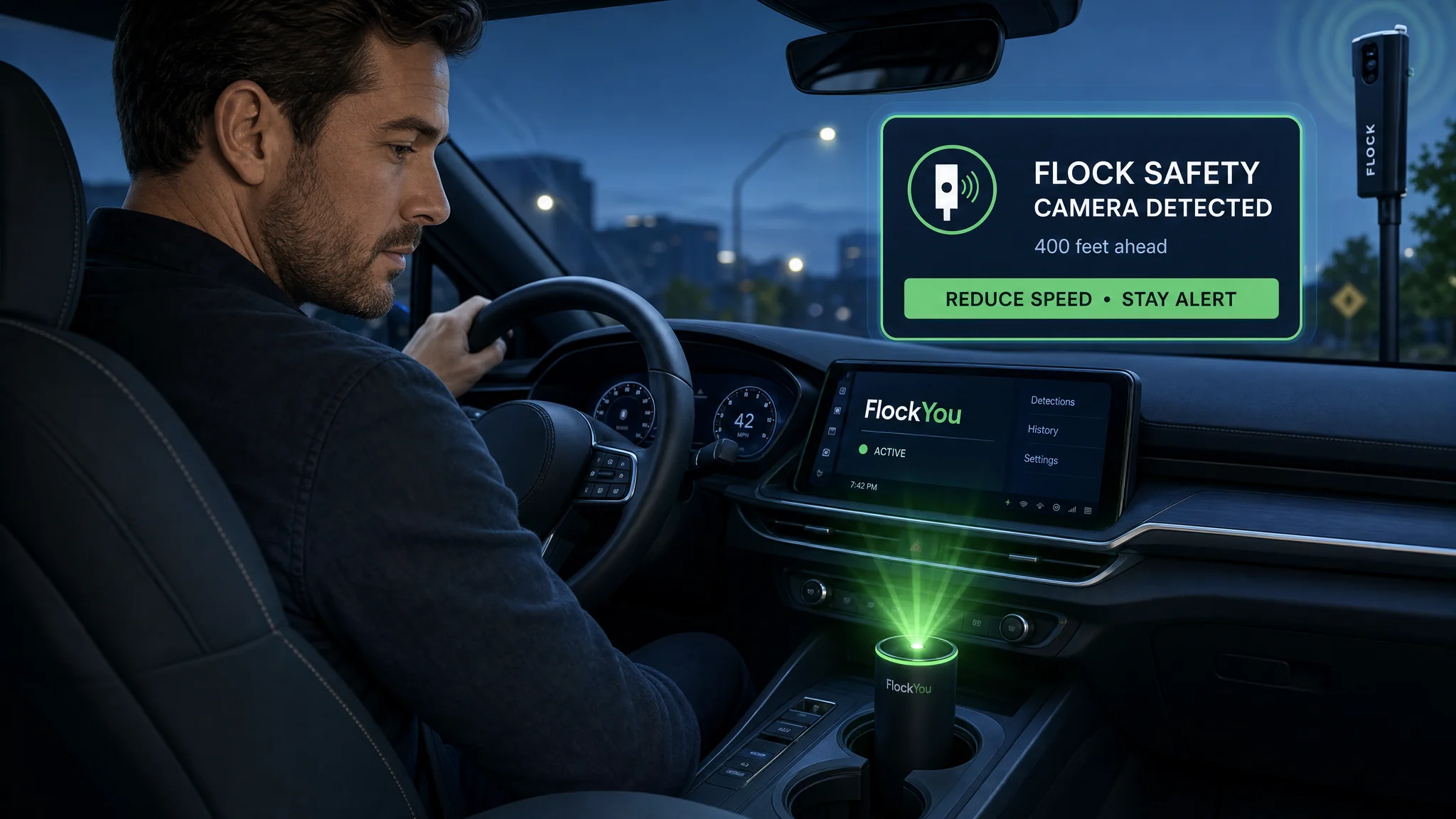
Scenario 1: Daily Commute Mapping
Objective: Document Flock camera locations along your regular routes.
Setup:
- Use device with GPS capability (DIY ESP32 with GPS module or OUI-SPY with GPS)
- Enable automatic logging
- Mount in vehicle or carry in pocket
- Set sensitivity to MEDIUM to reduce false positives
Procedure:
- Start detection device before departing
- Drive your normal route
- Device alerts when Flock cameras detected
- GPS coordinates automatically logged
- Return home and export data
- Import GPX/CSV into mapping software
- Create personal camera location map
Benefits:
- Awareness of surveillance coverage on your routes
- Identify camera-free alternate routes
- Contribute to community mapping projects
- Track deployment changes over time
Scenario 2: Neighborhood Surveillance Assessment
Objective: Determine Flock camera coverage in your residential area.
Setup:
- Use portable device (M5 Atom Lite, DIY ESP32, or OUI-SPY)
- Walking or bicycle survey
- Stationary monitoring at key intersections
Procedure:
- Walk/bike through neighborhood streets
- Stop at each intersection for 30-60 seconds
- Note detections on map
- Use signal strength to estimate distance/direction
- Visually confirm camera locations when possible
- Document findings with photos (from public areas)
Outcome:
- Complete map of local surveillance infrastructure
- Evidence for community organizing
- Data for public records requests
- Awareness for personal privacy decisions
Walking speed matters more than most people expect. The firmware hops WiFi channels roughly every 250 ms to keep up with how often the camera itself changes channel. Moving fast on foot or by bike can carry you past a camera’s detection window before a hop lines up. If you are getting inconsistent detections on a walking survey, slow down at intersections rather than reaching for a higher-gain antenna first. A stock antenna with a 30-60 second dwell time at each stop catches far more cameras than a high-gain antenna moving past at a brisk walk.
Scenario 3: Travel Privacy Assessment
Objective: Understand surveillance exposure when traveling.
Setup:
- Take compact device (M5 Atom Lite in pocket or DIY ESP32)
- Enable continuous logging
- Review data after trip
Use Cases:
- Medical appointments: Assess surveillance near clinics
- Legal consultations: Check attorney office area coverage
- Religious services: Understand monitoring near places of worship
- Political activities: Evaluate surveillance at events/protests
- Domestic situations: Identify if residence is monitored
Scenario 4: Community Advocacy
Objective: Provide data for policy debates and public awareness.
Applications:
- Present findings at city council meetings
- Include in public records requests
- Share with privacy advocacy organizations
- Contribute to research projects
- Inform neighborhood associations
Data Presentation:
- Create heat maps showing camera density
- Generate reports on coverage disparities
- Produce timelines of deployment expansion
- Correlate with crime statistics (or lack thereof)
How the Detection Code Actually Works
Core Detection Algorithm (Simplified)
For those interested in the technical implementation, here’s a simplified view of the detection logic:
// Flock-You Detection Core (Conceptual - not full code)

// OUI Database (31 known Flock-associated OUIs)
const uint8_t FLOCK_OUI_LIST[][3] = {
    {0xD4, 0xAD, 0xFC}, // Espressif ESP32-S3
    {0xAC, 0x67, 0xB2}, // Espressif ESP32-WROOM
    {0x84, 0xF3, 0xEB}, // Espressif ESP32-S3 variant
    // ... 28 more OUIs ...
};

// Promiscuous mode callback
void wifi_sniffer_callback(void* buf, wifi_promiscuous_pkt_type_t type) {
    wifi_promiscuous_pkt_t *pkt = (wifi_promiscuous_pkt_t*)buf;

    // Extract MAC address from frame
    uint8_t *mac = pkt->payload + 10; // addr2 field position

    // Check against OUI database
    for (int i = 0; i < NUM_OUIS; i++) {
        if (memcmp(mac, FLOCK_OUI_LIST[i], 3) == 0) {
            // OUI match found
            int rssi = pkt->rx_ctrl.rssi;

            // Check signal strength threshold
            if (rssi > RSSI_THRESHOLD) {
                // Analyze frame for additional signatures
                if (is_wildcard_probe_request(pkt)) {
                    // High confidence detection
                    trigger_alert(mac, rssi, HIGH_CONFIDENCE);
                } else {
                    // OUI match only
                    trigger_alert(mac, rssi, MEDIUM_CONFIDENCE);
                }
            }
        }
    }
}

// Wildcard probe detection
bool is_wildcard_probe_request(wifi_promiscuous_pkt_t *pkt) {
    // Management frame, subtype probe request
    if ((pkt->payload[0] & 0x0F) != 0x04) return false;

    // Check for empty SSID IE (wildcard)
    // Position depends on frame structure
    uint8_t *ie = &pkt->payload[24]; // Start of IEs
    if (ie[0] == 0x00 && ie[1] == 0x00) {
        return true; // Wildcard probe
    }
    return false;
}
Key Technical Concepts Explained
Promiscuous Mode: Instead of only receiving frames addressed to your device, ESP32 captures all WiFi frames in range. This is essential for detecting nearby devices that aren’t communicating with your detector.
MAC Address Structure: Every WiFi frame contains multiple MAC addresses:
addr1: Receiver addressaddr2: Transmitter address (contains OUI)addr3: Address of final destination/source
RSSI (Received Signal Strength Indicator): Signal strength in dBm (negative decibels relative to 1 milliwatt). Typical values:
- -30 dBm: Extremely strong (very close)
- -50 dBm: Strong signal
- -70 dBm: Weak but usable
- -90 dBm: Very weak (edge of range)
Probe Requests: WiFi devices send probe requests to discover available networks. Wildcard probes (empty SSID) search for any network, which is common in IoT devices like Flock cameras, making them reliably detectable.
Troubleshooting Common Issues
Problem: No Detections Despite Known Camera Nearby
Possible Causes:
- Camera offline/powered off: Flock cameras are temporarily inactive at times
- Signal blocked: Building materials absorb WiFi (metal, concrete)
- Out of range: Effective range ~100-300 feet depending on obstacles
- Moving too fast: channel-hop timing favors slow walking or a full stop over a brisk pace or vehicle speed
- Firmware issue: Outdated firmware misses newer OUI variants
Solutions:
- Confirm camera is visible and appears operational (solar panels, lights)
- Move closer to suspected camera location, or stop for 30-60 seconds instead of walking past
- Try different antenna orientations
- Update to latest Flock-You firmware
- Check device is actively scanning (verify LED/display activity)
Problem: Excessive False Positives
Possible Causes:
- High density of ESP32 devices: Smart home, IoT devices are common
- Sensitivity too high: Detecting distant/irrelevant devices
- Other surveillance cameras: Many use ESP32 modules
Solutions:
- Reduce sensitivity setting
- Enable wildcard probe detection (higher confidence)
- Physically verify detections before logging
- Use signal strength to filter (only alert on strong signals)
- Update OUI database to focus on confirmed Flock OUIs
Problem: Battery Drains Quickly
Possible Causes:
- Continuous scanning: No sleep/power management
- Display always on: Screen consumes significant power
- GPS active: GPS modules are power-hungry
- Old battery: Li-Po batteries degrade over time
Solutions:
- Enable passive scan mode (intermittent vs. continuous)
- Set display timeout
- Disable GPS when mapping not needed
- Replace battery (OUI-SPY/mesh-detect v2 have replaceable batteries)
- Use external battery pack for extended sessions
Problem: GPS Not Acquiring Lock
Possible Causes:
- Indoor use: GPS requires sky visibility
- Antenna not connected: mesh-detect v2 needs external antenna connected
- Cold start: First GPS lock takes 5-15 minutes
- Interference: Nearby electronics interfere with signal
Solutions:
- Move to position with clear sky view
- Ensure antenna properly connected (SMA connector)
- Wait for initial lock (subsequent locks faster)
- Move away from RF interference sources
- Check GPS is enabled in settings
Problem: Data Not Logging to SD Card
Possible Causes:
- SD card not formatted: Must be FAT32 format
- SD card full: No space remaining
- Card not detected: Not fully inserted
- File system corruption: Card damaged
Solutions:
- Format SD card as FAT32 (32GB maximum for compatibility)
- Delete old logs or use larger card
- Reinsert card fully (should click)
- Reformat card or replace if damaged
- Check device recognizes card (menu will show SD status)
Legal and Ethical Considerations
Legal Status of Detection Devices
WiFi Scanning Legality:
- ✅ Legal in US: Passive WiFi monitoring (receive-only) is legal
- ✅ No interception: Devices only monitor publicly broadcast frames
- ✅ No decryption: Not attempting to decrypt data or connect to networks
- ✅ Similar to radio scanners: Comparable legal status to police scanners
Important Distinctions:
- ❌ Illegal: Active jamming/interference with camera operation
- ❌ Illegal: Attempting to hack or access camera systems
- ❌ Illegal: Destroying or tampering with physical cameras
- ⚠️ Gray area: Some jurisdictions have stricter privacy laws. Verify local regulations before use.
Recommendation: Detection devices are for awareness only. Do not interfere with camera operation.
Ethical Usage Guidelines
Responsible Use:
- ✅ Use for personal awareness of surveillance
- ✅ Document for advocacy and policy discussions
- ✅ Share aggregated data with privacy organizations
- ✅ Contribute to community mapping projects
- ✅ Educate others about surveillance infrastructure
Avoid:
- ❌ Using data to facilitate illegal activities
- ❌ Harassing property owners who installed cameras
- ❌ Trespassing to confirm camera locations
- ❌ Vigilante actions against surveillance infrastructure
Privacy Considerations
Your Data Privacy:
- Detection devices log YOUR location (via GPS)
- Store this data securely
- Be aware of subpoena risk if involved in legal proceedings
- Consider encryption for sensitive log files
- Understand vendor privacy policies for cloud-connected devices
Respecting Others:
- Be mindful when using detection devices in private spaces
- Don’t use to track other individuals
- Consider ethical implications of data sharing
Community and Open Source Development
Contributing to the Flock-You Project
The Flock-You project thrives on community contributions:
GitHub Repository: github.com/colonelpanichacks/flock-you
Ways to Contribute:
- New OUI Discovery: Submit newly identified Flock camera OUIs
- Code Improvements: Submit pull requests for firmware enhancements
- Hardware Designs: Share custom detection device designs
- Documentation: Improve setup guides, translations
- Testing: Report bugs, verify functionality across devices
- Mapping: Contribute to crowdsourced camera location databases
Community Resources
Forums and Discussion:
- Reddit: r/privacy, r/privacytoolsIO, active discussions
- Discord: Colonel Panic Tech server, real-time chat
- GitHub Issues: Technical support and feature requests
Research Papers:
- Academic studies on ALPR surveillance
- Privacy impact assessments
- Legal analyses of detection device legality
Advocacy Organizations:
- Electronic Frontier Foundation (EFF): ALPR tracking
- ACLU: Surveillance and privacy rights
- Local groups: DeFlockJoplin and similar community initiatives
Future Development Roadmap
Planned Features (from project GitHub):
- Machine learning: Pattern recognition for higher accuracy
- Cloud synchronization: Optional crowdsourced detection database
- Mobile apps: Smartphone integration for enhanced interfaces
- Additional detection modes: Other surveillance technologies
- Real-time alerts: Push notifications via cellular/WiFi
Conclusion: Privacy Awareness Through Open Hardware
The Flock-You detection project puts counter-surveillance hardware within reach of any budget. Whether you choose the DIY ESP32 build ($5-12), the ready-to-go M5 Atom Lite ($49.99), or the multi-mode OUI-SPY ($85), each option turns Flock camera detection from a research project into a device you can build in an afternoon.
Remember what this hardware does and doesn’t cover: it detects Flock cameras over WiFi. It doesn’t detect Stingrays or personal trackers moving with you. Pair it with Rayhunter and Eye Spy below if you need that broader coverage.
Key Takeaways
- Open-source and free to modify: community-driven development keeps the OUI list and firmware current
- Affordable hardware: a bare ESP32 costs $5-12, and every tier above that adds convenience, not new detection capability
- Passive monitoring only: the device receives publicly broadcast WiFi frames and transmits nothing
- Regularly updated: new OUI signatures and wildcard-probe research get folded into the firmware as Flock’s hardware changes
- Field-verified: the DeFlockJoplin community caught 11 of 12 known cameras on a real drive test
Next Steps
- Read the background: Flock Safety Camera Surveillance: Prevalence and Privacy Concerns
- Choose your platform: match the DIY build, M5 Atom Lite, or OUI-SPY to your budget and skill level
- Order hardware: purchase from an authorized vendor listed above
- Flash and configure: follow the setup guide for your chosen platform
- Join the community: share findings and contribute detections back to the project
- Add the gaps this device doesn’t cover: pair it with Rayhunter for IMSI catchers and Eye Spy for AirTags and followers
ALPR surveillance keeps expanding, and awareness is the first practical response available to anyone. Knowing where the cameras are changes how you plan a drive, document a neighborhood, or push back on a local deployment.
Related Articles
| Article | Description |
|---|---|
| Flock Safety Camera Surveillance: Prevalence, Privacy Concerns, and Protection Strategies | The definitive guide to Flock Safety’s ALPR network, documented abuses, community organizing resources, and what you can do to protect yourself |
| Flock Finder: Map Every Suspected Flock Safety Camera Near You | How to use the open-source Flock Finder tool to visualize 40,000+ suspected Flock cameras worldwide using WiGLE data and OUI fingerprinting |
| Eye Spy: Passive Surveillance Detector for the M5Stack Atom Lite | A BLE and WiFi detector that covers what Flock-You doesn’t: AirTags, Tile trackers, body cameras, and drones, on the same hardware family |
| How to Flash Rayhunter on IMSI Catcher Detection Devices | Step-by-step guide to flashing Rayhunter firmware for detecting IMSI catchers and stingrays, running on a repurposed mobile hotspot rather than an ESP32 |
| DagShell Custom Firmware for the Orbic RCL400 | Full guide to installing DagShell on the Orbic RCL400 for advanced cellular network monitoring and IMSI catcher detection |
| Rayhunter Device Comparison 2026 | Side-by-side comparison of devices supported by Rayhunter to help you choose the right hardware for your counter-surveillance toolkit |
Looking for something that actively fights back against trackers instead of just detecting them? Simulacra is a separate, unaffiliated open-source project that floods the area with decoy BLE and WiFi devices to bury your real device’s signal. It solves a different problem than any device in this guide and is worth a look if passive detection alone isn’t enough for your threat model.
References
- Flock-You GitHub Repository - colonelpanichacks
- Flock Finder - Interactive ALPR Camera Map
- Flock Finder - GitHub Repository
- Colonel Panic Tech - Official Vendor
- STS Collective - M5 Atom Lite Pre-Flashed
- M5Stack Atom Lite Official Documentation
- Espressif ESP32 WiFi API Documentation
- 802.11 Probe Request/Response Reference
- DeFlock Joplin - Community ALPR Research
- DeFlock - Crowdsourced ALPR Map and Data
- Electronic Frontier Foundation - What Is ALPR?
- Arduino IDE Official Download
- Platform.io Documentation
- IEEE Registration Authority - MAC Address Block Large (OUI)
- 802.11 Beacon Frame Structure Reference

Disclosure and Affiliate Statement:
Affiliate Disclosure: We may earn a commission from links on this page. These commissions support our website and the content we provide. Rest assured, we only recommend products/services we believe in. Thank you for your trust! Click Here to Learn More
Related Posts