
ESP32 WiFi Canary: Passive 2.4 GHz Threat Detection
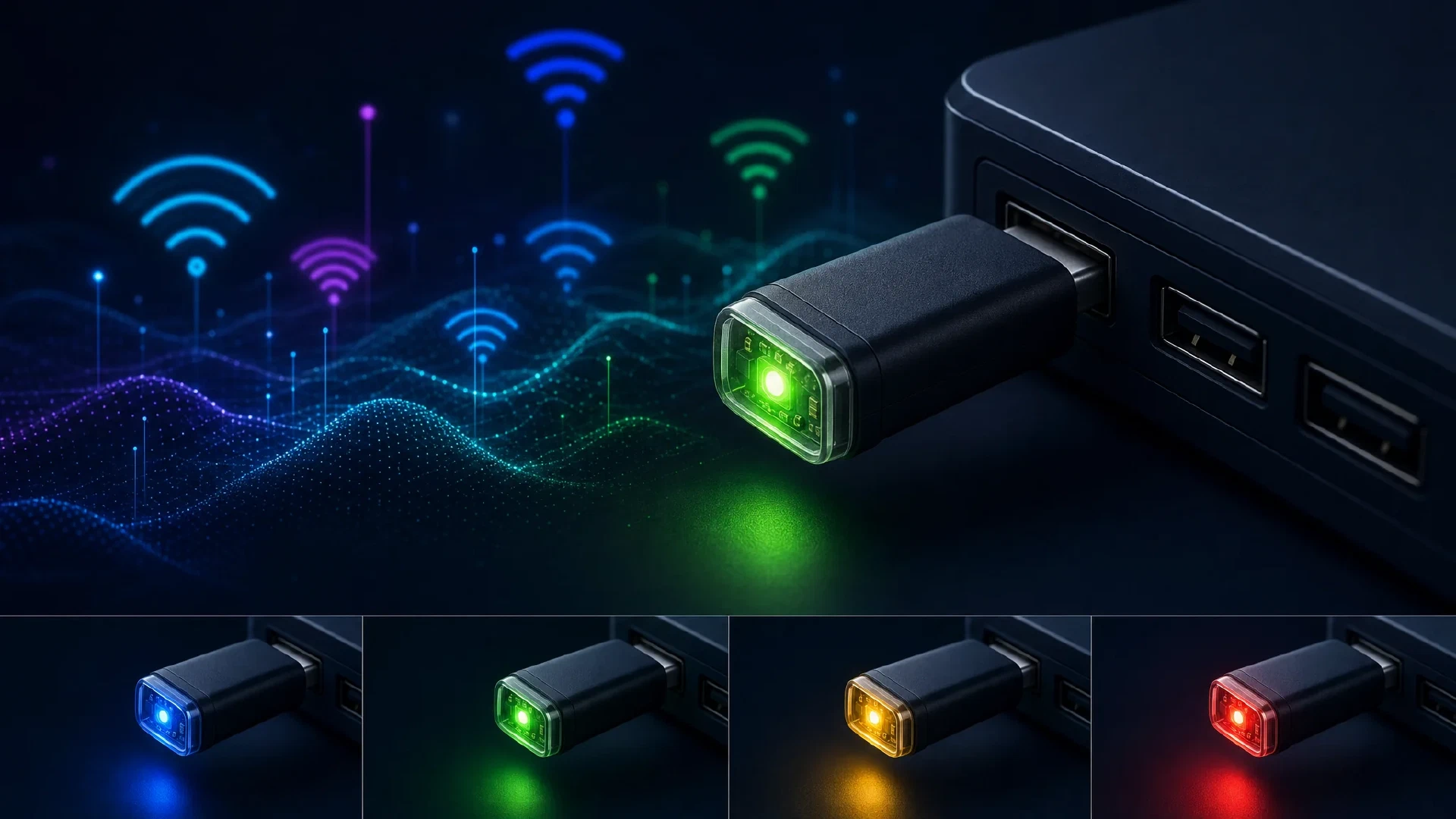
Table of Contents
A Thumb-Sized Passive WiFi Threat Sensor That Never Talks Back
Introduction: The Problem With Public WiFi
Every time you connect to hotel WiFi, a coffee shop hotspot, or an airport network, you’re trusting that the access point in front of you is the real one. The problem is that 802.11 management frames - the very frames that announce networks, manage connections, and coordinate clients - are completely unauthenticated in most deployments. Anyone with modest hardware can clone an SSID, blast deauthentication frames at clients, or set up an open decoy next to a legitimate WPA2 network.
The ESP32 WiFi Canary is a passive awareness sensor that addresses this reality with the smallest possible footprint. It fits on the M5Stack Atom Lite - a device roughly the size of a sugar cube - plugs into any USB port, learns the surrounding environment, and lights up an RGB LED when it detects patterns consistent with wireless threats.
It doesn’t connect to anything. It doesn’t capture credentials. It doesn’t transmit a single frame. It watches, scores, and tells you what color the situation is.
This article is a complete technical reference for the project: what it detects, how the confidence model works, how to build and flash it, and what its real-world limitations are.
What the ESP32 WiFi Canary Does (and Doesn’t Do)
Passive-Only, Always
The WiFi Canary operates in two radio modes, never simultaneously:
- Promiscuous mode - receives and inspects 802.11 management frames (deauth, disassoc) without associating to any network
- Scan mode - performs active WiFi scans to enumerate nearby access points and compare them to a learned baseline
The device never:
- Associates with or connects to any network
- Captures data frames or credentials
- Transmits 802.11 frames of any kind
- Stores anything to persistent flash
- Communicates over the internet
Everything it learns is held in RAM and reset on reboot. This design is intentional: the canary is a sensor, not a capture device.
The LED Is the Interface
There is no display, no app, no web UI. The entire output of the device is a single SK6812 RGB NeoPixel on GPIO 27 of the M5Stack Atom Lite. The LED speaks a four-state language:
| LED State | Meaning |
|---|---|
| 🔵 Blue (slow pulse) | Startup - building baseline reference |
| 🟢 Green (solid) | Normal - no high-confidence issues |
| 🟡 Yellow (solid) | Caution - suspicious pattern detected |
| 🔴 Red (fast pulse) | Alert - higher-confidence threat detected |
Startup takes approximately 24 seconds (3 scans × 8 seconds each). Once the device transitions out of blue, it has a working baseline and begins active monitoring.
Hardware
Primary Target: M5Stack Atom Lite
The project is designed around the M5Stack Atom Lite - a complete ESP32 development platform in a 24 × 24 mm enclosure.
| Component | Detail |
|---|---|
| MCU | ESP32-PICO-D4 |
| LED | Single SK6812 RGB NeoPixel (GPIO 27) |
| Button | GPIO 39, active-low |
| USB | CP2104 UART bridge |
| Power | USB-C, ~80–120 mA during scanning |
No breadboard, no external components, no soldering. Plug it into USB power and it runs.
Generic ESP32 DevKit (for Development/Testing)
The project includes a second PlatformIO build environment (esp32dev) that targets any standard ESP32 development board. In this configuration:
- GPIO 2 (onboard LED) is used instead of the NeoPixel
- Full serial debug output is enabled
- All detection logic runs identically to the Atom Lite build
This makes the project accessible to anyone with a $5 ESP32 DevKit, and it allows testing detection logic without the target hardware.
The Baseline Learning Process
Why a Baseline Matters
A canary that fires on every open network in a city would be useless. The ESP32 WiFi Canary solves this by learning its environment before it starts scoring threats. The first phase of operation is dedicated to building a reference table of access points that legitimately exist in the surrounding area.
Three Scans, 24 Seconds
On startup, the device runs three sequential WiFi scans, each separated by a pause. After all three complete, the learned set of APs - SSID, BSSID, encryption type, signal strength - is stored as the baseline.
Serial output during this phase looks like:
==============================================
 Travel WiFi Canary v1.0
 Passive 2.4 GHz awareness sensor
==============================================
[canary] setup done - starting baseline learning
[canary] baseline scan start (aps=0 score=0)
[canary] scan found 18 APs
[canary] baseline scan 1/3
[canary] baseline scan start (aps=18 score=0)
[canary] scan found 18 APs
[canary] baseline scan 2/3
[canary] baseline scan start (aps=18 score=0)
[canary] scan found 19 APs
[canary] baseline complete: 19 APs learned
  [00] MyHomeWifi                    aa:bb:cc:dd:ee:ff ch06 WPA2     -52 dBm
  [01] XFINITY                       11:22:33:44:55:66 ch01 WPA2     -71 dBm
  ...
[canary] STARTUP → NORMAL  (score=0  "")
Once the LED transitions from blue to green, the device is in full operation.
What It Detects: Threat Categories
The WiFi Canary monitors five distinct threat patterns. Each contributes points to a confidence score that drives LED state. No single indicator alone is treated as certain - the model is designed to accumulate corroborating evidence before escalating.
1. Deauthentication / Disassociation Bursts
802.11 management frame subtypes 10 (disassoc) and 12 (deauth) are the workhorses of WiFi attacks. Any device can send these frames, and any client receiving them will disconnect from their AP.
The canary monitors these frames in promiscuous mode and counts them per source MAC within a 5-second rolling window.
| Condition | Points Added |
|---|---|
| ≥ 8 frames from one source in 5 s | +2 |
| ≥ 20 frames from one source in 5 s | +4 |
| ≥ 5 broadcast deauth frames | +1 |
Why thresholds matter: A client roaming between APs will generate a handful of legitimate deauth/disassoc frames. What deauth attack tools generate is qualitatively different - hundreds of frames per second sustained against a target. The 5-second window and 8-frame floor filter out normal roaming noise while catching the sustained burst signature of tools like aireplay-ng.
2. Open Clone of Known Encrypted Network (Evil Twin)
The highest-confidence detection. An evil-twin attack often works by:
- Standing up an open (no password) copy of a known WPA2 SSID
- Making it stronger than the real AP so clients auto-connect
After baseline learning, if a new scan reveals an SSID that was WPA/WPA2/WPA3-only in the baseline now appearing as OPEN:
| Condition | Points Added |
|---|---|
| Same SSID, was encrypted, now open | +3 |
| BSSID not seen in baseline | +1 |
| Clone signal ≥ 10 dB stronger than known AP | +1 |
An open clone of the hotel WiFi SSID that is also 10 dB stronger than the real AP is essentially textbook. This combination pushes the score to 5 (Caution) in a single scan cycle.
Serial example:
[canary] OPEN CLONE: SSID='MyHomeWifi' baseline=WPA2 clone=OPEN bssid=de:ad:be:ef:00:01 rssi=-48/-52
[canary] score +4 → 4  "open clone of encrypted SSID 'MyHomeWifi'"
[canary] NORMAL → CAUTION  (score=4  "open clone of encrypted SSID 'MyHomeWifi'")
3. Original Encrypted AP Missing + Open Clone Present
A more advanced variant: the attacker’s stronger clone causes clients to prefer it, and the real AP is simultaneously deauthed off the air.
| Condition | Points Added |
|---|---|
| Baseline encrypted AP gone + matching open network appeared | +3 |
This covers the scenario where the real AP is still broadcasting but simply loses the signal-strength competition - or is actively disrupted.
4. Security Downgrade
Same SSID as a baseline entry, but observed with weaker encryption than recorded.
| Condition | Points Added |
|---|---|
| WPA3 → WPA2 | +1 |
| WPA2 → WPA | +1 |
| Drop of 2+ encryption ranks | +3 |
Open downgrades are handled by the evil-twin detection path above with higher scores. This category focuses on partial downgrades that might be missed in a pure open-vs-encrypted comparison.
5. Duplicate SSID from Unexpected Vendor
Same SSID, same security type as a baseline AP, but from a BSSID with a different vendor OUI (first 3 bytes of the MAC address).
| Condition | Points Added |
|---|---|
| Different OUI from baseline AP of same SSID | +1 |
| Clone is also ≥ 10 dB stronger | +2 |
This is intentionally low-scored. Enterprise networks, mesh systems, and ISP-deployed APs legitimately have many BSSIDs under the same SSID with different vendors. This signal is designed to accumulate alongside other evidence rather than trigger independently.
6. Beacon / SSID Flood
Counts new SSIDs (not present in baseline) appearing within a 30-second rolling window.
| Condition | Points Added |
|---|---|
| ≥ 15 new SSIDs in 30 s | +2 |
| ≥ 30 new SSIDs in 30 s | +3 |
Beacon flood attacks use tools that broadcast thousands of fake SSIDs to confuse client scanning tables or denial-of-service legitimate beaconing. 15 new unknown SSIDs in 30 seconds is an unusual event in most environments.
The Confidence Scoring Model
All detected signals feed into a single integer threat score. The score drives LED state:
| Score Range | LED State |
|---|---|
| 0–2 | Normal (green) |
| 3–5 | Caution (yellow) |
| 6+ | Alert (red, fast pulse) |
Score Decay
The score decays by 1 point every 60 seconds without new triggering events. This is one of the most practically important design decisions in the project:
- A single deauth burst will push the score to Caution, then automatically decay back to Normal over several minutes if the attack stops
- A sustained attack that continues generating events holds the Alert state indefinitely
- The device self-resets without any user intervention or reboot
This means:
- Brief anomalies (roaming events, neighbor network transients) resolve themselves
- Sustained attacks stay flagged
- No alert fatigue from single-event triggers that don’t recur
Button Reset
Pressing the GPIO 39 button on the Atom Lite does two things:
- Dumps the full current AP table to serial output - useful for auditing exactly what the device sees
- Resets the threat score to 0 - forces an immediate return to the green state so you can observe the next scan cycle fresh
Building and Flashing
Requirements
- PlatformIO (CLI or VS Code extension)
- M5Stack Atom Lite (or any ESP32 DevKit for testing)
- USB-C cable
Flash to M5Stack Atom Lite
git clone https://github.com/simeononsecurity/esp32-wifi-canary.git
cd esp32-wifi-canary

# Build and flash
pio run -e atom-lite --target upload

# Open serial monitor at 115200 baud
pio device monitor -b 115200
Flash to Generic ESP32 DevKit
pio run -e esp32dev --target upload
The DevKit build uses GPIO 2 (onboard LED) and outputs the full serial log. No NeoPixel is driven. All detection logic is identical to the Atom Lite build.
Project Structure
esp32-wifi-canary/
├── main.cpp              # All firmware logic
├── platformio.ini        # Build environments (atom-lite, esp32dev)
├── partitions_4mb.csv    # 4MB flash partition table
└── README.md
The entire firmware is a single C++ source file. There are no external libraries for the detection logic - just the ESP32 Arduino framework for WiFi scanning, promiscuous mode callbacks, and NeoPixel control.
platformio.ini Environments
[env:atom-lite]
platform = espressif32
board = m5stick-c
framework = arduino

[env:esp32dev]
platform = espressif32
board = esp32dev
framework = arduino
The atom-lite environment uses the m5stick-c board definition (same ESP32-PICO-D4 silicon, compatible pin mapping for the NeoPixel on GPIO 27).
Serial Output Reference
The device produces comprehensive logging at 115200 baud. All log lines are prefixed with [canary] for easy filtering.
Startup Sequence
==============================================
 Travel WiFi Canary v1.0
 Passive 2.4 GHz awareness sensor
==============================================
[canary] setup done - starting baseline learning
[canary] baseline scan start (aps=0 score=0)
[canary] scan found 18 APs
[canary] baseline scan 1/3
...
[canary] baseline complete: 19 APs learned
  [00] MyHomeWifi                    aa:bb:cc:dd:ee:ff ch06 WPA2     -52 dBm
  [01] XFINITY                       11:22:33:44:55:66 ch01 WPA2     -71 dBm
[canary] STARTUP → NORMAL  (score=0  "")
Detection Events
[canary] normal scan start (aps=19 score=0)
[canary] scan found 21 APs
[canary] OPEN CLONE: SSID='HotelWiFi' baseline=WPA2 clone=OPEN bssid=de:ad:be:ef:00:01 rssi=-48/-52
[canary] score +4 → 4  "open clone of encrypted SSID 'HotelWiFi'"
[canary] NORMAL → CAUTION  (score=4  "open clone of encrypted SSID 'HotelWiFi'")
Score Transitions
[canary] CAUTION → NORMAL  (score=2  "score decay")
[canary] NORMAL → ALERT    (score=6  "sustained deauth burst + open clone")
The serial log is sufficient to understand exactly what the device saw, when it saw it, and why the score moved. This makes it useful as a passive audit log even if you’re not watching the LED.
Detection Notes and Practical Limitations
The README is unusually honest about what this device can’t do, and that honesty is worth repeating in detail.
What Can Cause False Positives
Enterprise and mesh networks are the biggest source of false positives. A large enterprise deployment, a hotel with many APs, or a mesh system like Eero or Google WiFi may legitimately show:
- Multiple BSSIDs for the same SSID with different vendor OUIs (vendor detection)
- Security configuration differences between bands (security downgrade detection)
- Access points appearing and disappearing as the mesh adjusts
Airbnb and SOHO routers with multiple SSIDs for different bands can also trigger vendor OUI mismatches if the 2.4 GHz and 5 GHz radios use sequential MACs from different blocks.
Neighbor network transients: An encrypted network that temporarily disappears from scan and reappears with different parameters (firmware update, reboot, reconfiguration) can momentarily trigger detection.
The confidence scoring model and decay are designed to reduce - not eliminate - these false positives.
What Can Cause False Negatives
A well-crafted evil-twin attack that:
- Spoofs the exact BSSID of the legitimate AP (so OUI matches)
- Matches the security type exactly (WPA2 with correct IE configuration)
- Operates at signal strength within 10 dB of the real AP
…may not accumulate enough score to cross the Caution threshold. The deauth component of such an attack (needed to pull clients off the real AP) would add points, but a sophisticated attacker minimizing deauth frames could potentially stay under threshold.
Radio Switching Gap
The ESP32 WiFi radio can’t be in promiscuous mode and perform an active AP scan simultaneously. The firmware switches between these modes, which means deauth frames that arrive during the ~3 second scan window won’t be captured. An attacker that precisely times deauth bursts to coincide with scan windows could theoretically evade detection - though this would require knowledge of the device’s scanning schedule.
2.4 GHz Only
The ESP32 radio is a 2.4 GHz device. 5 GHz and 6 GHz networks aren’t scanned or monitored. In environments where 5 GHz evil twins are the attack vector, this device won’t detect them.
Passive Range
Deauth detection requires the device to be within receive range of the deauth frames. A distant or highly directional attacker, or an attacker specifically targeting a client far from the canary, may not generate frames strong enough to trigger the counters.
Use Cases
Traveling with Sensitive Work
The canary is designed primarily for travel. Plug it into a laptop’s USB port, a hotel room USB outlet, or a portable battery bank, and let it learn the hotel or conference center environment. Any subsequent appearance of an open clone of the hotel SSID - the most common attack scenario - will trigger at minimum a Caution state.
Coffee Shops and Public WiFi
Open WiFi environments are the most common attack surface for evil-twin setups. The canary’s baseline approach means it learns the legitimate coffee shop AP on arrival, then watches for competing SSIDs appearing alongside it.
Security Awareness and Education
The device’s serial output provides a detailed, human-readable log of exactly what it sees. For security training, demonstrating to someone what a deauth burst looks like in real-time - and watching the LED change color - is substantially more effective than a slide deck.
Passive Lab Monitoring
In a home lab or small office, the canary can serve as a persistent ambient monitor. The LED provides at-a-glance status without requiring active monitoring. The button-triggered AP dump gives on-demand visibility into what networks the device currently sees.
Architecture Notes
Why a Single Score Instead of Separate Alerts
The confidence scoring model aggregates disparate signals into a single number rather than presenting separate alert categories. This is a deliberate UX decision: the output interface is one LED with three states. A separate alert per detection category would require a display or app. The scoring model translates noisy, partially-correlated signals into a single actionable indicator.
Why Score Decay
Without decay, a single false-positive event would require manual intervention (button press) to clear. With 60-second decay, brief anomalies clear themselves within a few minutes. This means the canary can run unattended - in a bag, a hotel room, or a car - and return to baseline without user intervention after transient events.
Why Three Baseline Scans
A single baseline scan might miss an AP that wasn’t broadcasting during that window (AP was in a scan gap, AP was temporarily powered off, etc.). Three scans over ~24 seconds provide a more complete picture of the stable environment before monitoring begins.
Contributing and Project Status
The project is available at
github.com/simeononsecurity/esp32-wifi-canary
under a passive-use license. The codebase is a single main.cpp file, making it straightforward to read, audit, and extend.
If you’re working with PlatformIO and ESP32, the project is structured to compile with no modification for both the Atom Lite and the standard DevKit environments.
Comparison to Other WiFi Monitoring Approaches
| Approach | Passive? | No Credentials | Single LED Output | Travel Form Factor |
|---|---|---|---|---|
| ESP32 WiFi Canary | ✅ | ✅ | ✅ | ✅ |
| Kismet (laptop) | ✅ | ✅ | ❌ (requires display) | ❌ (heavy) |
| WiFi Pineapple | ❌ (active) | ❌ | ❌ | Partial |
| Wireless IDS (enterprise) | ✅ | ✅ | ❌ (requires infrastructure) | ❌ |
| Manual scanning (phone app) | Partial | ✅ | ❌ | ✅ |
The canary occupies a specific niche: zero-interaction, zero-network, always-on ambient awareness in a form factor that can live permanently on a keychain or in a laptop bag.
Conclusion
The ESP32 WiFi Canary is a tightly scoped tool that does one thing: watch the 2.4 GHz environment around you and change color when something looks wrong. It doesn’t try to be a full wireless intrusion detection system, a packet capture tool, or a forensic analyzer. It’s a canary - a passive sensor whose job is to notice when the mine gets dangerous.
The confidence scoring model, score decay, and three-phase baseline approach reflect careful thinking about the false-positive problem that plagues ambient security sensors. The result is a device that can run unattended in a hotel room or conference center and reliably signal when something meaningfully unusual is happening - while staying quiet during normal network churn.
For anyone building a portable security toolkit, working in environments with untrusted WiFi infrastructure, or looking for an ESP32 project with real practical utility, the WiFi Canary is worth an afternoon and a $15 M5Stack Atom Lite.
GitHub: github.com/simeononsecurity/esp32-wifi-canary

Related Posts