
Ansible vs Puppet vs Chef 2026: Config Management
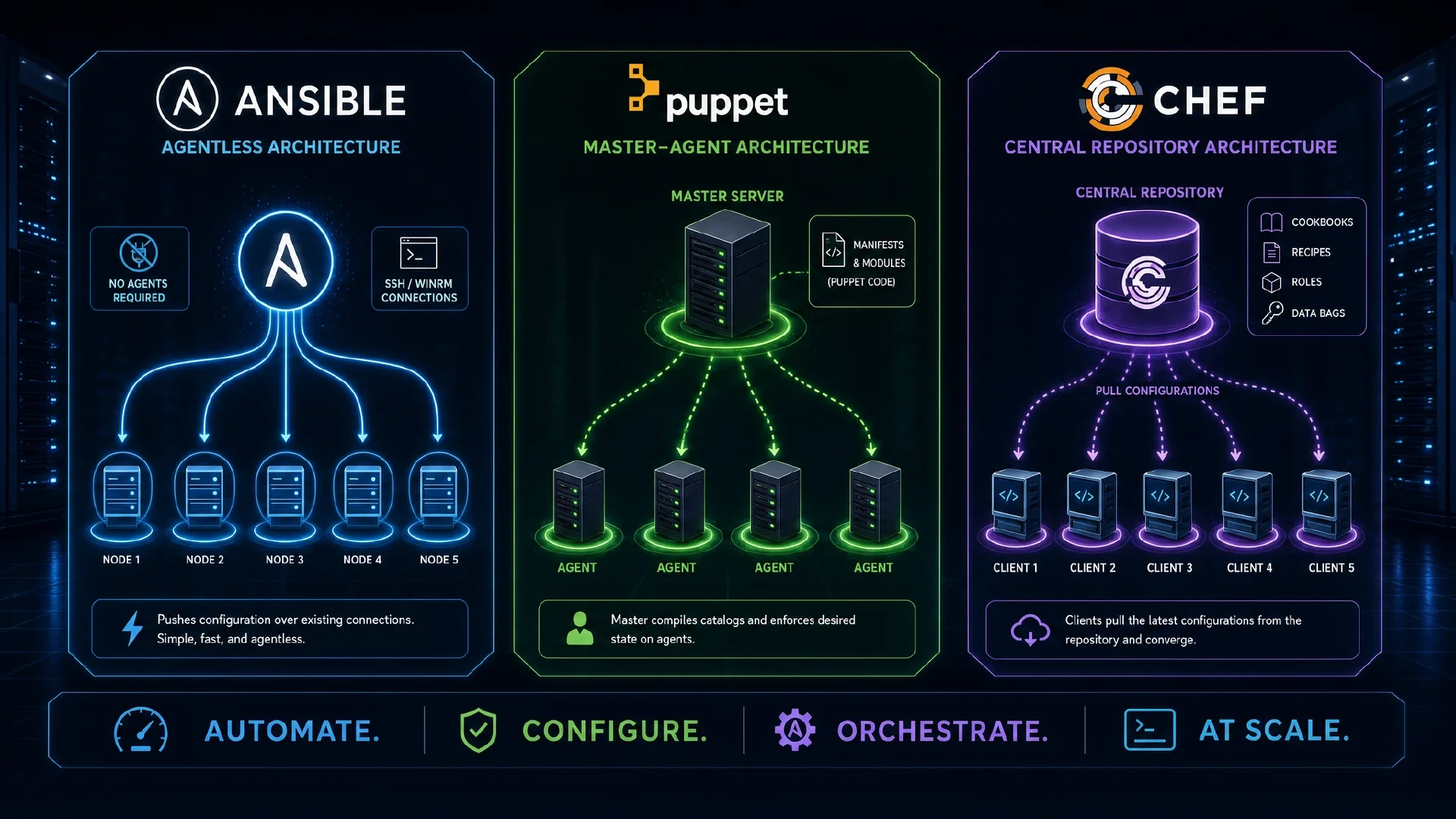
Table of Contents
Ansible vs Puppet vs Chef 2026: Complete Configuration Management Comparison
In 2026, configuration management remains critical for managing modern infrastructure at scale, with Ansible, Puppet, and Chef dominating the enterprise market. These tools enable Infrastructure as Code (IaC), allowing teams to automate server configuration, application deployment, and infrastructure orchestration across thousands of systems.
With 87% of enterprises using at least one configuration management tool and the average organization managing 500+ servers, choosing the right tooling significantly impacts operational efficiency, deployment velocity, and infrastructure reliability.
This comprehensive guide compares Ansible, Puppet, and Chef across architecture, features, performance, learning curve, pricing, and real-world use cases to help you make an informed decision for your infrastructure automation needs.
The State of Configuration Management in 2026
Market Overview:
- Ansible: 42% market share (Red Hat/IBM, most popular)
- Puppet: 28% market share (established enterprise base)
- Chef: 18% market share (DevOps-focused organizations)
- Other tools: 12% (SaltStack, CFEngine, custom solutions)
Key Trends:
- Shift toward agentless architecture (Ansible’s advantage)
- Cloud-native integration with AWS, Azure, GCP
- Kubernetes and container orchestration becoming primary use case
- GitOps workflows for infrastructure management
- Policy as Code for compliance automation
Quick Comparison: At a Glance
| Feature | Ansible | Puppet | Chef |
|---|---|---|---|
| Architecture | Agentless (SSH/WinRM) | Agent-based (pull model) | Agent-based (pull model) |
| Language | YAML (procedural) | Puppet DSL (declarative) | Ruby DSL (procedural) |
| Learning Curve | Easy (hours to days) | Moderate (days to weeks) | Steep (weeks to months) |
| Initial Setup | Minimal (control node only) | Complex (master + agents) | Complex (server + nodes) |
| Configuration Style | Procedural (order matters) | Declarative (state-based) | Procedural (recipes) |
| Scalability | Good (up to 5,000+ nodes) | Excellent (10,000+ nodes) | Excellent (10,000+ nodes) |
| Performance | Fast (SSH overhead) | Fast (efficient pull) | Fast (efficient pull) |
| Cloud Integration | Excellent (native modules) | Good (modules available) | Good (resources available) |
| Community | Largest (200k+ modules) | Large (6,000+ modules) | Large (5,000+ cookbooks) |
| Enterprise Support | Red Hat (Ansible Automation Platform) | Perforce (Puppet Enterprise) | Progress (Chef Automate) |
| Pricing (Open Source) | Free | Free | Free |
| Pricing (Enterprise) | $5,000-$10,000/100 nodes/year | $6,000-$15,000/100 nodes/year | $7,000-$13,500/100 nodes/year |
| Best For | General automation, cloud, agentless | Large enterprises, compliance | DevOps teams, infrastructure as code |
| Primary Weakness | SSH overhead at scale | Agent complexity | Steep learning curve |
Architecture Comparison
Ansible: Agentless Push Model
Architecture:
- Control Node: Where Ansible runs (Linux/macOS only)
- Managed Nodes: Target systems (Linux, Windows, network devices)
- Communication: SSH (Linux), WinRM (Windows), APIs (network/cloud)
- No agents required: Uses existing SSH infrastructure
How It Works:
- Admin runs playbook from control node
- Ansible connects to managed nodes via SSH/WinRM
- Python modules executed on target systems
- Results returned to control node
- Connection closed (stateless)
Advantages: ✅ Quick setup: No agent deployment required ✅ Lower maintenance: No agent updates or monitoring ✅ Simpler architecture: Fewer moving parts ✅ Immediate execution: Push-based, runs when triggered
Disadvantages: ⚠️ SSH overhead: Connection establishment takes time at scale ⚠️ No continuous enforcement: Doesn’t monitor/correct drift automatically ⚠️ Control node dependency: Single point of failure (mitigated by clustering) ⚠️ Network connectivity: Requires SSH access to all nodes
Puppet: Agent-Based Pull Model
Architecture:
- Puppet Server (Master): Central configuration authority
- Puppet Agents: Installed on every managed node
- PuppetDB: Stores facts, catalogs, and reports
- Certificate-based authentication: Secure communication
How It Works:
- Agents check in with server every 30 minutes (configurable)
- Agent sends system facts to server
- Server compiles catalog (desired state) for that agent
- Agent applies catalog to bring system into compliance
- Agent reports results back to server
Advantages: ✅ Continuous enforcement: Agents constantly maintain desired state ✅ Automatic drift correction: Detects and fixes configuration drift ✅ Scalable: Handles 10,000+ nodes efficiently ✅ Reporting: Detailed compliance and change reporting
Disadvantages: ⚠️ Agent installation: Requires agent on every system ⚠️ Agent maintenance: Agents need updates and monitoring ⚠️ Complex setup: Master/agent infrastructure requires planning ⚠️ Resource usage: Agents consume CPU/memory on managed nodes
Chef: Agent-Based Pull Model
Architecture:
- Chef Server: Central configuration repository
- Chef Clients (Nodes): Agents on managed systems
- Workstation: Where admins develop cookbooks
- Chef Automate: Enterprise platform for orchestration
How It Works:
- Admins develop recipes/cookbooks on workstation
- Cookbooks uploaded to Chef Server
- Chef Clients pull configurations from server (typically every 30 mins)
- Clients execute recipes to configure systems
- Results reported back to server
Advantages: ✅ Flexible Ruby DSL: Full programming language for complex logic ✅ Test-driven infrastructure: ChefSpec and Test Kitchen for testing ✅ Scalable: Efficient at managing thousands of nodes ✅ Advanced orchestration: Chef Automate provides workflow capabilities
Disadvantages: ⚠️ Steep learning curve: Requires Ruby knowledge ⚠️ Complex setup: Server, workstation, client architecture ⚠️ Agent required: Must install and maintain Chef clients ⚠️ Overkill for simple tasks: Heavy for basic automation
Configuration Language and Syntax
Ansible: YAML Playbooks
Syntax Style: Declarative-looking but procedural (order matters)
Example (install and start Apache):
---
- name: Configure web servers
  hosts: webservers
  become: yes

  tasks:
    - name: Install Apache
      ansible.builtin.package:
        name: httpd
        state: present

    - name: Start Apache service
      ansible.builtin.service:
        name: httpd
        state: started
        enabled: yes

    - name: Deploy website
      ansible.builtin.copy:
        src: ./website/index.html
        dest: /var/www/html/index.html
        mode: '0644'
Pros: ✅ Readable: YAML is human-friendly and easy to learn ✅ No programming required: Simple syntax for common tasks ✅ Quick to write: Less verbose than alternatives
Cons: ⚠️ Limited logic: Complex conditionals can get messy ⚠️ Procedural: Order of tasks matters (can be error-prone) ⚠️ YAML limitations: Indentation-sensitive, no native data types
Puppet: Puppet DSL (Domain-Specific Language)
Syntax Style: Declarative (describe desired state)
Example (same Apache setup):
class apache {
  # Install Apache package
  package { 'httpd':
    ensure => installed,
  }

  # Manage Apache service
  service { 'httpd':
    ensure  => running,
    enable  => true,
    require => Package['httpd'],
  }

  # Deploy website file
  file { '/var/www/html/index.html':
    ensure  => file,
    source  => 'puppet:///modules/apache/index.html',
    mode    => '0644',
    require => Package['httpd'],
  }
}

node 'webserver.example.com' {
  include apache
}
Pros: ✅ True declarative: Describe state, Puppet figures out how ✅ Resource relationships: Built-in dependency management ✅ Idempotent by design: Safe to run repeatedly
Cons: ⚠️ Learning curve: Different syntax paradigm to learn ⚠️ Less intuitive: Not as immediately readable as YAML ⚠️ Abstraction challenges: Can be confusing to debug
Chef: Ruby DSL
Syntax Style: Procedural with Ruby programming power
Example (same Apache setup):
# Recipe: apache::default

# Install Apache package
package 'httpd' do
  action :install
end

# Start and enable Apache service
service 'httpd' do
  action [:enable, :start]
  supports restart: true, reload: true
end

# Deploy website file
cookbook_file '/var/www/html/index.html' do
  source 'index.html'
  mode '0644'
  action :create
end
Pros: ✅ Full programming language: Ruby’s power for complex logic ✅ Flexible: Can do anything Ruby can do ✅ Testable: ChefSpec for unit testing recipes
Cons: ⚠️ Requires Ruby knowledge: Steep learning curve ⚠️ Can become complex: Easy to over-engineer solutions ⚠️ More verbose: More code than YAML
Feature Comparison 2026
Inventory Management
| Feature | Ansible | Puppet | Chef |
|---|---|---|---|
| Static Inventory | INI, YAML files | Node definitions | Node objects |
| Dynamic Inventory | Scripts, plugins (AWS, Azure, GCP, etc.) | PuppetDB queries, External Node Classifiers | Chef Server queries, knife search |
| Grouping | Groups in inventory files | Node groups, classification | Roles, environments |
| Variables | Host vars, group vars | Facts, Hiera data | Attributes, data bags |
Secret Management
Ansible:
- Ansible Vault: Encrypt files, variables, entire playbooks
- Integration: HashiCorp Vault, AWS Secrets Manager, Azure Key Vault
- 2026: Native integration with most secret management tools
Puppet:
- Hiera-eyaml: Encrypted Hiera data
- Integration: HashiCorp Vault (puppet-vault module)
- Enterprise: Puppet Enterprise includes secret management
Chef:
- Encrypted Data Bags: Encrypted JSON data
- Chef Vault: Improved secret management with key rotation
- Integration: HashiCorp Vault, AWS Secrets Manager
Winner: Tie - all three handle secrets well in 2026
Testing and Validation
Ansible:
- Linting: ansible-lint
- Syntax check:
ansible-playbook --syntax-check - Dry run:
--checkmode (doesn’t make changes) - Testing: Molecule framework for integration testing
- CI/CD: Easily integrated with Jenkins, GitLab CI, GitHub Actions
Puppet:
- Linting: puppet-lint
- Syntax check:
puppet parser validate - Testing: rspec-puppet for unit tests, Beaker for acceptance tests
- Simulation:
puppet agent --test --noop - CI/CD: GitLab CI, Jenkins pipelines
Chef:
- Linting: cookstyle (RuboCop-based), foodcritic
- Unit testing: ChefSpec (RSpec-based)
- Integration testing: Test Kitchen (supports multiple platforms)
- Compliance: InSpec for infrastructure testing
- CI/CD: Chef Automate, Jenkins-, GitLab CI
Winner: Chef - most comprehensive testing ecosystem
Reporting and Compliance
Ansible:
- Ansible Tower/AWX: Centralized logs, job history, dashboard
- Callbacks: Custom reporting via callback plugins
- JSON output: Machine-readable results
- Compliance: ansible-cmdb for documentation, Red Hat Insights
Puppet:
- PuppetDB: Complete state and change history
- Puppet Enterprise Console: Real-time reporting and dashboards
- Compliance: Detailed compliance reporting against policies
- Facts: Comprehensive system information collection
- Reporting: Best-in-class change/compliance reporting
Chef:
- Chef Automate: Centralized visibility and reporting
- Compliance: InSpec integration for continuous compliance
- Visibility: Node status, run history, cookbook usage
- Analytics: Detailed insights into infrastructure state
Winner: Puppet - most mature reporting and compliance capabilities
Performance and Scalability
Performance Benchmarks (2026)
Test Environment: Configuration deployment to 1,000 nodes (simple package install + service restart)
| Tool | Sequential Time | Parallel Time (10 threads) | Parallel Time (50 threads) | CPU Usage (Control) | Memory Usage |
|---|---|---|---|---|---|
| Ansible | 45 minutes | 8 minutes | 4 minutes | High (SSH overhead) | Low |
| Puppet | 30 minutes* | 5 minutes* | 2.5 minutes* | Low (agents poll) | Medium |
| Chef | 30 minutes* | 5 minutes* | 2.5 minutes* | Low (clients pull) | Medium |
*Agent-based tools complete faster as agents pull configurations in parallel automatically
Scalability Analysis
Ansible:
- Sweet spot: 500-2,000 nodes
- Maximum: Can handle 5,000+ with tuning (connection pooling, pipelining, fact caching)
- Bottleneck: SSH connection establishment overhead
- Optimization: Ansible Tower/AWX provides clustering for larger deployments
Puppet:
- Sweet spot: 1,000-10,000 nodes
- Maximum: 20,000+ nodes with multi-master setup
- Bottleneck: Server catalog compilation (mitigated by cached catalogs)
- Optimization: PuppetDB scaling, compile masters
Chef:
- Sweet spot: 1,000-10,000 nodes
- Maximum: 25,000+ nodes with HA Chef Server
- Bottleneck: Server load during peak check-in times
- Optimization: Load balancing, multiple Chef Servers
Winner: Puppet/Chef - better designed for extreme scale
Learning Curve and Adoption
Time to Productivity
Ansible:
- Basic tasks: 2-4 hours (simple playbooks)
- Intermediate: 1-2 weeks (roles, templates, variables)
- Advanced: 1-2 months (custom modules, complex orchestration)
- Proficiency: 3-6 months
Puppet:
- Basic tasks: 1-2 days (simple manifests)
- Intermediate: 2-4 weeks (modules, Hiera, relationships)
- Advanced: 2-3 months (custom functions, advanced patterns)
- Proficiency: 6-12 months
Chef:
- Basic tasks: 2-3 days (requires Ruby basics)
- Intermediate: 3-4 weeks (cookbooks, attributes, resources)
- Advanced: 3-4 months (LWRPs, libraries, advanced Ruby)
- Proficiency: 6-12 months
Winner: Ansible - fastest time to productivity
Documentation and Community
Ansible:
- Official docs: Excellent, comprehensive
- Community: Largest (Ansible Galaxy: 25,000+ roles)
- Stack Overflow: 50,000+ questions
- Books/Courses: Abundant resources
Puppet:
- Official docs: Very good, detailed
- Community: Strong (Puppet Forge: 6,000+ modules)
- Stack Overflow: 25,000+ questions
- Books/Courses: Many available
Chef:
- Official docs: Good but Ruby-focused
- Community: Active (Chef Supermarket: 5,000+ cookbooks)
- Stack Overflow: 20,000+ questions
- Books/Courses: Fewer than Ansible, more than Puppet
Winner: Ansible - largest community and most resources
Pricing Comparison 2026
Open Source Versions
| Feature | Ansible (Core) | Puppet (Open Source) | Chef (Infra Client) |
|---|---|---|---|
| Cost | Free | Free | Free |
| Features | Full automation | Full configuration management | Full configuration management |
| Limitations | No GUI, basic CLI only | No GUI, basic reporting | No GUI, basic reporting |
| Support | Community only | Community only | Community only |
| Updates | Red Hat maintains | Perforce maintains | Progress maintains |
Enterprise Versions
Ansible Automation Platform (Red Hat):
- Pricing: $5,000-$10,000/100 nodes/year (varies by support level)
- Features: AWX/Tower GUI, RBAC, workflows, certified content, job scheduling, API, clustering
- Support: Red Hat enterprise support (24/7 available)
- Compliance: FedRAMP authorized, SOC 2, ISO 27001
Puppet Enterprise:
- Pricing: $6,000-$15,000/100 nodes/year (varies by support tier)
- Features: Enterprise Console, orchestration, code management, RBAC, reporting, PuppetDB
- Support: Enterprise support (24/7 available)
- Compliance: FedRAMP authorized, SOC 2, ISO 27001
Chef Automate (Chef Enterprise):
- Pricing: $7,000-$13,500/100 nodes/year (varies by package)
- Features: Workflow engine, compliance (InSpec), visibility dashboard, RBAC, HA
- Support: Enterprise support (24/7 available)
- Compliance: FedRAMP authorized, SOC 2, ISO 27001
Total Cost of Ownership (TCO) Analysis
3-Year TCO for 500 Nodes:
| Cost Category | Ansible | Puppet | Chef |
|---|---|---|---|
| Software (Enterprise) | $75,000-$150,000 | $90,000-$225,000 | $105,000-$202,500 |
| Initial Setup | $10,000 (1 week) | $40,000 (4 weeks) | $40,000 (4 weeks) |
| Training | $15,000 (faster learning) | $30,000 (steeper curve) | $35,000 (Ruby required) |
| Maintenance (yearly) | $30,000 | $40,000 | $40,000 |
| Total 3-Year TCO | $175,000-$295,000 | $250,000-$425,000 | $280,000-$442,500 |
Winner: Ansible - lowest total cost of ownership
Use Case Recommendations
When to Choose Ansible
Best For: ✅ Cloud-native environments (AWS, Azure, GCP automation) ✅ Mixed OS environments (Linux, Windows, network devices) ✅ Teams new to configuration management (easy learning curve) ✅ Ad-hoc automation (one-off tasks, troubleshooting) ✅ Application deployment (CI/CD pipelines) ✅ Small to medium deployments (under 2,000 nodes) ✅ Agentless requirement (can’t install agents) ✅ Network automation (routers, switches, firewalls)
Example Organizations:
- Startups and SMBs
- Cloud-first companies
- DevOps teams preferring simplicity
- Organizations with security restrictions against agents
When to Choose Puppet
Best For: ✅ Large enterprises (10,000+ nodes) ✅ Compliance-heavy environments (finance, healthcare, government) ✅ Continuous enforcement (automatic drift correction required) ✅ Heterogeneous infrastructure (diverse server types and OSes) ✅ Mature DevOps practices (established change management) ✅ Regulated industries (audit trail requirements) ✅ Windows-heavy environments (excellent Windows support)
Example Organizations:
- Fortune 500 enterprises
- Financial institutions
- Healthcare organizations
- Government agencies
- Large universities
When to Choose Chef
Best For: ✅ DevOps-mature organizations (strong automation culture) ✅ Infrastructure as code focus (test-driven infrastructure) ✅ Complex orchestration (multi-tier application deployments) ✅ Ruby-skilled teams (can leverage full language power) ✅ Container/Kubernetes environments (Chef Habitat integration) ✅ Compliance automation (InSpec for policy as code) ✅ Application-centric deployment (cookbooks as deployment units)
Example Organizations:
- Tech companies with strong engineering teams
- SaaS providers
- Companies prioritizing test-driven infrastructure
- Organizations invested in Ruby ecosystem
Real-World Implementation Examples
Example 1: Web Server Fleet Management
Scenario: Manage 500 Apache web servers across multiple data centers
Ansible Approach:
- name: Manage web server fleet
  hosts: webservers
  become: yes
  roles:
    - common
    - apache
    - monitoring
  tasks:
    - name: Deploy application
      ansible.builtin.git:
        repo: https://github.com/company/webapp.git
        dest: /var/www/html
        version: production
Puppet Approach:
node /webserver\d+/ {
  include common
  include apache
  include monitoring

  vcsrepo { '/var/www/html':
    ensure   => latest,
    provider => git,
    source   => 'https://github.com/company/webapp.git',
    revision => 'production',
  }
}
Chef Approach:
# Role: webserver
run_list(
  'recipe[common]',
  'recipe[apache]',
  'recipe[monitoring]',
  'recipe[webapp::deploy]'
)

# Recipe: webapp::deploy
git '/var/www/html' do
  repository 'https://github.com/company/webapp.git'
  revision 'production'
  action :sync
end
Best Choice: Ansible - simplest implementation for this use case
Example 2: Compliance and Drift Management
Scenario: Ensure 5,000 servers maintain PCI-DSS compliance
Winner: Puppet - continuous enforcement and compliance reporting ideal for this scenario
Why:
- Agents automatically correct drift every 30 minutes
- PuppetDB provides complete compliance history
- Puppet Enterprise console offers real-time compliance dashboard
- Declarative nature ensures consistent state
Example 3: Multi-Cloud Kubernetes Cluster Management
Scenario: Manage Kubernetes clusters across AWS, Azure, and GCP
Winner: Ansible - excellent cloud provider modules and Kubernetes support
Why:
- Native modules for all three cloud providers
- Kubernetes collection for cluster management
- Agentless (works with kubectl/cloud CLIs)
- Simple YAML for infrastructure orchestration
Migration Strategies
Switching Between Tools
From Puppet/Chef to Ansible:
- Difficulty: Medium
- Strategy: Incremental migration, run both tools in parallel
- Timeline: 3-6 months for medium infrastructure
- Considerations: Lose continuous enforcement, gain simplicity
From Ansible to Puppet/Chef:
- Difficulty: High
- Strategy: Deploy agents first, rewrite configurations in new tool
- Timeline: 6-12 months for medium infrastructure
- Considerations: Gain scalability, increase complexity
Coexistence:
- Many organizations use multiple tools for different purposes
- Ansible for orchestration + Puppet/Chef for configuration
- Use each tool’s strengths for different scenarios
Decision Framework
Quick Decision Tree
Start here: How many nodes do you manage?
→ Under 500 nodes:
- New to configuration management? → Ansible
- Need Windows expertise? → Ansible or Puppet
- DevOps team with Ruby skills? → Chef
→ 500-2,000 nodes:
- Priority on simplicity? → Ansible
- Need continuous enforcement? → Puppet
- Strong automation culture? → Chef
→ Over 2,000 nodes:
- Compliance-heavy environment? → Puppet
- Ruby-skilled DevOps team? → Chef
- Cloud-native with agentless requirement? → Ansible (with clustering)
Evaluation Criteria Matrix
| Criterion | Weight | Ansible | Puppet | Chef |
|---|---|---|---|---|
| Ease of Learning | High | 10/10 | 6/10 | 5/10 |
| Time to Value | High | 10/10 | 6/10 | 6/10 |
| Scalability | Medium | 7/10 | 10/10 | 10/10 |
| Windows Support | Medium | 8/10 | 9/10 | 8/10 |
| Cloud Integration | High | 10/10 | 7/10 | 7/10 |
| Community Size | Medium | 10/10 | 7/10 | 6/10 |
| Enterprise Features | High | 8/10 | 10/10 | 9/10 |
| Cost | High | 9/10 | 7/10 | 6/10 |
| Continuous Enforcement | Medium | 5/10 | 10/10 | 10/10 |
| Compliance Reporting | High | 7/10 | 10/10 | 9/10 |
| Total (Weighted) | 8.4/10 | 8.0/10 | 7.4/10 |
Conclusion and Final Recommendations
All three tools excel in configuration management but serve different needs:
Universal Recommendations
🥇 Best Overall: Ansible
- Easiest to learn and fastest to productivity
- Lowest total cost of ownership
- Best cloud integration
- Ideal for most organizations under 2,000 nodes
🥈 Best for Enterprises: Puppet
- Excellent at scale (10,000+ nodes)
- Best compliance and reporting capabilities
- Continuous enforcement prevents drift
- Mature enterprise features
🥉 Best for DevOps Teams: Chef
- Most flexible with Ruby programming
- Best testing framework (ChefSpec + Test Kitchen)
- Excellent for complex orchestration
- Strong InSpec integration for compliance
Making Your Decision
Choose Ansible if:
- You’re new to configuration management
- You need quick wins and rapid deployment
- Your infrastructure is primarily cloud-based
- You manage under 2,000 nodes
- Agentless architecture is required
- Budget is limited
Choose Puppet if:
- You manage 2,000+ nodes
- Compliance and reporting are critical
- You need continuous configuration enforcement
- You’re in a regulated industry
- Windows is a primary platform
- You have
budget for enterprise tooling
Choose Chef if:
- Your team has Ruby expertise
- Test-driven infrastructure is a priority
- You need maximum flexibility
- Complex orchestration is required
- You’re building for containers/Kubernetes
- Compliance-as-code (InSpec) is important
The Multi-Tool Approach
Many successful organizations use multiple tools:
- Ansible for orchestration, ad-hoc tasks, cloud provisioning
- Puppet/Chef for configuration management and compliance
- Each tool’s strengths complement the other
Final Advice: Start with Ansible for its ease of use and quick wins. As your infrastructure grows and needs mature, consider Puppet or Chef if you need their specific strengths at scale.
References and Further Reading
- Ansible Documentation
- Puppet Documentation
- Chef Documentation
- Red Hat Ansible Automation Platform
- Puppet Enterprise
- Chef Automate
- Configuration Management Tools Survey 2026
- NIST Configuration Management Guidelines

Related Posts