

Module 14: Privileged Persistence and Process Migration
Table of Contents
← Return to the Red Team Course
Privileged persistence preserves an approved execution opportunity across a defined interruption. A Windows service is one possible mechanism. Its configured account, startup behavior, running process, and recovery dependencies need separate verification.
This module teaches you to build a service lifecycle record and judge whether process migration serves a concrete requirement. A running callback proves connectivity at one moment. It does not establish boot durability, service health, or successful restoration.
Allow 35–45 minutes. Difficulty: intermediate. The timeline exercise uses synthetic observations.
Learning Outcomes
- Distinguish service configuration, service state, and process lifetime.
- Explain account selection and filesystem redirection.
- Inspect a prepared service without changing its configuration.
- Evaluate migration against stability and evidence requirements.
- Create a lifecycle record covering trigger, observation, and restoration.
Before You Begin
Use the prepared Windows lab VM and service manifest from local privilege escalation . You need the exact training service name, expected executable path, permitted inspection account, and the owner’s expected start and stop behavior. An instructor-provided trace supports the paper exercise if no VM is available.
The commands below are read-only queries. A separate service demonstration needs an approved benign service program, a bounded trigger, and a restoration plan. An arbitrary console executable is not a substitute for a program implementing the service interface.
| Prerequisite | Why it matters |
|---|---|
| Service manifest | Separates lab-owned objects from operating-system services |
| Baseline account | Establishes the identity expected during execution |
| Lifecycle description | Defines whether the service stays running or completes a task |
| Collection window | Connects configuration and process evidence in time |
| Recovery owner | Resolves failures before another experiment starts |
Separate Four States
Service configuration specifies properties such as executable path, startup mode, and account. Service state describes its current relationship with the Service Control Manager, or SCM. Process state describes a particular executing instance. Session state describes the operator’s connection or task transport.
These states often change together, but they are not interchangeable. A service is configured even while stopped. A process might exit before an operator retrieves its result. A lost connection might leave a process running. Design observations around each state instead of using a callback as the single success signal.
| Layer | Example question |
|---|---|
| Configuration | What program and account should the service use? |
| Service state | Does SCM report running, stopped, or a pending transition? |
| Process state | Which process instance executed, and when did it exit? |
| Session state | Did the expected result reach the operator? |
Follow the Service Lifecycle
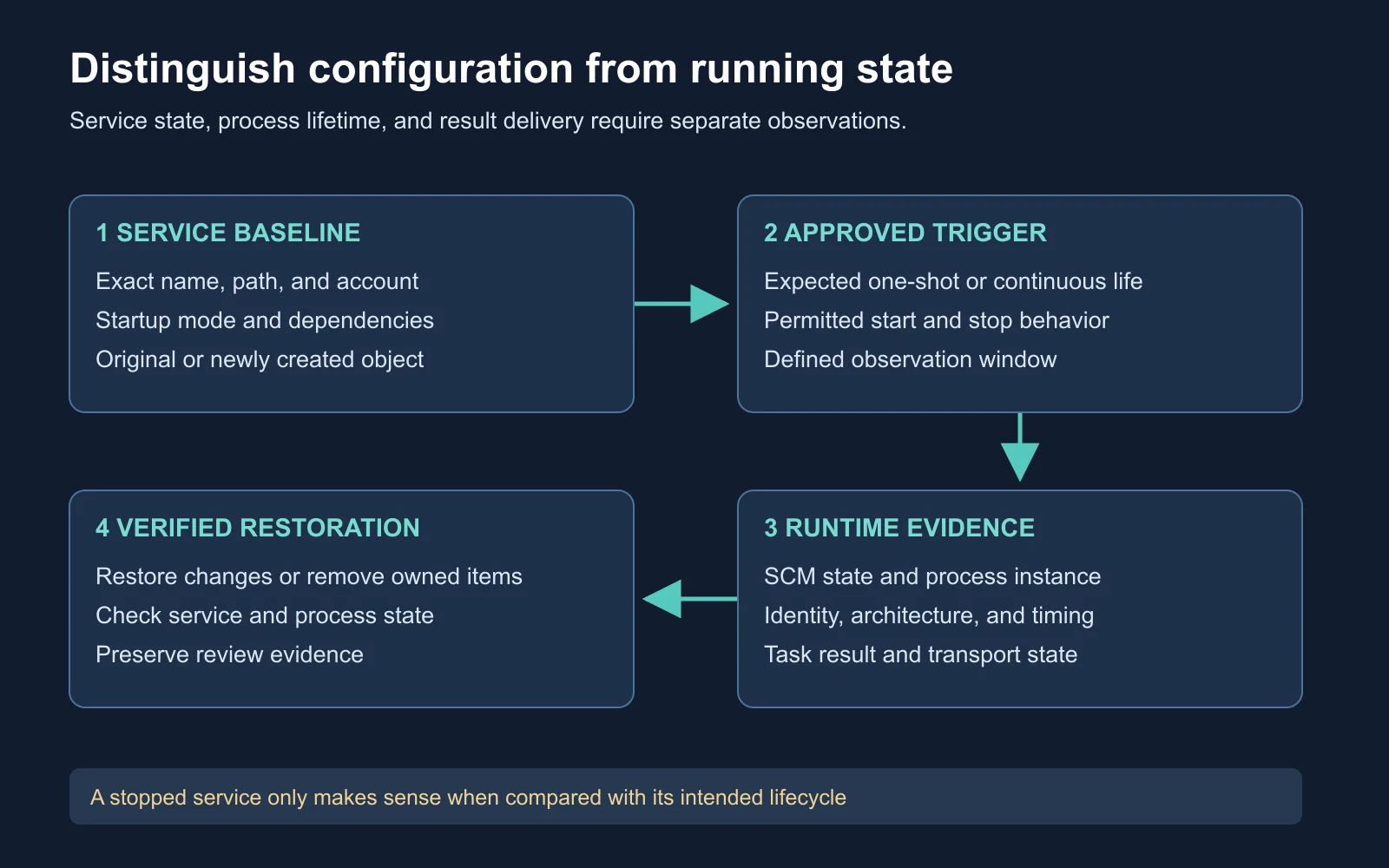
A service result needs configuration, runtime, and restoration evidence
A Windows service program implements SCM interfaces for startup and control handling. Services use different accounts and startup arrangements, and some share a process. A service is not inherently LocalSystem, automatically started, or a guarantee of durable access. Microsoft’s service-program documentation .
Your success condition follows the exercise objective. A one-shot maintenance service might legitimately stop after completing work. A continuously running service stopping unexpectedly is a different outcome. Record the program’s intended lifecycle before interpreting its state.
Key takeaway: A stopped service is a state to explain, not a universal success or failure signal.
Read the Service Baseline
sc.exe qc CourseLabService
sc.exe query CourseLabService
sc.exe qc reads configuration, while sc.exe query reports service state and related status fields. Record both outputs with timestamps. An error or missing service belongs in the result, and a similarly named service is not an acceptable substitute.
Microsoft’s configuration query
and
state query
.
$service = Get-CimInstance -ClassName Win32_Service `
    -Filter "Name = 'CourseLabService'"
$service | Select-Object Name, State, StartMode, StartName, PathName, ProcessId
Win32_Service exposes the selected service’s state, configured account, path, startup mode, and process ID. The filter narrows the query to the named lab object. A zero or unavailable process ID does not name a running service process.
Microsoft’s Win32_Service class
.
if ($null -ne $service -and $service.ProcessId -gt 0) {
    Get-Process -Id $service.ProcessId -ErrorAction Stop |
        Select-Object Id, ProcessName, StartTime, Path
}
Process correlation is time-sensitive. A service might stop between the two queries, a PID might be reused, or access to a property might be denied. Preserve those limitations instead of inventing missing values. This example reads process properties through Get-Process .
Expected result: A prepared running service supplies a service record and, with sufficient query access, a matching process observation. These commands were checked against documentation, not executed on the macOS authoring host. Your VM supplies the actual runtime evidence.
Resolve Architecture Questions
Filesystem redirection affects some paths requested by 32-bit applications on 64-bit Windows. The Sysnative alias lets a 32-bit application address the native system directory. It is not a real directory or a universal path for every process. Microsoft also documents exceptions to redirection.
Windows filesystem redirector
.
Separate the querying process, the configured executable, and any library it loads. A 32-bit management process does not inherently require migration before inspecting or configuring a service. Verify the resolved path and the application’s compatibility instead of treating a change of process as a mandatory ritual.
| Question | Evidence to collect |
|---|---|
| Which OS architecture? | Host inventory |
| Which process architecture? | Process properties for the relevant instance |
| Which executable path? | Service configuration and file identity |
| Which path was used? | Runtime process or file-access evidence |
Evaluate Process Migration
Process migration places an agent’s execution into a different process context, depending on the tool’s implementation. It is distinct from changing a service’s stored configuration. Moving execution does not automatically preserve every task, handle, impersonation state, or communication property.
Windows checks process access rights for operations such as querying information, writing process memory, and creating threads. Permissions and process protections constrain the available operations. A familiar executable name does not remove those boundaries. Microsoft’s process security and access rights .
The right decision begins with the operational requirement. If a compatible approved process already satisfies the objective, another transition adds dependencies and cleanup work. If a lab investigates migration itself, define the expected before-and-after identity, architecture, task behavior, and failure result.
| Consideration | Review question |
|---|---|
| Lifetime | What event ends the destination process? |
| Compatibility | Does the implementation support the destination architecture? |
| Identity | Which primary or impersonation context applies afterward? |
| Stability | What legitimate function fails if the destination exits? |
| Evidence | Which source proves the transition occurred? |
| Restoration | Which processes and configuration changes remain afterward? |
No universal safe process list exists. A process’s role, protection, workload, and lifetime matter more than its basename. Avoid inferring either guaranteed detection or guaranteed concealment from names such as rundll32.exe.
Observe Process Evidence
Microsoft’s Sysmon demonstration provides context for observing endpoint behavior. While watching, distinguish a recorded event from a detection rule and an analyst’s conclusion. Collection configuration determines which event types are available. Watch on YouTube .
A service installation event, where the relevant auditing is enabled, records an installation rather than proving later service health or successful execution. Preserve service metadata and correlate it with the exercise timeline. Microsoft’s event 4697 reference .
For your collection plan, request only the events needed to answer the exercise question. A full host capture introduces review volume and potential sensitive data. An absent event needs a collection-health check before it becomes a statement about the tested behavior.
Analyze a Stopped Service
This synthetic timeline describes an instructor’s one-shot service. The service manifest says it launches a benign worker and reports completion after dispatch. The worker writes a lab marker and exits independently.
| Time | Observation |
|---|---|
| 10:00:00 | Approved start request accepted |
| 10:00:01 | Service process and worker creation recorded |
| 10:00:02 | SCM reports the service stopped |
| 10:00:03 | Worker writes the expected marker |
| 10:00:05 | Worker exit recorded |
The supported conclusion is successful dispatch and worker completion for this specific fixture. The stopped state agrees with its documented design. A callback without the worker evidence would support a weaker conclusion, and the same timeline would violate a continuously running service’s expected behavior.
Durability remains untested. The timeline contains no reboot, dependency outage, or later trigger. If boot survival is the actual requirement, define a separate approved test. Do not use one successful start to claim resilience across events the exercise never observed.
Plan Restoration Early
A lifecycle record links each created object to its owner and original state. A newly created lab service and a modified pre-existing service require different restoration actions. Deleting a borrowed service would remove the customer’s original configuration.
Service removal also has asynchronous consequences. Microsoft’s deletion API marks a service for deletion, and removal waits for relevant handles to close and the service to stop. A successful deletion request therefore needs a later verification. DeleteService behavior .
| Object | Restoration question |
|---|---|
| Service registration | Was it created for the lab or present beforehand? |
| Configuration | Which exact fields changed from baseline? |
| Processes | Which lab-owned instances are still running? |
| Files | Which hashes and paths identify the lab’s files? |
| Evidence | Where are logs retained for the joint review? |
Create Your Lifecycle Record
Prepare a service lifecycle record for the synthetic timeline. Include one alternative explanation for a missing marker and one reason to avoid migration. Your review should establish the exercise outcome without assuming any unobserved startup behavior.
Service name and owner:
Original account, startup mode, and path:
Expected lifecycle and approved trigger:
Service and process observations with timestamps:
Identity and architecture evidence:
Migration requirement or reason to omit it:
Observed result and untested durability condition:
Restoration action, owner, and verification:
Expected reasoning: The one-shot fixture succeeded within its stated lifecycle, but boot persistence was not tested. Migration supplies no benefit to this short benign task unless the exercise explicitly studies a process transition. A missing marker needs execution and collection checks before attributing failure to SCM.
Self-Check and Answers
| Question | Expected reasoning |
|---|---|
| Does every service run as SYSTEM? | No, inspect the configured account and actual execution context |
| Does stopped always mean success? | No, compare observed state with the program’s intended lifecycle |
| Does x86 management require migration? | No, investigate compatibility and path resolution directly |
| Is a process basename a safety guarantee? | No, assess role, access rights, lifetime, and failure consequences |
| Does one start prove boot durability? | No, the boot condition needs its own approved observation |
| Does deletion success finish cleanup? | No, verify final registration, runtime state, and owned artifacts |
Next Steps
Bring the lifecycle record to Module 15: Persistence Cleanup and Defense Evasion . Use it to restore the exact objects touched by the exercise and preserve the evidence needed for a joint review.
Return to the Red Team Course for the complete sequence.

