

Module 15: Persistence Cleanup and Defense Evasion

Table of Contents
← Return to the Red Team Course
Cleanup restores agreed system state after an exercise. It removes or reverses the team’s changes while preserving the evidence needed to explain them. Deleting a visible file is only one possible step, and a failed query does not prove an artifact is absent.
This module develops a restoration ledger linking ownership, baseline, action, verification, and unresolved work. It also separates defense-evasion testing from evidence destruction, so the assessment’s final state remains reviewable.
Allow 30–45 minutes. Difficulty: intermediate. The worked cleanup case uses synthetic records.
Learning Outcomes
- Define restoration, artifact ownership, and verification scope.
- Explain how registry identity and loaded hives affect cleanup.
- Inspect the exact Run entry from the earlier benign exercise.
- Analyze failed queries, file identity changes, and remaining processes.
- Create a restoration ledger with an independent review condition.
Before You Begin
Bring the baseline records from user persistence and privileged persistence . You need the original account SID, registry location and view, named values, owned files, process observations, and any configuration fields changed during the exercise.
Use the same disposable VM for the inspection example. If you did not complete the Notepad Run-entry exercise, use the synthetic case instead. This lesson does not create another persistence mechanism or assume every reader has a matching artifact.
| Input | Why cleanup needs it |
|---|---|
| Original state | Distinguishes restoration from deletion |
| Ownership evidence | Prevents removing a similarly named customer object |
| Exact identity | Selects the intended user’s configuration |
| Runtime record | Finds lab activity still running after trigger removal |
| Evidence location | Preserves observations for the final report |
Define the Restoration Target
A created object usually needs removal if the exercise owns it and the agreement requires no residual artifact. A modified object needs restoration of the affected fields to the agreed baseline. An observed object needs no cleanup merely because it appeared in a tool’s output.
For example, the earlier Notepad exercise created a named Run value, not the Windows Notepad application. Removing the lab value and closing its identified window addresses those changes. Deleting the operating-system executable would damage an unrelated component.
| Object category | Appropriate disposition |
|---|---|
| Created lab value | Remove the exact owned value after comparison |
| Modified existing setting | Restore approved baseline fields |
| Existing OS executable | Leave intact |
| Collected evidence | Retain according to the engagement agreement |
| Unrecognized change | Escalate for ownership review before mutation |
Follow the Restoration Loop
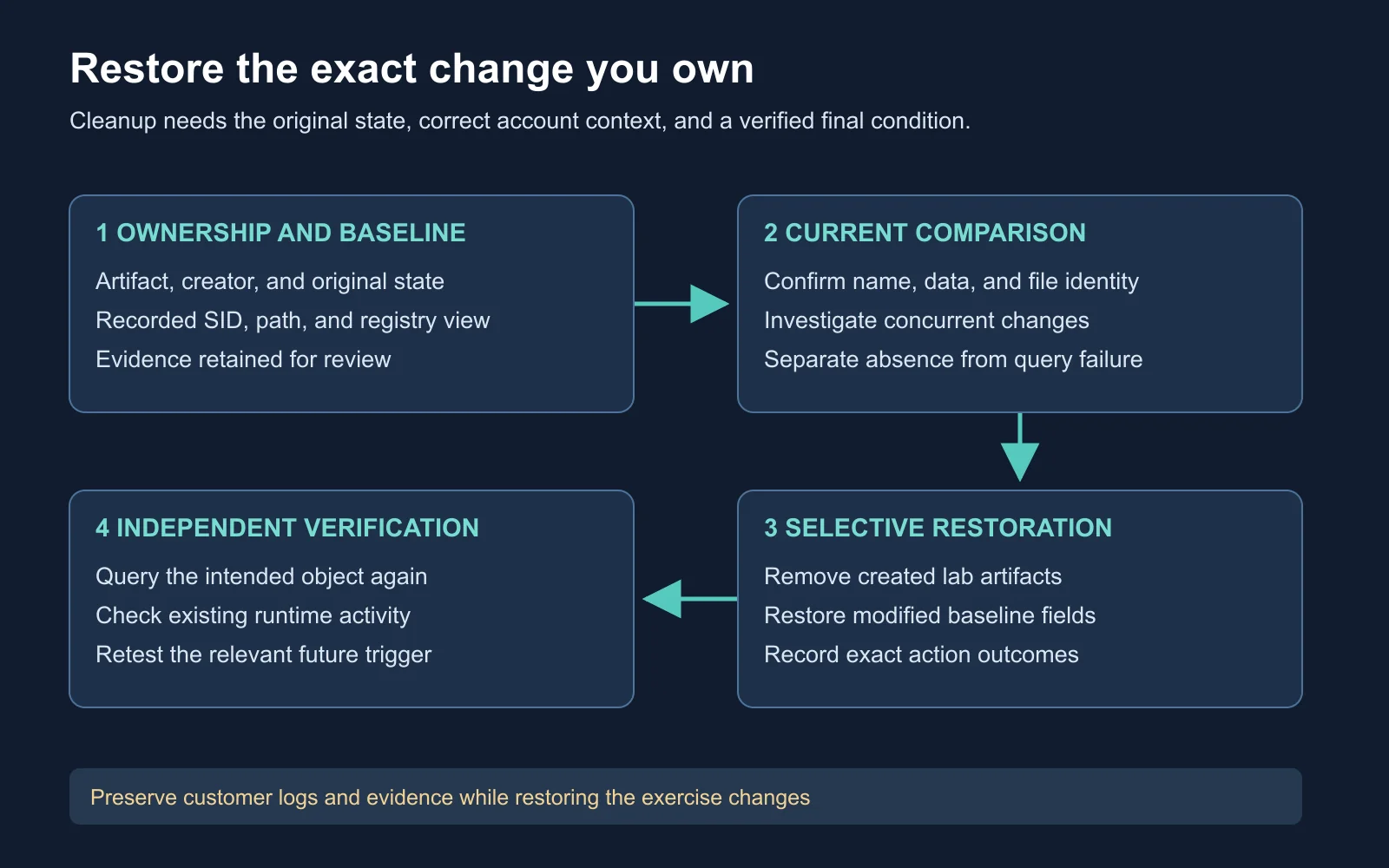
An action result and a verified final state are separate entries in the cleanup record
The restoration loop begins with a comparison, not a deletion command. Confirm the current object still matches the team’s recorded change. Apply the narrow reversal, then independently check the intended final state and any affected trigger.
Concurrent changes complicate rollback. If an administrator edited a value after the exercise created it, blindly restoring an old snapshot might erase legitimate work. Record the mismatch, preserve the current value, and let the system owner resolve the conflict.
Decision rule: An uncertain owner or changed value is a review task, not permission for broader deletion.
Resolve Registry Identity
HKCU refers to a current-user registry mapping. Its behavior follows process and security context, with caching details relevant to impersonating applications. A SYSTEM-context cleanup tool should not assume this handle refers to the interactive user who created the artifact.
Microsoft’s predefined registry keys
.
Use the recorded SID and account authority from the creation record. A short username alone is ambiguous across local and domain accounts. SID length does not distinguish a local account from a domain account, and a _Classes suffix identifies a different registry branch rather than an account’s domain status.
Microsoft’s security identifier documentation
.
| Observation | Interpretation |
|---|---|
| HKCU value absent | Absence in the queried mapping, if the query succeeded |
| Recorded SID under HKU | A loaded branch available for a targeted query |
| Recorded SID not listed | Investigate profile loading and collection context |
| Similar username | Insufficient evidence of the same security principal |
Loaded hives are not a complete user-account inventory. If the target profile is unloaded, a live HKU listing does not prove its persisted configuration is clean. Prefer verification in the original user’s controlled session, or an owner-managed profile inspection procedure with its own rollback plan.
Inspect the Exact Value
whoami.exe /user
reg.exe query HKU
Identity inspection records the account executing cleanup and lists the loaded registry roots visible to it. Compare the result with the SID captured during the earlier exercise. Do not choose a SID by its position, length, or resemblance to a screenshot.
$recordedSid = 'S-1-5-21-111111111-222222222-333333333-1001'
$runKey = "HKU\$recordedSid\Software\Microsoft\Windows\CurrentVersion\Run"
reg.exe query $runKey /v CourseLab-Notepad /reg:64
$queryExitCode = $LASTEXITCODE
$queryExitCode
Replace the synthetic SID with the exact recorded SID before running the query. /v selects the lab value, and /reg:64 matches the earlier exercise’s 64-bit registry view. $LASTEXITCODE preserves the native command’s exit result.
Microsoft’s reg query reference
.
Expected interpretation: A successful result reveals the named value and its current data. A failure requires the accompanying error text. Missing key, missing value, and access denied are different outcomes. This example is documentation-reviewed and requires a Windows lab for execution validation.
For the actual removal, use the guarded, value-specific cleanup in Module 12 from the original user’s session. Compare the current name and data with the recorded lab value first. Do not delete the parent Run key, which contains other startup entries.
Verify File Ownership
Get-FileHash -LiteralPath 'C:\CourseLab\Artifacts\example-marker.txt' `
    -Algorithm SHA256
Get-FileHash reads file content to calculate a digest. Use this example only for a lab-owned file recorded in your manifest. The digest helps compare current content with the creation record, but a matching hash alone does not establish ownership or justify deletion.
Microsoft’s Get-FileHash documentation
.
Record the exact path, owner, and purpose alongside the digest. Two copies of the same lab file require two artifact records. A file containing another team’s data needs a different disposition even if its name resembles your test artifact.
| Comparison | Decision |
|---|---|
| Path and digest match | Continue with the approved ownership-based reversal |
| Digest changed | Preserve and investigate the intervening change |
| Path absent | Check query success and record the observation time |
| Access denied | Diagnose access before drawing a content conclusion |
Diagnose Cleanup Failures
Access denied does not prove a live agent is holding a file. Windows distinguishes access-denied errors from sharing violations, and other conditions affect file operations. Preserve the exact native error rather than replacing it with a guessed explanation. Windows system error codes .
A remaining process requires its own ownership check. PID alone is insufficient after a long delay because identifiers are reused. Correlate image, start time, parent relationship, and the original exercise record before closing an application or asking the owner to stop a service.
| Failure | Narrow next check |
|---|---|
| Registry access denied | Query account, requested view, and object permissions |
| File sharing violation | Identify the handle owner and expected application state |
| Service marked for deletion | Check running state and outstanding management handles |
| Artifact reappears | Look for another recorded trigger or management policy |
| Process remains | Determine whether trigger removal affected an existing instance |
Trigger removal prevents a future launch through the removed mechanism. It does not automatically end existing activity or remove every alternate launch source. The final check should cover both the startup configuration and the known running lab instance.
Observe With Process Monitor
Microsoft’s Process Monitor demonstration supplements the file and registry investigation. Focus on process identity, operation, path, result, and event time. An unsuccessful lookup means something different from a successful write or delete. Watch on YouTube .
Process Monitor collects filesystem, registry, and process/thread activity and supports filtering. Use a bounded collection window and preserve the original capture before narrowing the analyst view. Filters help review, but an incomplete capture does not establish the absence of an earlier operation. Microsoft’s Process Monitor documentation .
Preserve Detection Evidence
Defense-evasion testing examines whether a defined change affects prevention or detection under specified conditions. Its result belongs beside the original configuration, exact test window, and collection status. Fewer child processes or a changed command line does not establish invisibility.
Assessment cleanup should preserve customer event logs and agreed evidence. If an exercise includes a defense-evasion hypothesis, document its measured outcome and restore any authorized configuration change. Do not relabel log destruction as routine housekeeping. Revisit communication and detection comparisons for a controlled comparison method.
| Record | Preserve for review |
|---|---|
| Endpoint observation | Raw event reference and collection status |
| Operator action | Exact object, time, and task result |
| Detection outcome | Alert, prevention action, or reviewed absence within a window |
| Restoration result | Action status plus final-state verification |
Review a Synthetic Cleanup
Assume a training Run value was created for user A, and cleanup occurs later under an administrative account. The operator queries its own HKCU, receives no matching value, and marks cleanup complete. A later sign-in by user A opens the lab Notepad window again.
The failure is scope, not a mysterious registry recovery. The operator queried a different mapping and never verified the original trigger. Correct the ledger to unresolved, return to the recorded SID and view, and compare the actual lab entry with its creation record.
| Evidence | Supported conclusion |
|---|---|
| Administrator’s HKCU lacks value | No matching value in the queried context |
| User A’s entry still exists | The original trigger remains configured |
| Known lab window launches later | Runtime behavior is consistent with incomplete cleanup |
| Exact value removed and logon retested | Stronger evidence of restoration for this mechanism |
Expected reasoning: Successful verification names the right account, value, view, and trigger. A remaining Notepad window from before removal does not prove a new launch. Close the identified lab instance before the controlled later sign-in and correlate new process evidence.
Create a Restoration Ledger
Build a ledger entry for the Run value and a second for any lab-owned file. Mark each as verified, unresolved, or retained by agreement. Avoid a single blanket “host clean” statement when the evidence covers only selected artifacts.
Host and artifact identifier:
Owning exercise and creation evidence:
Original state / exercise change:
Current identity, location, view, and value:
Comparison result and conflicts:
Approved restoration action and result:
Independent query and trigger verification:
Retained evidence and remaining work:
Reviewer, owner, and completion time:
Completion standard: Another reviewer should reproduce your final-state check without guessing the account or deleting additional objects. Unresolved items need an owner and next action, not an optimistic completion label.
Self-Check and Answers
| Question | Expected reasoning |
|---|---|
| What if a pre-existing value was modified? | Restore its agreed baseline instead of deleting it |
| Does an empty HKCU query prove cleanup? | Only for the verified queried context and successful query |
| Does SID length identify domain accounts? | No, use the recorded identifier and account authority |
| Does access denied prove a live implant? | No, inspect the exact error and object-access conditions |
| Why retest the trigger? | Configuration absence and future launch behavior are separate observations |
| What happens to customer logs? | Preserve them for the agreed review and retention process |
Next Steps
Carry the restoration ledger into Module 16: Domain Privilege Escalation and Kerberos Abuse . The next lesson separates ticket requests, password exposure, and account authorization before evaluating domain impact.
Return to the Red Team Course for the complete sequence.
