

Module 13: Local Privilege Escalation

Table of Contents
← Return to the Red Team Course
Local privilege escalation crosses a permission boundary on a host. A writable directory, unusual service, or scanner finding starts an investigation. Establish which identity controls which operation, which privileged process consumes the result, and what evidence supports the claimed impact.
This module develops a permission-boundary record. You will inspect a prepared training service without modifying it, compare incomplete findings, and design a minimal validation with a clear stopping point.
Allow 35–50 minutes. Difficulty: intermediate. The worked case is illustrative, not an observed compromise.
Learning Outcomes
- Define service permissions, file permissions, and DLL search behavior.
- Explain why a suspicious configuration is an incomplete escalation claim.
- Inspect a training service and its filesystem permissions.
- Compare evidence for competing escalation hypotheses.
- Produce a validation record with a remediation and retest condition.
Before You Begin
Use a disposable Windows lab VM with an instructor-provided service named CourseLabService and a documented application directory. Read
Windows identity and tokens
and
host awareness
first. Run the inspection from the account whose permissions you intend to assess.
If no training service exists, complete the paper exercise below. Do not substitute an unfamiliar production service. The inspection commands query state, while service installation, ACL changes, and restarts require a separate exercise specification.
| Requirement | Record before inspection |
|---|---|
| Principal | Account SID, groups, integrity level, and relevant token privileges |
| Object | Exact service name, executable path, and application version |
| Boundary | Current rights and the additional operation under review |
| Trigger | Permitted event and its expected service impact |
| Evidence | Timestamp, command result, trace location, and baseline owner |
Define the Boundary
A discretionary access control list, or DACL, specifies allowed and denied access entries on an object. Effective access depends on the requested operation and the caller’s token. Reading a configuration is different from changing it, and changing a file is different from replacing its containing directory.
The service object and its executable are separate securable objects. Permission to query a service does not imply permission to reconfigure it. A service’s configuration, binary, and supporting directories therefore need separate evidence. Microsoft documents distinct service rights for querying, changing configuration, starting, and stopping a service. Service access rights .
| Evidence | Meaning | Missing conclusion |
|---|---|---|
| Query succeeds | Configuration is readable | Configuration is writable |
| Directory is writable | Some filesystem operations are permitted | Privileged code loads a controlled file |
| Service uses LocalSystem | Configured service identity is highly privileged | Your proposed input reaches its execution path |
| Start is permitted | Caller has a trigger permission | Caller controls the launched program |
Trace the Whole Path
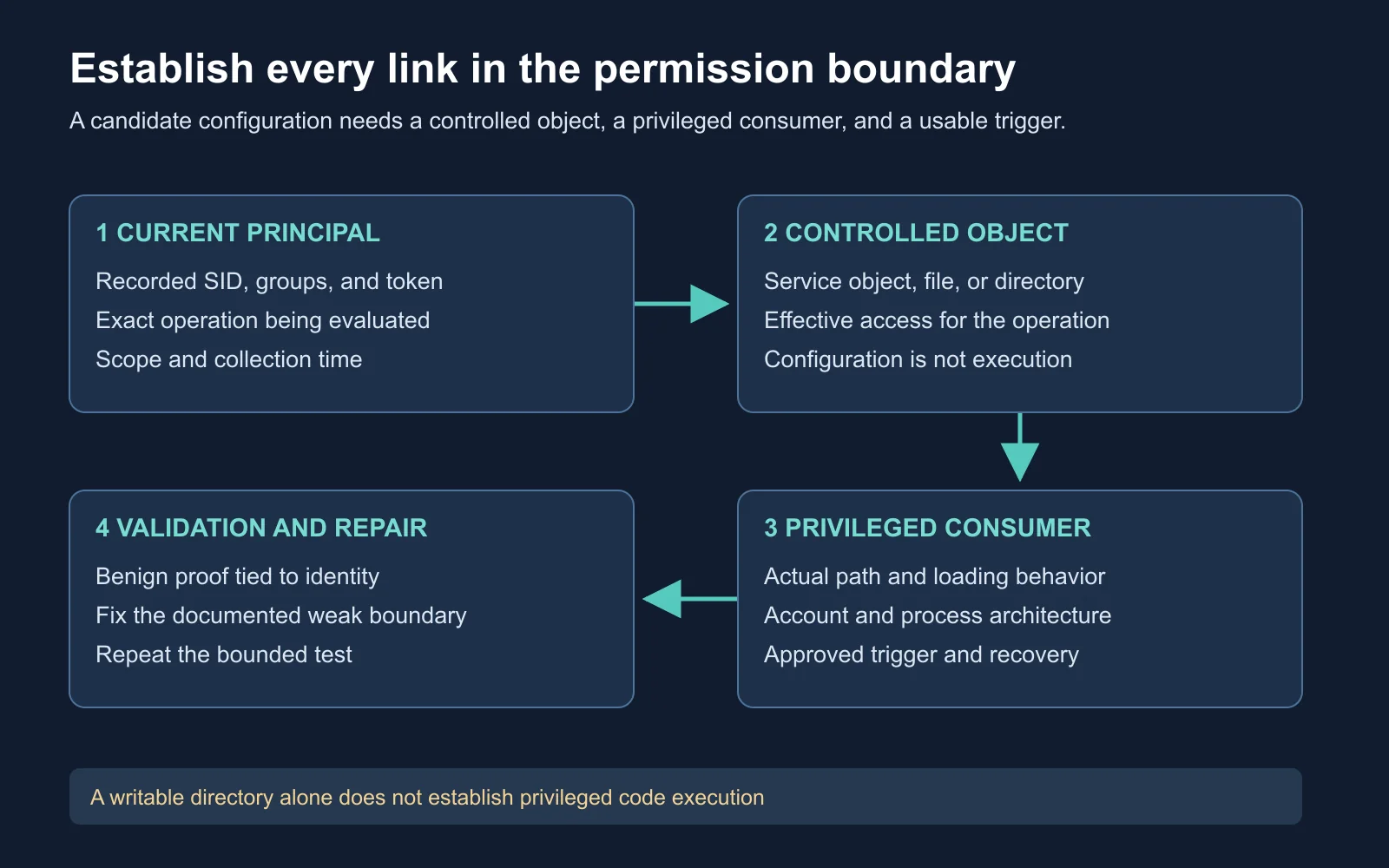
Every link needs evidence before a configuration finding becomes an escalation result
A useful escalation hypothesis names a chain: principal, permitted modification, privileged consumer, and trigger. One missing link changes the conclusion. The chain also reveals where a defender should break the dependency.
Consider a training application’s plugin directory. An ordinary user writes files there, but the privileged service loads plugins only from a different, protected directory. The writable location deserves configuration review, yet it does not establish the proposed service escalation. Your report should preserve this distinction instead of promoting every weak permission into SYSTEM execution.
Evidence discipline: State the strongest supported claim, then name the next observation needed to strengthen it.
Inspect the Training Service
whoami.exe /all
sc.exe qc CourseLabService
sc.exe sdshow CourseLabService
whoami.exe /all records the inspection identity and token context. sc.exe qc reads the service configuration, including its configured executable and service account. sc.exe sdshow displays the service security descriptor, whose interpretation concerns the service object rather than its executable. Use sc.exe explicitly in PowerShell to avoid a command-name alias collision.
Microsoft’s sc qc reference
and
sc sdshow reference
.
icacls.exe "C:\CourseLab\Service"
icacls.exe "C:\CourseLab\Service\CourseLabService.exe"
icacls.exe displays filesystem DACLs when invoked this way. Replace the example paths only with the instructor’s recorded lab paths. The commands do not grant permissions or establish which file a running process has loaded. Preserve both command output and error messages.
Microsoft’s icacls reference
.
| Result | Next interpretation |
|---|---|
| Service absent | Check the lab manifest rather than inventing a target |
| Access denied | Record the blocked query and current principal |
| Inherited permission | Identify its parent and affected objects before proposing a fix |
| Path differs | Update the hypothesis to match the configured application |
Expected observation: Successful queries produce configuration and permissions for the prepared objects. No particular permission weakness is guaranteed. These Windows examples are documentation-reviewed, not execution-tested on the macOS authoring host.
Interpret Tool Findings
SharpUp is a C# assessment tool with checks for issues such as modifiable services, modifiable service binaries, unquoted service paths, and hijackable paths. Its repository distinguishes checks from weaponization. Record the source revision and selected check rather than treating an old screenshot as a stable interface. GhostPack’s SharpUp repository .
A checker result prioritizes manual review. An unquoted service path needs more analysis than the presence of a space. A writable PATH entry needs more analysis than a permissive ACL. Compare the tool’s assumptions with the exact process, filesystem layout, and operating-system build in your record.
Execution method also changes the observation surface. An external utility, managed assembly, and in-process BOF have different dependencies and failure boundaries. None guarantees silence, and an in-memory operation still invokes observable system behavior. Revisit Beacon execution and BOFs for compatibility and failure analysis before choosing a collection method.
| Collection choice | Question to answer first |
|---|---|
| Native query | Which process and object access events are expected? |
| Managed checker | Which runtime, checks, and child processes does this version use? |
| In-process component | What happens to the hosting process if the component fails? |
| Existing defender trace | Does its collection window cover the proposed behavior? |
Understand DLL Loading
DLL search-order hijacking depends on actual loader behavior. Windows considers factors such as loaded modules, KnownDLLs, manifests, application type, and loader flags. PATH is only part of some search strategies. An arbitrary writable PATH directory does not guarantee selection. Microsoft’s DLL search-order documentation .
A missing-file event is also incomplete evidence. Programs often probe optional files or continue searching after an unsuccessful lookup. Correlate the requested name, process identity, later lookup results, and the path ultimately loaded. Avoid publishing a named Windows DLL as a universal escalation route without a reproducible affected-version record.
For ordinary native x86/x64 DLL loading, match the library to the loading process. A 64-bit operating system also runs 32-bit processes, so OS bitness alone is insufficient. The file’s expected exports and application behavior matter alongside architecture. Microsoft’s process interoperability documentation .
| Observation | Further evidence needed |
|---|---|
| NAME NOT FOUND | Whether the failed lookup affects a used code path |
| Writable searched directory | Whether a controlled file would be selected before another copy |
| Compatible architecture | Required exports and successful application behavior |
| Privileged loader | Token context at the operation and an approved trigger |
Watch a Specific Case
Compass Security’s case study illustrates how application behavior and timing shape a DLL hijacking investigation. Treat its demonstrated conditions as specific to the researched case. It is supplemental analysis, not proof of vulnerability on every Windows installation. Watch the presentation on YouTube .
While watching, identify the controlled object, the privileged consumer, and the timing dependency. Then ask which observation would invalidate the proposed path. This exercise builds a stronger review habit than remembering a filename.
Compare Three Findings
The following synthetic findings concern one training application. Assume the instructor supplied complete permission evidence for the stated objects, but no execution test has occurred. Your task is to rank the next investigation step without claiming successful escalation.
| Finding | Available evidence | Defensible assessment |
|---|---|---|
| A: Writable cache | User modifies cache files, service never reads them | No demonstrated privileged dependency |
| B: Writable plugin | User modifies a file read by a higher-privilege loader | Strong candidate, loading semantics and trigger remain |
| C: Readable service | User queries a LocalSystem service with protected files | Read access alone supplies no escalation path |
Finding B deserves the next bounded validation because the evidence connects user control to a privileged consumer. Request a prepared benign fixture from the application owner, define its expected marker, and agree on a trigger window. Do not substitute an unrestricted payload or reboot simply because an earlier lab used one.
A negative result still needs interpretation. No marker after the trigger might reflect a failed load, a different path, a blocked action, or missing collection. Preserve the trace and separate these possibilities before closing the finding.
Choose the Smallest Proof
A good validation plan answers one disputed question. If the dispute is whether the service reads a directory, a file-access trace might suffice. If the dispute is code execution under another identity, a mere file read is insufficient. Agree on the evidence threshold with the reviewer before changing the lab.
Operational cost belongs in the decision. Restarting a service, changing a dependency, or rebooting a host has different effects. A maintenance window does not automatically authorize every trigger. Prefer an owner-provided test application when production timing or recovery is uncertain.
| Disputed claim | Minimal useful evidence |
|---|---|
| Principal controls object | Effective permission result for the required operation |
| Consumer selects path | Correlated loader or application trace |
| Boundary is crossed | Benign result tied to the higher-privilege execution context |
| Remediation breaks path | Repeated narrow test after the specified permission or loader fix |
Build Your Boundary Record
Create a one-page assessment from the synthetic case or your prepared VM. Include exact object names and evidence references. Another reviewer should understand both the finding and its uncertainty without reproducing a risky action.
Current principal and token:
Controlled object and required operation:
Permission evidence and collection time:
Privileged consumer and version:
Actual path selection evidence:
Approved trigger and recovery owner:
Claim established / claim still untested:
Minimal validation and stopping condition:
Remediation owner and retest evidence:
Completion standard: Distinguish configuration exposure from demonstrated execution, identify at least one invalidating condition, and choose a fix at the actual weak boundary. Tightening an unrelated directory does not repair the documented dependency.
Self-Check and Answers
| Question | Expected reasoning |
|---|---|
| Does querying a service prove modification rights? | No, querying and changing configuration require different access rights |
| Does a writable PATH entry prove hijacking? | No, establish actual search behavior, selection, privilege, and trigger |
| Which architecture matters for a DLL? | The loading process and its supported native module architecture |
| Which synthetic finding deserves more work? | B, because evidence connects controlled input to a privileged consumer |
| Does no callback prove no execution? | No, distinguish execution evidence from result transport and collection |
| What makes remediation convincing? | A fix addressing the documented boundary plus a scoped retest |
Next Steps
Carry the permission-boundary record into Module 14: Privileged Persistence and Process Migration . The next lesson examines service state, process lifetime, and whether an additional persistence mechanism serves the mission objective.
Return to the Red Team Course for the complete sequence.

