

Module 17: Lateral Movement and Expanding Access
Table of Contents
← Return to the Red Team Course
Lateral movement is a sequence of host-to-host decisions. A credential, route, protocol, service, and authorization rule each influence the result. One successful login does not prove access to every server or every administrative function.
This module creates a movement path ledger. You will separate network reachability, authentication, authorization, execution, and result collection so a failed attempt produces useful evidence.
Allow 35–50 minutes. Difficulty: intermediate. The examples use an approved lab inventory.
Learning Outcomes
- Define reachability, authentication, authorization, and execution.
- Explain why a valid credential does not imply remote administration.
- Inspect a named host and service using read-only checks.
- Compare SMB, WinRM, and SSH prerequisites.
- Create a path ledger with a stopping condition.
Before You Begin
Use the host and identity records from domain privilege escalation and host operations . The lab manifest should list source host, destination host, approved protocol, account, time window, and owner. Do not scan or authenticate to unlisted hosts.
| Gate | Evidence to collect |
|---|---|
| Name resolution | Resolved address and resolver used |
| Network path | Route, port, and firewall result |
| Authentication | Protocol response and account identity |
| Authorization | Requested action and access decision |
| Execution | Process or service evidence on destination |
| Collection | Returned output and timestamp |
Model the Five Gates
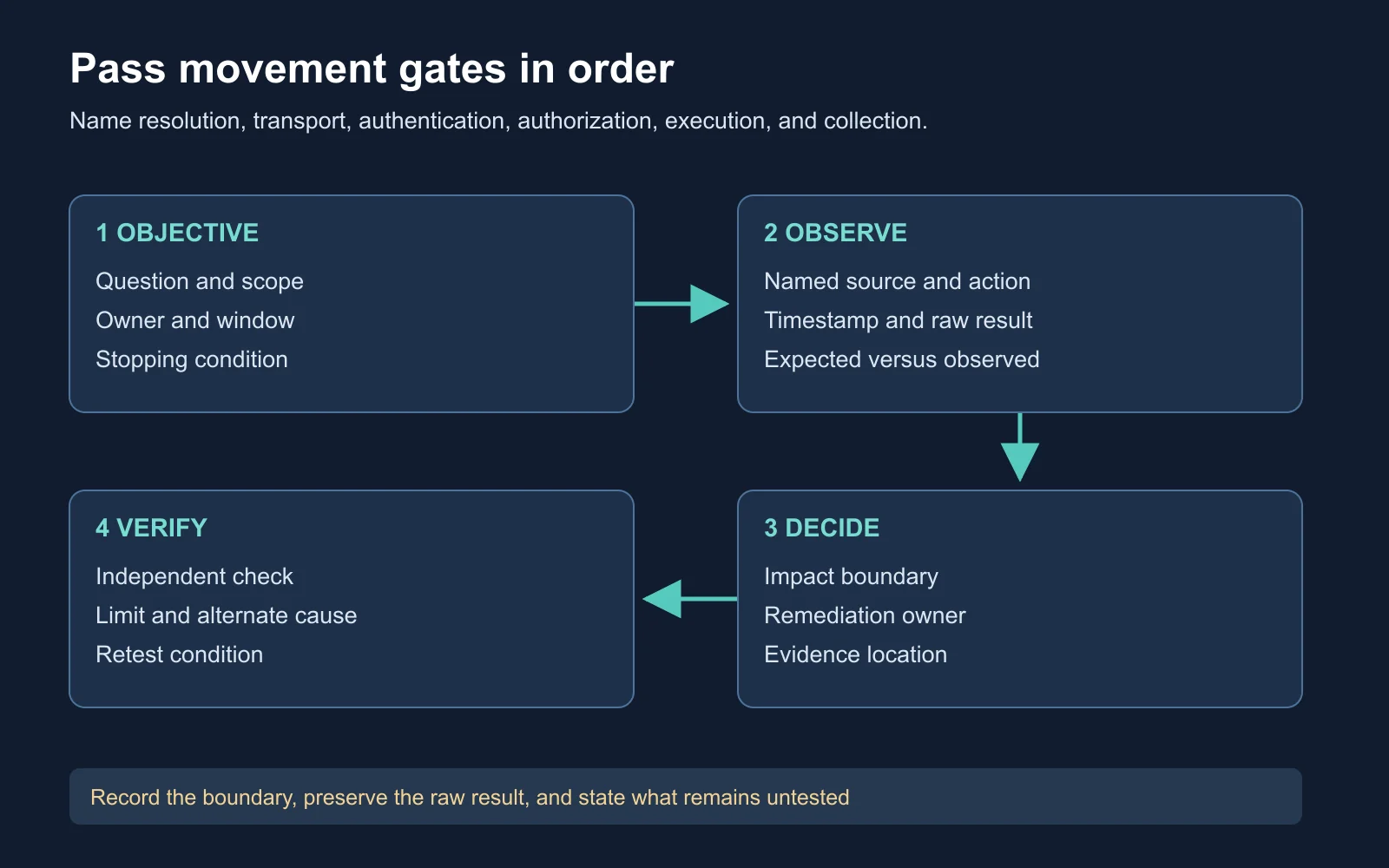
A path ledger keeps each remote-access gate visible
Reachability asks whether packets are able to reach a service. Authentication asks whether the endpoint accepts the presented identity. Authorization asks whether the identity is permitted to perform the requested operation. Execution asks whether the operation created the intended remote activity. Collection asks whether the result returned to the operator.
| Gate | Failure example | Correct conclusion |
|---|---|---|
| Reachability | Port blocked | No transport path observed |
| Authentication | Logon rejected | Credential or protocol failure, not bad DNS by itself |
| Authorization | Access denied | Identity reached the service but lacks which right |
| Execution | Service did not start | Remote action outcome is unproven |
| Collection | Session timed out | Result transport is unproven |
Treating all five as “access” hides the next useful test. A valid password still fails because the account is denied network logon, the service is disabled, or the requested operation needs a separate right.
Name the Destination Precisely
Resolve-DnsName fileserver.corp.example
Test-NetConnection fileserver.corp.example -Port 445
Resolve-DnsName records the answer returned by the selected resolver. Test-NetConnection tests a TCP path to the named port. Neither command authenticates or authorizes an action. Preserve address, port, interface, and time in the ledger.
Expected result: The lab might return multiple addresses, a failed lookup, or a closed port. A DNS answer does not prove the endpoint is the intended host, and an open port does not prove a successful logon. These commands were documentation-reviewed and not executed on the macOS authoring host.
Compare Remote Services
SMB commonly supports file and named-pipe access. WinRM exposes Windows management through configured HTTP or HTTPS listeners and policy. SSH supports password, key, certificate, or GSSAPI methods depending on server configuration. Each protocol has its own authorization model and audit trail.
| Service | Reachability | Authorization question |
|---|---|---|
| SMB | TCP 445 and server policy | Share and filesystem rights |
| WinRM | Listener and firewall policy | Remote-management group and endpoint policy |
| SSH | Listener and host policy | Allowed account, key, shell, and command policy |
Do not infer an HTTPS page implies WinRM, or an open SMB port grants administrative shares. Confirm the protocol and resource named in the exercise.
Track Error Meaning
Error 1326 commonly maps to a logon failure, but the surrounding protocol and account policy still matter. A path-not-found response might reflect an incorrect share, route, or name. DNS, authentication, authorization, and resource errors need their original text and protocol context.
| Symptom | First review |
|---|---|
| Name not resolved | Resolver, suffix, and manifest spelling |
| Port closed | Destination service state and firewall owner |
| Logon failure | Account, method, time, and policy response |
| Access denied | Requested resource and effective rights |
| Path not found | Share name, namespace, and server response |
| Timeout | Transport, service, and result-collection windows |
Watch a Movement Demonstration
Microsoft’s PsTools demonstration shows remote administration utilities and their operational context. Use it to identify which actions require remote service access and which produce process or service evidence. Watch the demonstration on YouTube .
**The video is a supplement, It does not prove every lab account uses every tool. Record the selected tool, destination, requested operation, and resulting event before assigning impact.
Build a Movement Path
Start with the least expansive action answering the question. A read-only share listing might resolve resource ownership. A remote service query might confirm configuration. A command changing state needs a separate approval and rollback entry.
Source host and principal:
Destination host and owner:
Name and address evidence:
Protocol, port, and listener evidence:
Authentication method and result:
Requested resource or operation:
Authorization result:
Execution and collection evidence:
Rollback owner and stopping condition:
Path completeness matters. If the destination process ran but no output returned, report execution and collection separately. If authentication succeeded but the share denied access, report authentication without claiming file access.
Analyze a Synthetic Failure
Assume analyst.user resolves app01.corp.example to 10.20.30.14. TCP 5985 is open. WinRM accepts the account, but the endpoint denies the requested command because the user is not in the approved remote-management group.
The supported conclusion is name resolution, transport, and authentication success. Authorization and execution failed. The next action is an owner-approved group or endpoint-policy review, not a second protocol chosen at random.
| Evidence | Claim supported |
|---|---|
| DNS answer | Name resolved at the recorded time |
| Open 5985 | TCP path to the listener exists |
| WinRM logon | Endpoint accepted the identity |
| Endpoint denial | Requested operation was not authorized |
| No process event | No execution evidence in the collected window |
Evaluate Expansion Risk
Expanding access increases the number of hosts, accounts, and owners affected by the exercise. A broad credential sweep creates more audit events and more cleanup obligations. Limit each move to the host and operation answering the mission question.
Consider credential scope, host criticality, service impact, and evidence quality before proceeding. A destination appearing reachable might be a production controller, a backup server, or a safety-critical system. The asset owner and engagement scope determine whether the test is appropriate.
| Decision factor | Question |
|---|---|
| Need | Does this host answer the objective? |
| Exposure | Which account and data cross the boundary? |
| Impact | Would the action interrupt a service? |
| Evidence | What exact result will prove or disprove the hypothesis? |
| Recovery | Who restores state if the action fails? |
Create the Path Ledger
Produce a movement path ledger for the synthetic WinRM case and one proposed SMB comparison. Include the gate which failed, an alternative explanation, and the smallest owner-approved next check.
Completion standard: A reviewer distinguishes a network result, an authentication result, an authorization result, and an execution result. The ledger contains no claim based only on a port scan or credential possession.
Self-Check and Answers
| Question | Expected reasoning |
|---|---|
| Does an open port prove remote execution? | No, it proves only a transport path to a listener |
| Does successful authentication prove share access? | No, resource authorization is a separate gate |
| What does error context add? | It distinguishes protocol, resource, and policy failures |
| Why avoid broad credential sweeps? | They add scope, telemetry, and cleanup without proving the objective |
| What should follow an endpoint denial? | An owner-approved policy or group review |
| What makes the ledger complete? | Evidence for each gate plus an explicit stopping condition |
Next Steps
Carry the movement path ledger into Module 18: Cross-Domain Pivoting and LDAP Enumeration , where trust direction and directory query scope add more gates.
Return to the Red Team Course for the complete sequence.

