

Module 10: Initial Access: Phishing and Delivery

Table of Contents
← Return to the Red Team Course
Initial access is the establishment of a usable starting context for an assessment. A delivered message, a clicked link, and code execution represent different outcomes. Your test should identify which boundary it examines and collect evidence appropriate to the tested boundary.
Allow about 20 minutes, plus time to design the simulation record. The worked examples use synthetic events and require no messages sent to real recipients.
What You Will Learn
- Distinguish delivery, interaction, execution, and communication outcomes.
- Explain how email, document, identity, and endpoint controls affect an access path.
- Analyze a synthetic campaign’s rates and ambiguous events.
- Evaluate whether two simulations support a fair comparison.
- Create a bounded initial-access test specification and handover record.
| Term | Meaning |
|---|---|
| Delivery | A message or artifact reaches the specified destination |
| Interaction | A recorded action such as following a link |
| Execution | Instructions run in an identified process and security context |
| Foothold | Usable access within the assessment’s permitted scope |
| Mark of the Web | Windows zone information associated with some downloaded files |
| Simulation artifact | Harmless material used to exercise an agreed control or behavior |
Choose the Access Boundary
Phishing is one initial-access technique, not a universally reliable route. Its outcome depends on the scenario, delivery path, controls, and user context. An assessment might instead examine a public application boundary or begin from a deliberately supplied test account.
Remote code execution means an input causes instructions to run remotely. An upload feature alone does not establish this condition. File validation, storage location, server configuration, execution permissions, and how the uploaded content is handled determine the effect.
A web shell is server-side code exposing a command interface through a web application. Its presence is an execution and access concern, not the ordinary outcome of every uploaded document. Keep a suspected upload weakness separate from proof of server-side execution. Read MITRE ATT&CK’s web-shell description .
| Proposed test | Boundary examined | Minimal useful proof |
|---|---|---|
| Mail simulation | Delivery and recipient response | Correlated message and interaction records |
| Document-control test | Opening and execution policy | Policy result for an inert test artifact |
| Application assessment | Input handling and authorization | Bounded reproducible behavior |
| Assumed-access exercise | Controls after a defined starting point | Documented supplied identity and privileges |
Trace the Delivery Chain
A message’s lifecycle crosses several independent controls. Sending infrastructure, receiving mail systems, clients, browsers, endpoint policy, and network access each contribute a possible outcome. Name the stage where the observation occurred instead of reporting every failure as “phishing blocked.”
Human interaction also needs interpretation. A tracking request does not necessarily establish a deliberate click by the recipient. Microsoft documents false positives caused by security applications and automated message inspection, including interactions with forwarded simulation messages. Read the simulation FAQ .
Execution and callback evidence are separate again. Even an authorized test program which starts successfully might fail to reach its reporting endpoint. Use the task-state distinctions from Module 5 when recording these outcomes.
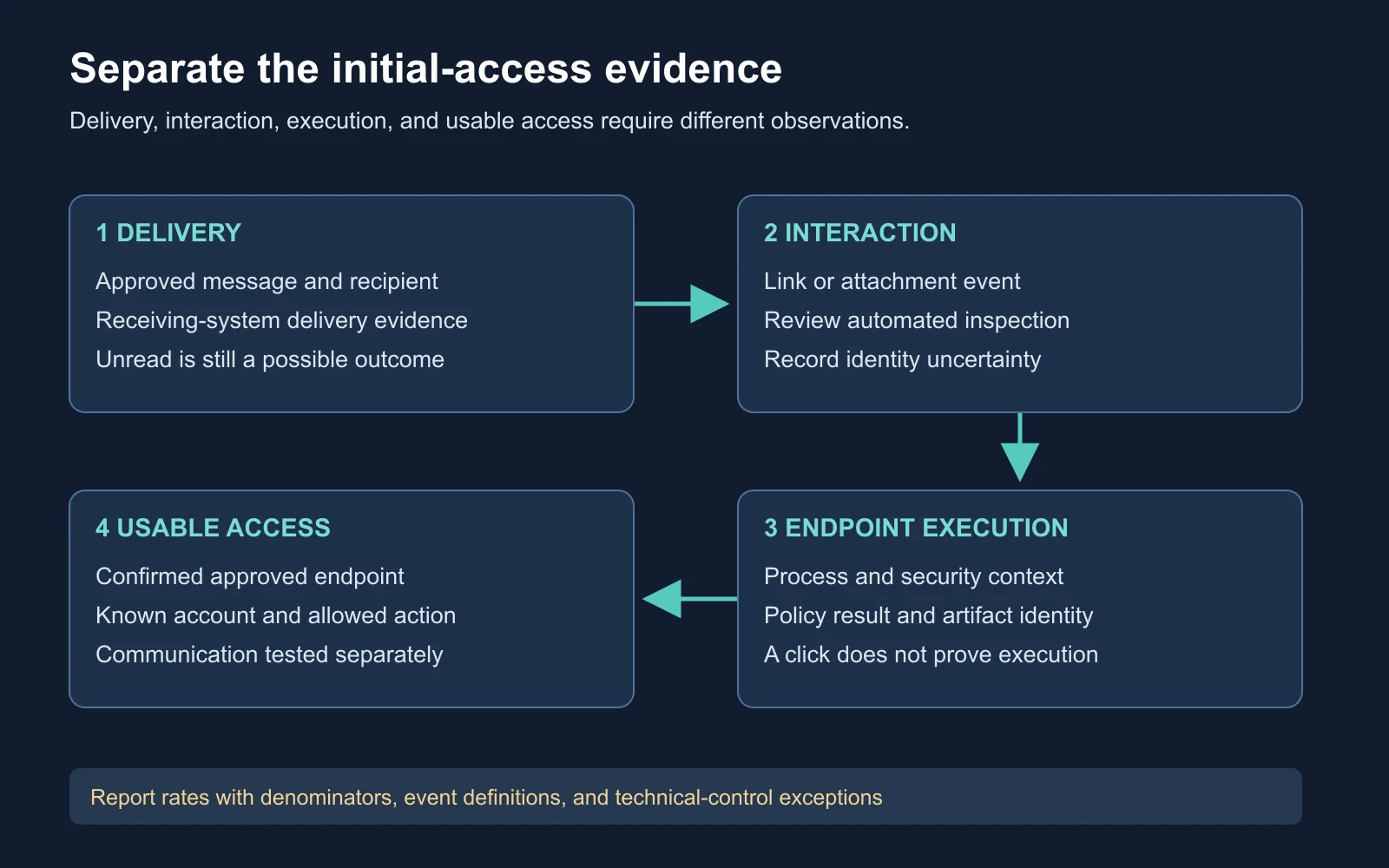
Each transition needs evidence beyond success at the previous stage
Set Up the Measurement
Gophish campaign configuration combines recipients, an email template, a landing page, a sending profile, and scheduling details. Its campaign records track events for analysis. Review the platform’s event definitions before assigning stronger meanings to the displayed labels. Read the Gophish campaign documentation .
A sending profile defines the approved sending service and related settings. It does not inherently require impersonating an unrelated organization. A landing page also need not collect credentials, so choose an inert completion page when a link-following measurement meets the objective.
Training and control assessment differ in purpose. An awareness exercise measures recognition, reporting, and learning under defined conditions. A technical assessment measures whether the delivery and execution controls work along an agreed path, so changes which permit training delivery alter the technical test.
| Measurement | Useful evidence | Limitation |
|---|---|---|
| Delivered | Receiving-system or platform delivery record | Does not prove the recipient read it |
| Opened | Platform-defined observation | Image handling and client behavior affect it |
| Clicked | Correlated interaction record | Automated inspection needs review |
| Reported | User-reporting workflow event | Platform coverage and timing differ |
| Executed | Endpoint-side process and result evidence | Does not prove usable remote access |
Account for Document Controls
Office macro behavior depends on application version, file origin, and policy. Microsoft’s current guidance documents default blocking of macros from internet-sourced files in affected Office applications. An older demonstration of an attachment launching code is insufficient evidence of behavior on a current managed device. Read Microsoft’s macro-blocking guidance .
Record the environment before testing a document control. Include the application build, delivery method, relevant policy, and observed warning or block. A harmless file with no executable content tests delivery or opening, but not whether a malicious macro would have executed.
Do not change the tested control mid-run merely to obtain a desired outcome. If the approved exercise needs an exception for training delivery, record the exception and narrow the conclusion accordingly. An intentionally permitted path does not establish the baseline control would have allowed it.
| Test condition | Conclusion boundary |
|---|---|
| Inert attachment opens | File delivery and opening worked |
| Macro policy blocks a test document | The observed policy prevented the tested execution path |
| Training delivery exception enabled | Result applies to the exception configuration |
| Different Office build used | Comparison needs a version qualification |
Work Through Campaign Rates
Illustrative scenario: a simulation targets 100 approved training accounts. Ten messages fail delivery. Among the 90 delivered messages, the platform records 18 unique accounts with click events, and review identifies six of those accounts as automation-only events. Fifteen accounts report the message through the training workflow.
Calculate the rates before interpreting them. Use delivered accounts as the denominator for this exercise and count each account once per metric. The reporting and clicking groups might overlap, so do not add them as mutually exclusive categories.
| Metric | Calculation | Result |
|---|---|---|
| Delivery rate | 90 / 100 | 90% |
| Raw recorded-click rate | 18 / 90 | 20% |
| Reviewed user-click rate | 12 / 90 | About 13.3% |
| Reporting rate | 15 / 90 | About 16.7% |
Expected reasoning: the raw click count overstates the reviewed user count in this synthetic dataset. Keep both values and document the review criteria rather than silently editing history. None of these rates establishes a compromised endpoint or a captured credential.
A stronger report includes delivery failures, ambiguous events, reporting delay, and the exact denominator. Microsoft provides several simulation and training reports with defined metrics, so use the relevant report’s definitions when interpreting a real export. Read the reporting documentation .
Compare Difficulty Fairly
Different messages create different tasks for recipients. An obviously unrelated request and a plausible work-context message are not equivalent challenges. A lower click rate on the easier message does not establish improved recognition across all phishing scenarios.
The NIST Phish Scale provides a method for rating human phishing-detection difficulty. It considers message cues and premise alignment with the audience. Use its documented method alongside outcome metrics when comparing exercises. Read the NIST Phish Scale User Guide .
Compare like conditions wherever possible. Record audience, message difficulty, reporting tools, delivery exceptions, timing, and any preceding training. If several conditions changed, describe the combined result and avoid attributing it to one cause.
| Comparison difference | Possible effect |
|---|---|
| New recipient group | Different role context and prior experience |
| Different message premise | Different detection difficulty |
| Delivery-policy exception | Different exposure to the technical controls |
| Automated-click filtering | Different measurement rather than changed behavior |
Inspect Architecture Context
Windows process architecture matters when interpreting a subsequent test. Starting a service or using a particular operator command does not automatically imply a 32-bit process. Verify the actual process, operating system, and artifact architecture instead of inferring them from the workflow’s name.
WOW64 filesystem redirection affects many accesses from 32-bit processes to the Windows system directory on 64-bit Windows. The Sysnative alias lets a 32-bit application address the native system directory. It is not an ordinary physical directory or a universal path for 64-bit applications.
Read Microsoft’s filesystem-redirector documentation
.
A read-only PowerShell check distinguishes the current shell process from the operating system. Run it inside the shell whose context you are examining. It says nothing about the architecture of an unrelated application.
[Environment]::Is64BitOperatingSystem
[Environment]::Is64BitProcess
Interpret the booleans in order. A true OS result and false process result indicate a 32-bit PowerShell process on a 64-bit operating system. Two true results indicate a 64-bit process on a 64-bit OS. Read the .NET process-architecture property .
Handle Unexpected Recipients
Forwarding and remote reading introduce scope uncertainty. A simulation URL tied to one recipient might be fetched from another device or by another person. Treat the correlation token as a record key, not proof of the operator’s identity or device ownership.
An unexpected interaction should trigger the agreed containment and review process. Stop any dependent assessment action, retain the minimal event evidence, and reconcile the event with the campaign owner. Avoid expanding endpoint access based only on a callback’s arrival.
| Handover field | Why it matters |
|---|---|
| Message and recipient IDs | Correlate the planned delivery |
| Observed interaction | Describe the event without assuming identity |
| Endpoint identity | Confirm the approved asset where relevant |
| Process and token context | Bound any execution claim |
| Allowed next action | Prevent automatic expansion beyond the test |
Watch the Simulation Overview
Microsoft Security’s overview introduces Attack Simulation Training and its measurement purpose. Watch for how simulation outcomes lead to targeted learning and subsequent evaluation. Compare the presentation’s metrics with the denominator and ambiguity checks above.
The video is an introductory 2021 presentation. Consult current product documentation for availability, UI details, and event semantics.
Watch on YouTube: Attack Simulation Training with Microsoft .
Design Your Test Specification
Create a specification for an inert link simulation using synthetic recipients. Define delivery evidence, a user-interaction criterion, an automated-event review rule, and a reporting objective. State explicitly which execution and access questions the simulation leaves unanswered.
Test ID and approved objective:
Recipients and excluded groups:
Sending service and artifact revision:
Landing-page behavior and collected fields:
Delivery window and stopping conditions:
Delivery evidence:
Interaction evidence and automation review:
Reporting metric and denominator:
Technical-control exceptions:
Unexpected-recipient handling:
Retention, owner, and follow-up:
Evaluate the design by applying it to the worked dataset. Another reader should reproduce the four rates and explain the remaining uncertainty. Revise any metric which labels a click as endpoint compromise without separate evidence.
Check Your Understanding
- Stages: why is message delivery insufficient proof of execution?
- Automation: what else generates a recorded link interaction?
- Comparison: why does message difficulty matter when comparing rates?
- Architecture: does a 64-bit OS prove the current process is 64-bit?
| Question | Expected reasoning |
|---|---|
| Stages | Client, application, policy, and user-action boundaries remain |
| Automation | Security inspection, link analysis, and other automated processing |
| Comparison | The recipient’s recognition task changed |
| Architecture | A 32-bit process also runs on supported 64-bit Windows systems |
Next Steps
Host awareness establishes what an approved starting context contains. Continue to Module 11: Situational Awareness and Host Operations for identity, process, network, and freshness checks. Return to the Red Team Course hub for the full sequence.
