

Module 4: Windows Internals and Authentication

Table of Contents
← Return to the Red Team Course
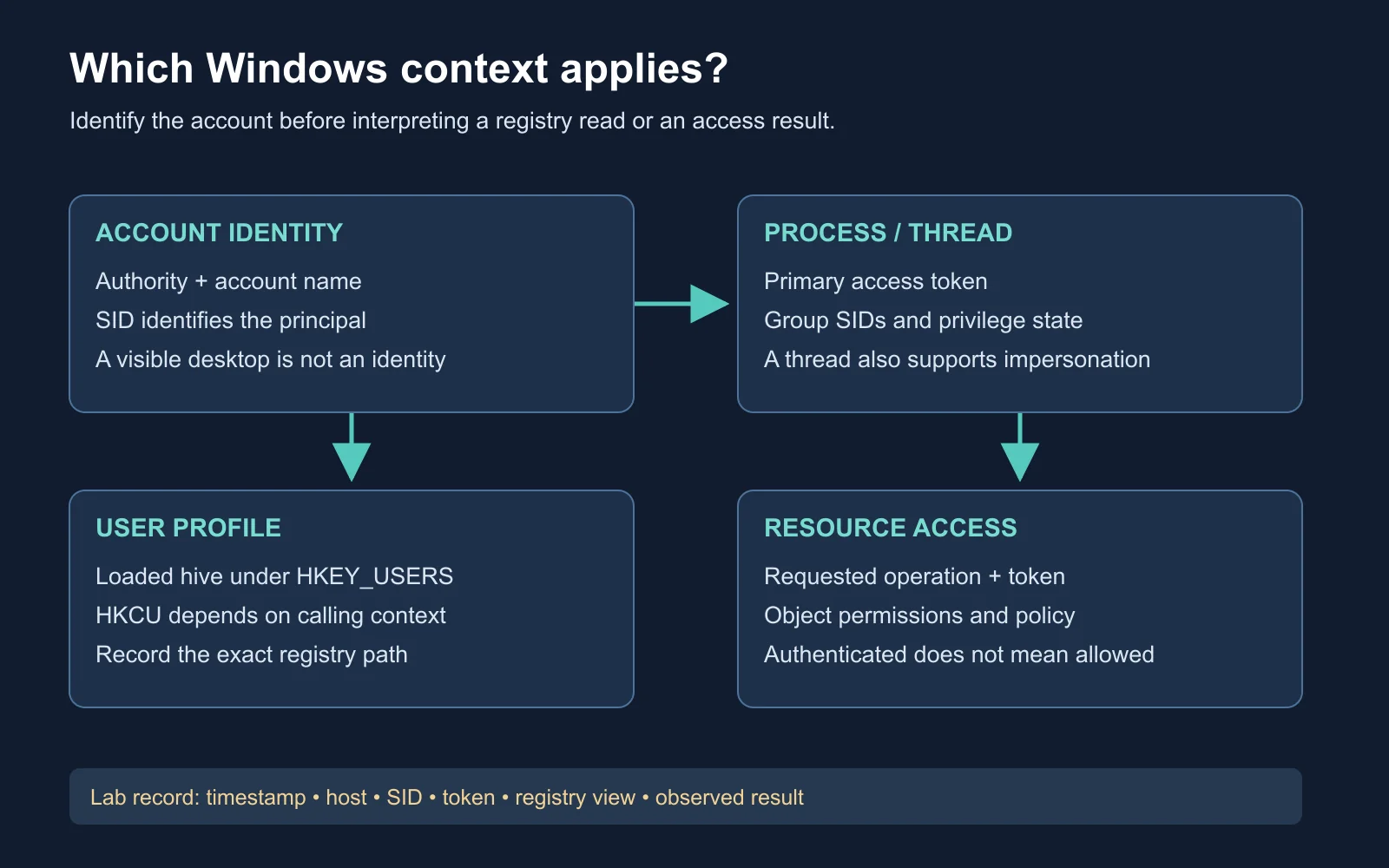
Windows security context determines which account a process represents, which objects it is permitted to access, and which user profile it reads. This module connects registry paths, security identifiers, access tokens, and authentication. You will inspect a disposable Windows VM and produce an identity record before changing anything.
Allow 25 minutes for reading and 20 minutes for the optional lab. Complete the networking and Active Directory module first.
Learning Outcomes
- Identify registry context: distinguish predefined keys from the loaded hives behind them.
- Read a token: separate account identity, group membership, and enabled privileges.
- Explain authentication artifacts: distinguish an NT password hash from a network challenge response and a Kerberos ticket.
- Check an observation: use account authority, SID, process context, and timestamps together.
- Create a context record: document the identity and registry view behind each lab observation.
The Registry Model
The registry organizes operating-system and application configuration into keys and named values. A key contains subkeys and values, while each value has a name, a type, and data. A path identifies a location, but the process context and registry view determine what a particular program reads.
| Term | Meaning | Example |
|---|---|---|
| Key | Container for subkeys and values | Software\ExampleApp |
| Value name | Identifier within a key | DisplayMode |
| Value type | Interpretation of the data | REG_SZ for a string |
| Value data | Stored setting | Light |
| Hive | Logical registry collection with backing files | A loaded user profile hive |
A hive is more specific than a top-level name displayed in Registry Editor. For example, HKEY_LOCAL_MACHINE, abbreviated HKLM, groups several machine hives. A user’s NTUSER.DAT backs much of their user configuration.
Microsoft registry-hive documentation
Predefined Keys and Profiles
HKEY_USERS, abbreviated HKU, exposes loaded user hives. It is not an inventory of every account ever used on the machine. An existing profile on disk and a currently loaded hive are different observations.
HKEY_CURRENT_USER, abbreviated HKCU, resolves through the calling process’s user context. Do not equate it with the person sitting at the keyboard. Microsoft also documents limitations around cached predefined handles and impersonation, so programs impersonating a client need the appropriate user-key API.
Microsoft predefined-key documentation
| Calling context | Important question |
|---|---|
| Alice’s ordinary application | Which Alice account and SID launched this process? |
| Application elevated as Alice | Did elevation change privileges while retaining Alice’s identity? |
| Application started as Bob | Is the application reading Bob’s profile instead? |
| LocalSystem service | Is the code using its service context or explicitly opening another user’s loaded hive? |
Worked example: Alice’s startup entry is present in her profile. A LocalSystem service reads its own HKCU location and finds no matching value. This establishes a context mismatch, not successful removal of Alice’s entry. Record Alice’s SID and verify her specific loaded hive before drawing a conclusion.
The same desktop session contains processes with different identities and privileges
SIDs Identify Principals
A security identifier (SID) identifies an account or group. A display name is a label, while the SID is the identifier Windows uses in access-control decisions. Deleting and recreating an account with the same name produces a different identity. Microsoft security-identifier documentation
Local and domain accounts require an authority as well as a name. LABPC\Alice and LAB\Alice represent different accounts even if their display names match. Do not infer account origin from the apparent length of its SID. Local and domain account SIDs use comparable structures.
LAB\Alice              Domain account, down-level name
LABPC\Alice            Local account on LABPC
[email protected]      User principal name, when configured
User principal name (UPN) suffixes are configured identity names and need not match a workstation’s DNS suffix. A nonexistent prefix does not universally trigger local authentication. The logon interface, authentication provider, and requested account determine the result, including failure. Microsoft user-name formats
Processes and Access Tokens
An access token describes a process or thread’s security context. It includes an account SID, group SIDs, privileges, and other security attributes. A process has a primary token, while a thread performing impersonation has an additional context to consider. Microsoft access-token documentation
Identity and permission are different questions. Knowing which account launched a program does not establish whether its current token authorizes a particular operation. Group attributes, privilege state, the requested operation, and the target object’s access-control entries all matter.
| Observation | What it establishes | What remains unresolved |
|---|---|---|
| Account belongs to Administrators | Administrative group membership | Whether this process holds an elevated token |
| Privilege appears in a token | The token contains the privilege | Whether it is enabled and relevant to this operation |
| Process runs as LocalSystem | A highly privileged local identity | Access to every remote service or protected resource |
| Thread impersonates a client | A separate thread context is involved | Which context the specific API uses |
User Account Control (UAC) adds another distinction. In Admin Approval Mode, an administrator normally starts applications with a filtered token and elevates selected operations. An elevated process remains subject to security checks. Microsoft explanation of UAC
Supplemental Video
Watch: Windows Access Tokens - From Authentication to Exploitation , published by Compass Security. Use the token explanation to distinguish account identity from the privileges available to a particular process. The accompanying presentations page provides the speaker’s material.
Viewing task: Draw a process with its primary token and a thread with an impersonation token. Explain why a username alone is insufficient evidence for predicting an access check. Compare your diagram with Microsoft’s access-token reference before moving to the lab.
Inspect Your Own Context
Run these read-only commands in Command Prompt on your own Windows lab VM:
whoami /user
whoami /groups
whoami /priv
whoami /all
whoami /user reports the account and SID. /groups shows group information, /priv shows privileges, and /all combines current-token details. Save output from the ordinary shell before opening an elevated shell for comparison.
Microsoft whoami reference
Expected reasoning: Under same-account elevation, the account SID should remain the same while token details differ. If the elevation prompt uses another account, compare the new account’s SID instead. An observed difference needs an explanation tied to the login path, not a blanket rule about administrator usernames.
Read the Registry Context
Inspect the current profile without adding or removing values:
reg query "HKCU\Volatile Environment"
reg query "HKCU\Software\Microsoft\Windows\CurrentVersion\Run"
reg query HKU
reg query reads the named key. A missing Run key or an empty result is not an error in the exercise, since the profile might contain no startup entries there. Record the account, path, return message, and time instead of inventing an expected value.
Microsoft reg query reference
Do not change user context mid-comparison. First relate the whoami result to the current-profile query. Then compare a second explicitly identified lab account if available. The point is to prove which identity produced the observation, not to obtain a privileged session.
Hashes, Responses, and Tickets
An NT password hash is derived from a password and is distinct from the challenge-response messages exchanged during NTLM authentication. Two identical passwords produce identical NT hashes under the same derivation. A captured NTLMv2 response is not interchangeable with the stored NT hash. Microsoft NTLM protocol overview
Pass-the-hash describes authentication using suitable password-derived material without recovering the plaintext password. Its applicability depends on the protocol, account, policy, and target service. It does not mean any hash authenticates to any application. MITRE ATT&CK: Pass the Hash
| Artifact | Purpose | Avoid this confusion |
|---|---|---|
| NT password hash | Password-derived secret used by relevant authentication mechanisms | A generic file hash |
| NTLM challenge response | Proof computed for an authentication exchange | The stored password hash |
| Kerberos ticket | Credential for a ticket-based exchange | A plaintext password |
| Access token | Local security context used for authorization | A network authentication packet |
Kerberos separates initial authentication from obtaining service tickets. Domain membership alone does not establish which protocol a particular connection used. Read the corresponding authentication evidence instead of assuming every Windows connection uses NTLM. Microsoft Kerberos overview
Place Credential Storage Correctly
Local account material belongs to the machine’s local account database, while domain account material is maintained by Active Directory. A workstation also holds authentication state and, depending on configuration, cached domain-logon information. These are different artifacts with different uses and protections. Microsoft credential-storage explanation
Credential availability is conditional. Privilege alone does not guarantee readable plaintext passwords or every account’s secret. Credential isolation, protected processes, sign-in method, and current session state change what exists and what an administrator is permitted to inspect. The lab needs no credential dump to demonstrate the distinction.
| Question | Appropriate evidence |
|---|---|
| Which account is this? | Authority, account name, and SID |
| Which process context applies? | Token details from the relevant process |
| Which authentication occurred? | Authentication package and correlated logon records |
| Which registry data was read? | Full path, loaded profile, process architecture, and timestamp |
Identity Is More Than IP
DHCP assigns address leases and other network settings. An address often stays the same across renewals, but a later lease change is possible. An IP address is therefore an observation at a time, not a durable machine identifier.
Build a host record from hostname, account context, relevant interface addresses, and collection time. Correlate it with inventory or lease records when needed. Multiple addresses alone do not prove a host routes traffic between networks, and one address alone does not prove two observations concern the same machine.
Observation time and time zone:
Host identity and lab snapshot:
Account authority / name / SID:
Process identity and architecture:
Ordinary or elevated token:
Registry path and loaded profile:
Command and exact observed result:
Inference supported by the evidence:
Unresolved question:
Self-Check and Reasoning
- Same name, different SID: You recreate a deleted lab account named Alice. Should its old file permissions automatically follow the name?
- Empty registry query: A service finds no value under its own HKCU. Has it established the user’s startup entry is absent?
- Administrator without elevation: Why does a command fail even though its account belongs to Administrators?
- Authentication capture: Is an NTLMv2 response the same artifact as an NT password hash?
- Changed address: What additional evidence ties yesterday’s address to today’s workstation?
Expected answers: Recreated Alice is a new security principal. The service queried a different context, so it has not proved the user’s state. An administrator’s ordinary process often uses a filtered token.
Artifact and host checks: A challenge response and a stored password-derived secret serve different roles. Correlate host identity and timed inventory or DHCP evidence before joining the network observations.
Deliverable: Complete the identity record for two explicitly named lab contexts and explain one difference. Include actual command output and an interpretation. Label untested assumptions so the record remains useful when another reader repeats the exercise.
Next Steps
Carry the context record forward into host operations, persistence, and cleanup. A later command is easier to interpret when you already know whose token and profile it uses. Continue with Module 5: Command and Control Operations , or return to the course hub .

