

Module 3: Networking and Active Directory Foundations
Table of Contents
← Return to the Red Team Course
Network reachability, authentication, and authorization answer different questions. A reachable server does not prove an account is valid, and a successful login does not grant every permission. This module connects web transports, directory services, DNS, and group membership so you diagnose the right layer before choosing a tool.
Allow 25 minutes for reading and 20 minutes for a small domain-lab exercise. You need basic IP addressing and access to your own Windows lab.
Learning Outcomes
- Distinguish layers: separate an application protocol from its transport and encryption.
- Explain the domain: identify the roles of DNS, a domain controller, and a resource server.
- Trace permissions: follow a group-membership path to an explicit resource permission.
- Interpret failure: distinguish name resolution, connection, authentication, and access denial.
- Create an evidence map: connect observations without assuming a complete attack path.
Protocols Have Different Jobs
TCP provides an ordered byte stream with mechanisms for acknowledging and retransmitting data. UDP sends datagrams without TCP’s connection and delivery mechanisms. An application using UDP still implements additional reliability or security when its protocol requires it. TCP specification, RFC 9293
| Layer | Example | Question it answers |
|---|---|---|
| Naming | DNS | Which address or service location corresponds to this name? |
| Transport | TCP or UDP | How are bytes or datagrams carried? |
| Channel protection | TLS | How is the connection authenticated and protected? |
| Application | HTTP, SMB, LDAP | What operation does the client request? |
A port number is a clue, not proof of the application behind it. A TCP listener on port 443 still needs protocol validation. A service moved to another port keeps its application behavior, and a proxy often presents a different network endpoint from the underlying application.
HTTP, TLS, and Visibility
HTTPS protects HTTP traffic using a secure channel. TLS provides confidentiality and integrity for application data and supports authentication of the communicating endpoints. The protection applies between the endpoints of the TLS connection, including an inspecting proxy when one terminates the connection. TLS 1.3 specification, RFC 8446
Encryption does not establish ordinary behavior. A network observer still has connection-level information such as destination addresses, timing, and traffic volume. Endpoint tools and a configured inspection proxy have different visibility. A rarely used destination or an unusual initiating process remains relevant even when the content is encrypted.
| Observation | Reasonable conclusion | Unsupported conclusion |
|---|---|---|
| TLS negotiation succeeds | The tested TLS connection was established | The application is trustworthy |
| TCP port 443 is reachable | Something accepts connections there | All application requests will succeed |
| HTTP body contains binary data | The application transfers binary content | The transfer is malicious because it is not readable text |
| No plaintext in a capture | The capture lacks clear application content | Defenders have no other evidence |
HTTP is not limited to text pages. Images, compressed bodies, software downloads, and application data are ordinary uses of HTTP. A claim about command-and-control traffic needs evidence from the application, endpoint, or traffic pattern, rather than a blanket assumption about binary data.
HTTP/3 also corrects the shortcut “web traffic always uses TCP.” It maps HTTP semantics onto QUIC, which uses UDP. Distinguish the application protocol from its transport before interpreting a capture or proposing a firewall rule. HTTP/3 specification, RFC 9114
Read a TCP Exchange
Client                    Server
SYN --------------------->
    <--------------------- SYN-ACK
ACK --------------------->
Application data -------->
The three-way handshake establishes a TCP connection. It does not prove authentication to the application or permission to read its data. A connection failure belongs to a different diagnostic stage from a valid application response denying access.
A burst of connection attempts deserves interpretation in context. Destination count, port distribution, time interval, and the initiating application help distinguish a scan from an expected inventory job. Completing the handshake does not make scanning invisible, and a SYN scan is not inherently undetectable either.
What Active Directory Stores
Active Directory Domain Services (AD DS) stores directory objects and supports identity, authentication, and administration for a domain environment. A domain controller (DC) runs those services and participates in directory replication. A deployment normally includes multiple domain controllers rather than a single universal database server. Microsoft AD DS overview
A domain is not a subnet. Systems in different routed networks belong to the same domain, while systems sharing a subnet belong to different domains or no domain. Separate logical identity structure from packet-routing structure in your notes.
| Object or role | Purpose |
|---|---|
| User account | Represents a person or application identity |
| Computer account | Represents a domain-joined machine identity |
| Security group | Collects principals for rights or permissions |
| Organizational unit | Organizes objects for delegation and policy application |
| Domain controller | Provides directory and authentication services |
| Resource server | Hosts the share, application, or other resource being accessed |
Domain-controller access is not every engagement’s objective. An assessment might instead test access to one application role, a file share, or an approved synthetic record. Domain controllers are sensitive dependencies, and local workstation account secrets are not simply copies of the domain account database.
DNS Finds Domain Services
DNS service records help clients locate domain controllers and domain services. A directory operation depends on more than reaching an IP address. The client also needs appropriate naming, routing, time, authentication, and permission for the requested action. Microsoft domain-controller location process
Worked failure: A workstation reaches a file server’s address but cannot resolve the domain’s service records through its configured resolver. This supports investigating DNS configuration before calling the account invalid. Record the resolver and query result, then compare them with the intended lab configuration.
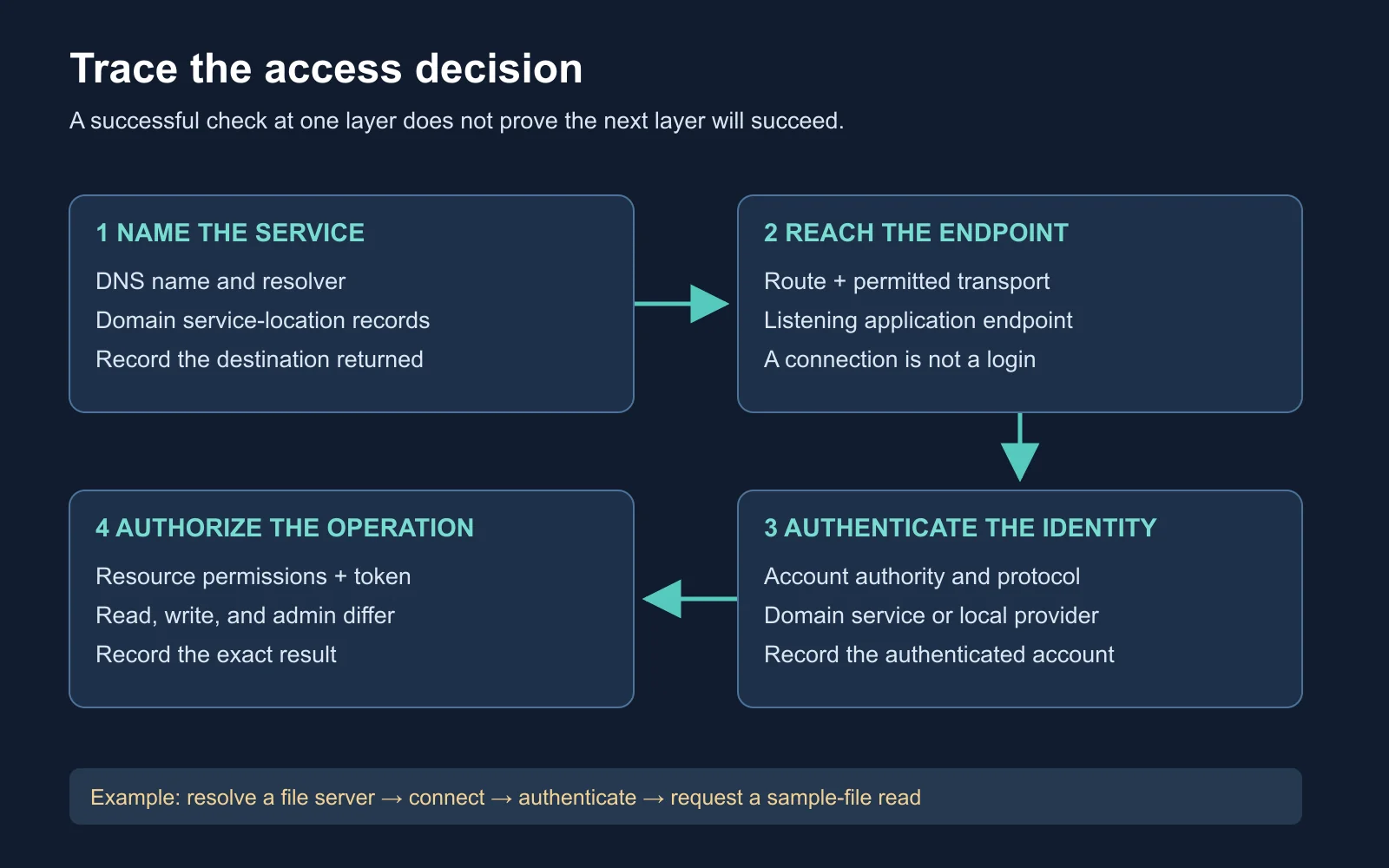
Reachability, authentication, and permission require separate evidence
Groups and Effective Access
Security groups support permission assignments to collections of accounts and other groups. Distribution groups serve a different purpose and are not security principals for permission assignment. Group scope constrains valid membership and where permissions apply. Microsoft security-group documentation
Group names are not permission evidence. A group called Finance Admins needs an actual rights assignment or resource permission before the name establishes anything useful. A direct account entry in an access-control list is also possible. The common administrative preference for groups does not prohibit permissions assigned to an individual account.
Illustrative lab access path:
LAB\Alice
  -> member of Finance-Readers
  -> member of Reports-Read
  -> explicit read permission on a sample report folder
The membership path is only part of the decision. Inspect the intended operation, the resource’s access-control entries, and the token used for the attempt. File access through a share involves both share and filesystem permissions. Membership changes also need an appropriate session or token refresh before testing their effect.
| Evidence | What it contributes |
|---|---|
| Directory membership | A relationship between an account and group |
| Current access token | Group information available to the running process |
| Resource permissions | Rights granted or denied on the target object |
| Observed operation | The result for the exact action and context tested |
Illustrative decision: Alice belongs to Reports-Read and successfully reads a sample file. This proves the read operation under the tested context. It does not prove write access, local administrator rights, or access to another share with a similar name.
Supplemental Video
Watch: Active Directory Domain Service Deep Dive , by John Savill’s Technical Training. Use the architecture explanation to connect domains, forests, and domain controllers. Record the logical relationship between the components before studying the later technique-specific modules.
Viewing task: Draw two domain controllers in one domain and two member servers on different subnets. Explain which relationship is directory membership and which relationship is network reachability. Your diagram should work without treating a subnet as a domain boundary.
Observe a Lab Connection
Use PowerShell on your domain-joined lab workstation. Replace the example names with your own approved domain and server:
Resolve-DnsName -Name _ldap._tcp.dc._msdcs.lab.example -Type SRV
Test-NetConnection -ComputerName files.lab.example -Port 445
whoami /groups
Resolve-DnsName asks for the specified DNS record type. Test-NetConnection tests the selected TCP destination and reports connection information. whoami /groups shows group information in your current context. None of these commands proves permission to a particular file.
Resolve-DnsName reference
,
Test-NetConnection reference
Record actual results. A successful TCP test indicates reachability for this connection attempt, while an unsuccessful one has several possible causes. Name resolution, routing, firewall policy, and a stopped service belong in the differential diagnosis. Do not label every failure “bad credentials.”
Work Through a Failure
Scenario: A lab user resolves the file server, connects to port 445, and receives access denied when opening a sample report. Another approved lab user reads the same file successfully. No network or account changes have yet been made.
| Check | Observation | Next inference |
|---|---|---|
| Name resolution | Both users resolve the same server | Compare the remaining layers |
| Transport | Both connect to TCP 445 | A basic connection is available |
| Identity | The users present different accounts | Confirm which token and authentication were used |
| Resource operation | One read succeeds and one fails | Compare the exact permissions and context |
Expected reasoning: The successful second read makes a universal service outage less likely. By itself, it does not identify the missing permission or establish whether the denied operation failed authentication or authorization. Inspect the resource and correlated records before recommending a change.
Create a dependency record for this scenario or your own lab observation. Include resolver, destination, protocol, account authority, requested operation, result, and the next evidence needed. This record becomes the starting point for the Windows identity module.
Self-Check
- HTTPS: Which observations remain available outside the encrypted content?
- HTTP/3: Why is “all web traffic uses TCP” inaccurate?
- Directory structure: Does one subnet imply one domain?
- Group nesting: What additional evidence turns a membership chain into a supported access claim?
- Connection success: What has a successful TCP 445 test left untested?
Answer key: Addresses, timing, and volume remain useful, and endpoint or proxy visibility differs from a passive capture. HTTP/3 uses QUIC over UDP. A domain and a subnet describe different structures.
Access checks: A membership chain needs the relevant token, permissions, and requested operation. TCP reachability leaves application authentication and authorization unproven.
Next Steps
Keep the dependency map beside your lab notes. It helps separate a naming problem from a credential or permission problem. Continue with Module 4: Windows Internals and Authentication , or return to the course hub .

