

Module 6: Beacon Execution and Beacon Object Files

Table of Contents
← Return to the Red Team Course
A Beacon Object File (BOF) extends an agent with compiled code executed inside its process. Understanding the file format is only the starting point. You also need to reason about compatibility, dependencies, input handling, runtime behavior, and the consequences of a failure.
Allow about 18 minutes, plus time to build the compatibility record. The examples are illustrative and do not require running an offensive payload.
What You Will Learn
- Distinguish object files, executable images, scripts, and runtime code.
- Explain how execution location changes the failure boundary.
- Inspect architecture metadata without executing an object file.
- Evaluate compatibility and evidence before selecting an execution method.
- Create a test record covering valid input, invalid input, and failure handling.
| Term | Meaning |
|---|---|
| COFF | Common Object File Format used for compiled object modules |
| BOF | Object code following a loader’s expected entry and API conventions |
| ABI | Application binary interface governing how compiled components interact |
| Aggressor Script | Cobalt Strike client scripting and integration layer |
| In-process execution | Code running within an existing process |
| Fork and run | Tool-specific workflow using another process for a task |
Understand the File Format
A COFF object file contains compiled sections, symbols, and relocation information. A linker ordinarily combines object files into an executable image. An object file is therefore not interchangeable with a complete Windows executable, even if both contain machine code. Read Microsoft’s PE and COFF specification .
A BOF loader supplies another route from an object file to execution. Cobalt Strike resolves the supported components and invokes code using its conventions. The extension depends on its loader’s supported APIs and runtime assumptions, rather than inheriting every facility of a normally linked application. Read the BOF documentation .
Source language is distinct from the object format. C is common, but vendor tooling also demonstrates a C++ development template. The compiled result still needs the required entry convention and compatible runtime behavior. Read the vendor’s development and debugging guide .
| Artifact | Typical consumer | Important distinction |
|---|---|---|
| Object file | Linker or compatible custom loader | Contains unresolved integration requirements |
| Executable image | Operating-system image loader | Includes image structure and loading metadata |
| Client script | Operator application’s script engine | Integrates commands and formats arguments |
Separate Script and Endpoint
An Aggressor script runs in the operator’s client. It often provides a named command, handles arguments, selects an object file, and submits the task. Loading a script is different from running its associated endpoint code. Read Mandiant’s component analysis .
Command registration is one integration mechanism, not a universal requirement for executing every BOF. A missing command might indicate an unloaded script, a naming conflict, a script error, or a different toolkit version. Check the integration layer before concluding the endpoint rejected the object.
Argument agreement matters across the boundary. A script expecting one string format and an object expecting another do not form a compatible pair merely because their filenames match. Record the script revision and object revision together in the test record.
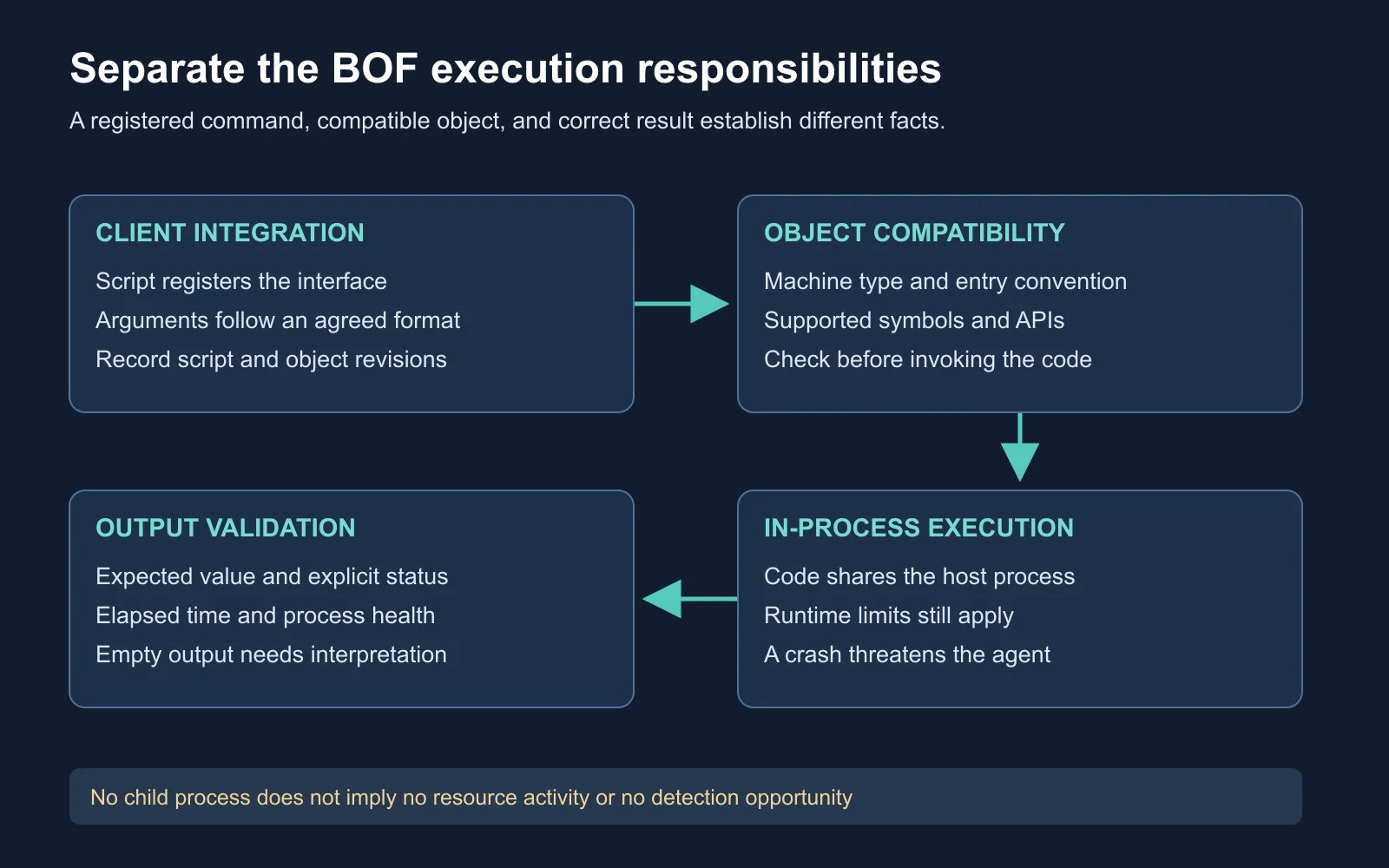
Compatibility and successful delivery are prerequisites, not proof of a correct result
Compare Execution Boundaries
In-process code shares the host process’s resources and failure consequences. A memory error or unhandled failure in an extension threatens the running agent. The vendor’s BOF documentation explicitly describes this crash risk. Review the documented limitations .
A separate process changes the failure boundary but does not guarantee isolation from every effect. A child might modify shared files, hold network connections, or consume system resources. Judge the action’s effects as well as its location.
Telemetry also changes with the execution method. Avoid treating “no new child process” as “no observable activity.” File, registry, network, and other resource operations remain relevant observations, depending on the sensors and configuration. Review Sysmon’s event categories .
| Method | Failure consideration | Evidence consideration |
|---|---|---|
| In-process extension | Shares the existing process’s fate | Inspect resource activity and task output |
| Separate task process | Adds a process with its own lifetime | Correlate creation, execution, and termination |
| Read-only native tool | Depends on the tool and requested scope | Record executable, arguments, identity, and result |
A measured comparison keeps the requested operation constant. Comparing a one-field query with a complete directory inventory mostly measures differences in workload. Use equivalent inputs and outputs before attributing differences to the execution method.
Check Architecture First
Process architecture is the relevant boundary for code loaded into the receiving process. A 64-bit operating system also supports some 32-bit applications, so the OS label alone is insufficient. Check the object metadata and the receiving process architecture independently.
Static inspection reads an artifact without invoking its entry point. On a Windows development machine with the Visual Studio tools installed, use the Developer Command Prompt to inspect a benign object supplied for your lab. The /headers option displays file and section-header information.
Read Microsoft’s DUMPBIN header reference
.
dumpbin /headers lab-query.obj
Read the machine field and record it alongside the filename and hash. Microsoft’s COFF specification identifies values such as I386 for x86 and AMD64 for x64. This check establishes the declared machine target, not whether every symbol, API call, or argument is compatible.
| Check | Evidence | Insufficient substitute |
|---|---|---|
| Architecture | Object header and receiving process | Operating-system marketing name |
| Entry convention | Loader documentation and source review | Filename extension |
| Dependencies | Imports, source, and loader support | Successful compilation alone |
| Integration | Matching script and object revisions | Similar release dates |
Account for Runtime Limits
The documented inline BOF model expects short, single-threaded work. Its execution blocks other Beacon functionality while it runs, and the standard loader does not supply a normal C runtime library. A function available in an ordinary C application is not automatically available through this interface. Read the runtime limitations .
Other job mechanisms have different lifecycles. Cobalt Strike separately documents background tasks running in another process. Do not turn a limitation of the inline BOF model into a claim about every task supported by the platform. Read the job-control documentation .
Version records prevent ambiguous conclusions. Keep the loader release, compiler settings, object revision, script revision, and operating-system build with a test result. A successful run establishes compatibility for the tested combination, not every environment using the same product name.
| Symptom | Candidate explanation | Next evidence |
|---|---|---|
| Unknown command | Client integration issue | Script load result and registered name |
| Object rejected | Format or compatibility mismatch | Loader error and header metadata |
| Agent stops responding | Blocking work, failure, or channel problem | Timing, endpoint health, and task record |
| Empty output | Empty result, error handling, or formatting issue | Expected result and explicit status |
Work a Compatibility Case
Illustrative scenario: a training VM runs a 64-bit OS, but its exercise loader runs in a 32-bit process. You receive an x64 object and a script from a different release. The script loads successfully and exposes a command.
Your task is to identify the evidence supporting execution and the evidence still missing. Decide whether loading the script proves the object is compatible. Then propose the smallest set of checks needed before a benign inventory test.
| Observation | Supported conclusion |
|---|---|
| 64-bit OS | The operating system supports its documented architectures |
| 32-bit loader | Loaded code must match the test process’s supported interface |
| x64 object | The provided object targets a different architecture |
| Command appears | Client registration succeeded |
Expected reasoning: stop before execution because the object and receiving process do not match. Obtain a reviewed compatible build, then verify the script’s expected arguments against the object interface. Successful client registration does not test endpoint loading.
A second case changes the object to a compatible architecture but produces empty output for a query known to have one result. Architecture is no longer the only issue. Investigate argument handling, permissions, status reporting, and output formatting before claiming the queried item is absent.
Watch the Vendor Demonstration
The Cobalt Strike Archive demonstration introduces the BOF feature through a small example. Watch how client-side tasking relates to endpoint execution and returned output. Note which parts of the workflow would need separate compatibility evidence in your own record.
The video demonstrates the feature introduced in Cobalt Strike 4.1. Pair it with the current documentation rather than assuming every UI detail still matches.
Watch on YouTube: Beacon Object Files - Luser Demo .
Design a Benign Test
Choose a small query with a known expected result in a disposable training environment. Suitable examples include reporting the test process’s own architecture or returning a fixed input string. Avoid mixing the compatibility test with a privilege change, network sweep, or persistence action.
Test the input boundary as well as the successful case. Specify expected behavior for missing input, malformed input, and a valid empty result. Vendor debugging guidance includes a standalone development approach, which helps separate basic correctness from agent-channel problems. Read the development guide .
Test identifier:
Question and expected result:
Loader and process architecture:
Object hash and source revision:
Compiler and build settings:
Client script revision:
Input case:
Returned status and output:
Elapsed time and process health:
Observed side effects:
Evidence location and unresolved questions:
Evaluate the result against the expected output, explicit status, elapsed time, and process health. A test which returns the right string but leaves the test process unresponsive has not passed. A failure with a clear error and an intact process still teaches something useful about error handling.
Your deliverable is a compatibility record containing at least three input cases and one justified decision about execution location. Explain the trade-off in terms of correctness, consequences, and observability. Avoid unsupported claims about which method is universally “quietest.”
Check Your Understanding
- Format: why is a COFF object different from a complete executable image?
- Architecture: which architecture matters when loading an extension?
- Integration: what does successful script loading establish?
- Visibility: which observations remain useful without a new child process?
| Question | Expected reasoning |
|---|---|
| Format | An object carries linking and relocation requirements for its consumer |
| Architecture | The receiving process and loader’s supported interface |
| Integration | The client accepted the integration, subject to its reported status |
| Visibility | Resource activity, output, timing, and endpoint health |
Next Steps
Communication behavior is another independent dimension of an operation. Continue to Module 7: Malleable C2 and Communication Evasion to distinguish a valid profile from a supported detection claim. Return to the Red Team Course hub for the full sequence.

