

Module 9: Active Reconnaissance and Scanning

Table of Contents
← Return to the Red Team Course
Active reconnaissance sends requests to a system to answer a defined question about its current behavior. A scan result describes what the scanner observed from a particular location at a particular time. It becomes useful when you preserve the method, interpret the limits, and connect the result to an approved next action.
Allow about 20 minutes, plus time for the loopback exercise. The exercise uses one port on your own machine.
What You Will Learn
- Distinguish host discovery, port state, service identification, and vulnerability validation.
- Explain the differences between TCP SYN and connect scans.
- Run a bounded local scan and preserve its output.
- Analyze conflicting observations from different vantage points.
- Create a scan plan with evidence requirements and stopping conditions.
| Term | Meaning |
|---|---|
| Vantage point | Network location and routing context of the observer |
| Host discovery | Probes used to identify responsive addresses |
| Port scan | Probes used to classify transport endpoints |
| Service identification | Evidence about the application using an endpoint |
| Deconfliction | Coordination which distinguishes assessment activity from other events |
| Scan manifest | Record of targets, options, timing, source, and purpose |
Ask a Bounded Question
Start with the decision. “Does the training web service accept TCP connections on its assigned port?” needs less probing than a complete asset inventory. Define the target, transport, port, and allowed method before choosing options.
Scope and ownership remain separate from reachability. A name resolving to an address does not expand your authorization to every service or tenant using it. Carry unresolved ownership questions from Module 8 into the scan plan instead of resolving them through speculative probes.
Source selection determines which network boundary the scan tests. Use the agreed assessment source and record its identity. A redirector is a forwarding role, not a requirement for every scan, and a disposable source still creates costs, records, and coordination obligations.
| Question | Smallest relevant observation |
|---|---|
| Is this port reachable? | Transport response from the approved source |
| Which service answers? | Authorized application-level response |
| Does a control block access? | Response plus control-side evidence |
| Is a vulnerability present? | Separate validated conditions beyond a port label |
Understand Scan States
Nmap states describe the scanner’s interpretation of responses. An open TCP port accepts connections, while a closed port responds without a listening service. Filtered means the scan lacks enough access to determine whether the port is open. These are observations rather than permanent properties of a machine. Read Nmap’s port-state definitions .
Combined states, such as open|filtered, preserve ambiguity. Do not convert them into confirmed open services when building a report. The permitted interpretation depends on the scan method and returned evidence.
Vantage point matters. A service reachable from a management subnet might be filtered from a guest subnet. Those results are compatible with a working segmentation policy, so retain both rather than selecting whichever looks more conclusive.
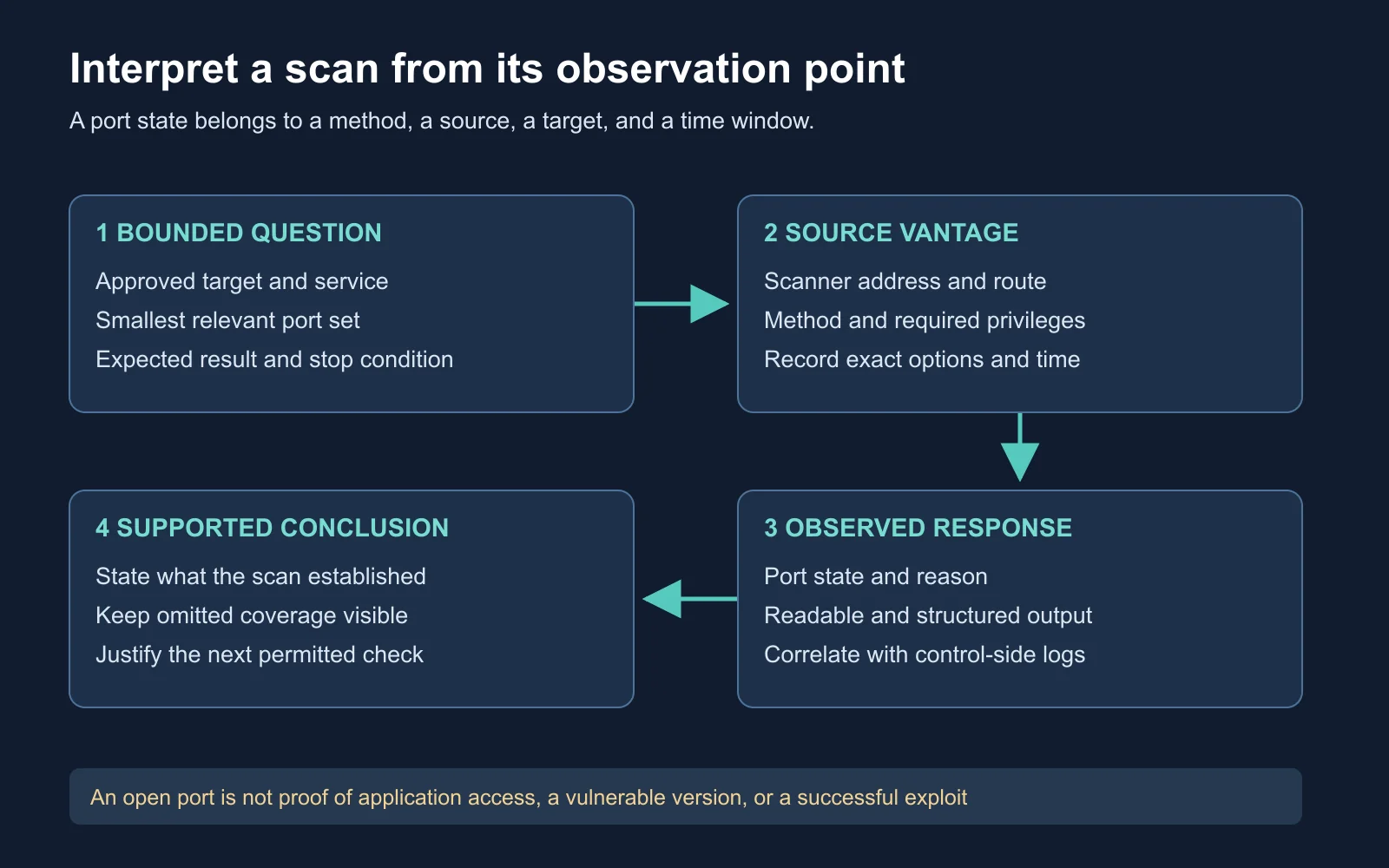
The scan’s location and method are part of the result
Compare TCP Scan Methods
A TCP connect scan, selected with -sT, asks the operating system to establish a connection. It completes the TCP handshake when an open service accepts it. It does not require the raw-packet privileges used by a SYN scan.
Read Nmap’s connect-scan documentation
.
A SYN scan, selected with -sS, examines responses without completing the connection in the same way. Both methods remain observable to suitable sensors. Completing a handshake is insufficient evidence of normal application use or avoided detection.
Method choice follows privileges, platform support, the question, and the permitted assessment behavior. Nmap’s own documentation describes the greater likelihood of application-side records from connect scans. Avoid teaching -sT as universally quieter than -sS.
| Method | Connection behavior | Interpretation limit |
|---|---|---|
| TCP connect | Uses the operating system’s connection API | Successful handshake proves no application operation |
| TCP SYN | Evaluates raw TCP responses | Half-open does not mean unobserved |
| Service probes | Add application-specific requests | More interaction than a port-state check |
Separate Discovery From Scanning
Host discovery is a preliminary question about responsive addresses. Nmap supports several probe types, so it is broader than an ICMP echo request. A blocked discovery probe does not establish the unreachability of every service on the address. Read the host-discovery reference .
-Pn skips ordinary host discovery and treats specified targets as available for the requested scan. It is not a stealth option and does not make a failed route work. On some local network paths, link-layer resolution still takes place.
Port selection should reflect the question. The -p option selects explicit ports, while an ordinary default scan covers Nmap’s selected common ports rather than every possible port. Record the exact selection so readers understand what the scan omitted.
Read the port-specification reference
.
| Observation | Insufficient conclusion |
|---|---|
| No discovery reply | Every service is unavailable |
| One selected port is closed | The host has no listening applications |
| Default scan finds nothing | All TCP and UDP ports were tested |
| TCP connection succeeds | Authentication and application access will succeed |
Run a Loopback Exercise
Prepare a temporary service with Python 3 in a terminal. The server binds only to 127.0.0.1, and --directory points to a newly created empty folder. This keeps the example’s service off external interfaces and away from your working files.
Read Python’s demonstration-server documentation
.
scan_lab_dir=$(mktemp -d)
python3 -m http.server 8765 --bind 127.0.0.1 --directory "$scan_lab_dir"
Use a second terminal with Nmap installed to scan the one local port. First create a temporary results directory so repeated exercises do not overwrite previous evidence. The command requests a TCP connect scan, skips DNS lookups and host discovery, and saves XML plus readable output.
scan_results_dir=$(mktemp -d)
nmap -sT -Pn -n -p 8765 --reason \
  -oX "$scan_results_dir/listening.xml" \
  -oN "$scan_results_dir/listening.nmap" \
  127.0.0.1
Flag meanings: -sT selects connect scanning, -Pn skips ordinary discovery, -n disables DNS resolution, and -p 8765 restricts the port list. --reason includes the basis for the state classification. -oX and -oN name the XML and readable output files.
Read Nmap’s output reference
.
Expected result: port 8765/tcp appears open while the local server is listening. The displayed service name is not proof Python’s HTTP server was identified. No version-detection option was requested.
| Exercise phase | Expected TCP state | Required condition |
|---|---|---|
| Server running | Open | Server bound successfully to the chosen port |
| Server stopped | Closed | No replacement listener or filtering interference |
Stop the server with Ctrl+C in its terminal. Repeat the scan from the second terminal using different output filenames. Leave the source, target, options, and port unchanged so the listener state is the intended difference.
nmap -sT -Pn -n -p 8765 --reason \
  -oX "$scan_results_dir/stopped.xml" \
  -oN "$scan_results_dir/stopped.nmap" \
  127.0.0.1
Compare your observations with the expected states. If the port remains open, check for another listener or an unsuccessful shutdown. If the initial scan was closed, check whether the server started and whether both commands used the same port.
Preserve the evidence before removing the disposable directories. Print their paths with printf '%s\n' "$scan_lab_dir" and printf '%s\n' "$scan_results_dir" in the respective shells. This exercise demonstrates a controlled state change, not the behavior of a remote firewall.
Identify Services Separately
A port-number label is a naming convention, not a measured application identity. A service on port 443 is not automatically HTTPS, and an HTTP service is not restricted to port 80. Nmap’s -sV option performs additional probes to identify services and versions.
Read the service-detection reference
.
Additional probes change the test. A transport check, a banner request, an authenticated application test, and a vulnerability test have different prerequisites and effects. Keep them as separately justified actions rather than adding every available option to the initial command.
Version strings also need context. Reverse proxies, customized banners, vendor backports, and incomplete fingerprints complicate interpretation. A suspected version warrants an evidence-based follow-up, not an automatic vulnerability claim.
| Evidence | What to report |
|---|---|
| Port-state result | Endpoint, method, state, reason, and vantage |
| Application response | Protocol behavior and observed identifying fields |
| Version inference | Matched evidence and confidence limits |
| Validated finding | Specific conditions, supported impact, and reproduction boundaries |
Work a Segmentation Case
Illustrative scenario: a management-source scan reaches a training service, while an approved guest-source scan reports the same port as filtered. Both runs use the same method and time window. The service owner confirms the listener remained healthy throughout.
Analyze the difference before requesting more probes. Identify the policy question, the additional evidence needed, and the strongest conclusion supported by the two results alone. Assume the intended policy permits management access and denies guest access.
Expected reasoning: the observations are consistent with the intended separation. They do not identify the exact filtering device or prove every guest path is blocked. Correlate the test timestamps with the relevant network-control records to locate the enforced boundary.
| Proposed statement | Assessment |
|---|---|
| “The service was unavailable” | Contradicted by the management observation |
| “The guest test did not reach an open service” | Supported within the recorded method and window |
| “Every guest access path is blocked” | Broader than the tested evidence |
Watch the Nmap Presentation
Fyodor’s ShmooCon presentation explains network reconnaissance with Nmap. The official Nmap site hosts the presentation context and slides. Focus on how a probe produces evidence and how the observer interprets it. Read the presentation page .
This talk is from 2006. Use the current manual for platform support, defaults, and option behavior.
Watch on YouTube: Fyodor - Advanced Network Reconnaissance with Nmap - ShmooCon 2006 .
Create a Scan Manifest
Design a bounded scan for an approved training service using the template below. Define the information needed, the smallest relevant port set, and the source from which the result matters. Include a stop condition tied to service health or a scope mismatch.
Scan ID and purpose:
Approved target and resolved address:
Source host, address, and network context:
Transport, ports, and exact command:
Tool version and required privileges:
Start/end timestamps and clock reference:
Expected observations:
Health checks and stopping conditions:
Raw output paths:
Observed states and reasons:
Uncertainty and proposed next action:
Review the manifest against the original question. A useful plan makes omitted coverage visible and records why further probing is justified. Keep scan evidence available for deconfliction even if no alert or finding resulted.
Check Your Understanding
- Methods: why is a connect scan not inherently invisible?
- States: what does filtered leave unresolved?
- Labels: why is a port’s service label insufficient to identify an application?
- Coverage: what did the loopback exercise leave untested?
| Question | Expected reasoning |
|---|---|
| Methods | Completed connections and patterns remain observable |
| States | Whether the service is open beyond the filtering boundary |
| Labels | Port conventions differ from observed protocol behavior |
| Coverage | Other ports, UDP, remote routes, authentication, and application vulnerabilities |
Next Steps
Initial-access planning uses validated context and a separate assessment objective. Continue to Module 10: Initial Access, Phishing and Delivery to distinguish delivery, user interaction, and execution evidence. Return to the Red Team Course hub for the full sequence.
