

Hermes Agent and Local AI Course: Build a Brokerized Agentic Workflow
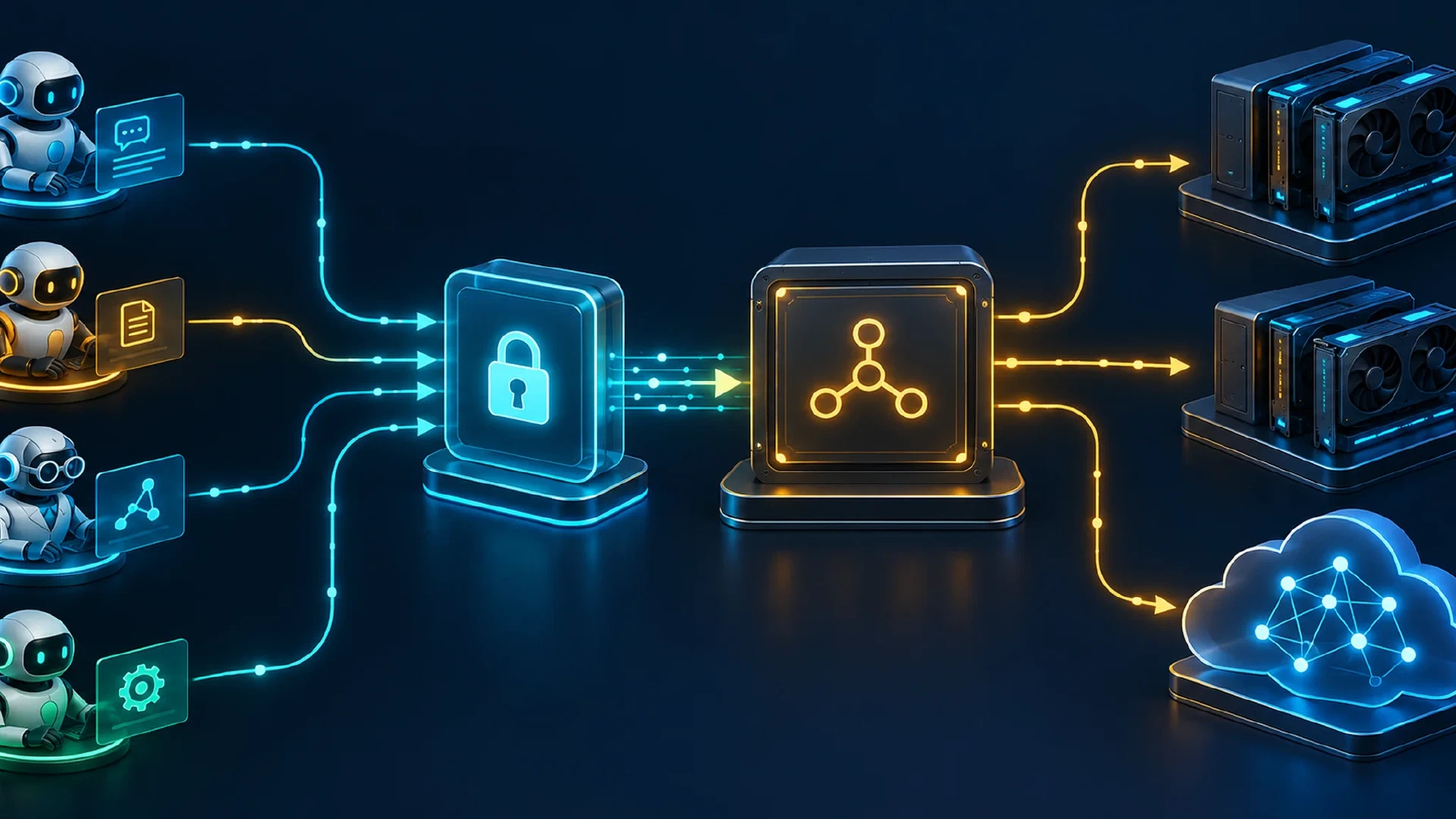
Table of Contents
Introduction
Hermes Agent runs your AI profiles, bots, and coding agents against models you control. This course wires every agent to one private endpoint, routes each request to the right local or cloud model, and keeps provider keys and budgets under your own policy. It runs as a nine-lesson path, and every step on this page links to the lesson covering it in full.
The reader question is direct: how do you point Hermes Agent and other agents at models you control, through a single private endpoint, and mix in cloud models only where the workflow allows? You will read the stack from top to bottom, stand up each layer with the minimum config, then fan a real multi-bot job across it.
The broker, gateway, and backends below are actively developed tools. Treat every command and config key as current to the October 2026 sibling guides and re-check it against your installed versions before a production rollout.
Key Takeaways
- One base URL serves every agent. Hermes profiles, bots, and coding agents all point at the same OpenAI-compatible endpoint, so swapping a model never touches client config.
- The broker owns routing and budgets. Lazy loading, pools, auto-routing, and per-key limits live in one place instead of being copied into each client.
- Aperture is the private edge. The endpoint rides your tailnet with no public ports, and tailnet identity decides who reaches which model.
- Local first, cloud by rule. Requests default to your GPU fleet and reach a cloud model only where a routing rule and a budget allow it.
- Security is layered, not a single wall. Each hop adds one control, and prompt injection stays an agent-boundary problem the broker does not solve.
Audience and Prerequisites
This course serves homelab operators, developers, and administrators who run their own models and want one private endpoint in front of them. You need three things in place before wiring the stack together:
- A local AI server with a GPU and at least one model serving requests. The local AI secure server course covers hardware fit, a first model, and hardening the host.
- A working agent workflow habit. The effective AI workflow course covers delegation, task packets, and output verification, which this series assumes.
- A Tailscale tailnet with MagicDNS enabled and your devices joined, so the private endpoint is reachable by name.
Estimated time: two to three hours to stand up all five layers from scratch, less if the backend and tailnet already run. Difficulty: intermediate. You should be comfortable editing YAML and HuJSON config and reading access rules.
The Three Layers and One Edge
The whole series is one fixed shape: agents on top, a private edge, a broker, and the backends on the GPU host. Read it from the agent down to the metal.
Agents (Hermes profiles and bots, coding agents)
   | one base URL, OpenAI-compatible
Tailscale Aperture  = PRIVATE edge (tailnet identity, no public ports; also fronts cloud providers)
   |
OpenAI-compatible broker (lazy load, pools, auto router, per-key budgets)
   |
Ollama | vLLM | llama.cpp | Strata   on the GPU host
Each layer has one job:
- Agents send OpenAI-wire requests to a single base URL. They name a model and nothing about where it runs.
- The private edge is Aperture. It accepts the request over the tailnet, checks the caller’s tailnet identity, injects any upstream credential server-side, and forwards the request. No public port is open.
- The broker is the routing brain. It loads models on demand, pools backends, picks a local or cloud target by rule, and enforces per-key budgets.
- The backends are the runtimes on the GPU host: Ollama, vLLM, llama.cpp, or Strata. The broker starts and stops them and reads their health.
A public edge for anonymous internet traffic is a separate concern and out of scope for this series, where the usual pick is a public-facing proxy such as LiteLLM. Everything below stays on the private path.
Key Takeaway: agents speak to one URL, the edge proves who is calling, the broker decides where the request goes, and the backends do the inference.
Learning Outcomes
After the course, you will:
- Select an inference backend for a given GPU and workload across Ollama, vLLM, llama.cpp, and Strata.
- Stand up an OpenAI-compatible broker with lazy loading, pools, same-model failover, and non-loading health checks.
- Route each request to a local or cloud model by cost tier, latency budget, and placement rule.
- Expose the endpoint privately through Tailscale Aperture with tailnet identity and no public ports.
- Point Hermes profiles and coding agents at one base URL.
- Fan a large job out across role-specific bots with dependency gating and verified handoffs.
- Govern spend and access with virtual keys, budgets, and fail-closed allowed-model lists.
- Threat-model the whole chain and name which controls hold in code and which are deployment choices.
Course Order
The rest of this page is a quick tour of the five moves. Each lesson below goes deep on one layer.
| # | Lesson | What you build |
|---|---|---|
| 1 | Hermes Agent Overview | A map of profiles, skills, memory, bots, and the gateway |
| 2 | Choose a Backend | A runtime pick across Ollama, vLLM, llama.cpp, and Strata |
| 3 | The OpenAI-Compatible Broker | One base URL in front of every model |
| 4 | Auto-Routing Local and Cloud | A cost-tier policy keeping cheap work local |
| 5 | Tailscale Aperture, the Private Edge | An identity-aware gateway with no public ports |
| 6 | Point Coding Agents at the Broker | Claude Code and OpenCode on the one endpoint |
| 7 | Fan Work Out to Bot Profiles | A multi-bot job split across a kanban board |
| 8 | Secure the Broker | Virtual keys, budgets, and allowed models |
| 9 | Threat-Model the Stack | A boundary-by-boundary attack and control map |
Step 1: Pick a Backend
Pick the runtime the broker will drive first, because the backend sets your throughput, memory headroom, and health model. Ollama is the simplest start, vLLM pushes throughput on a busy GPU, llama.cpp runs tight on constrained memory, and Strata fits a managed multi-model host.
A minimal Ollama start looks like this:
ollama pull gpt-oss-20b
ollama serve
(Not tested here. Illustrative only. The backend comparison sibling covers versions and health checks.)
The runtime choice is a trade-off across load lifecycle, multi-GPU control, the OpenAI surface, and quantization. For the full comparison and a decision table, read Ollama vs vLLM vs llama.cpp vs Strata . Do not wire clients straight to the backend. The broker in the next step is what gives you one stable endpoint.
Step 2: Stand Up the Broker
The broker is the OpenAI-compatible layer every agent talks to. It loads a model on first request, unloads it when idle, pools several backends behind one model name, and attaches a budget to each key. One model name maps to one pool of backends.
A minimal model-to-backend mapping looks like this:
models:
  gpt-oss-20b:
    backends:
      - url: http://<GPU_HOST>:11434   # Ollama on the GPU host
    strategy: least_busy
(Not tested here. Illustrative only. The broker guide covers lifecycle, pools, retries, and health.)
The broker is where lazy loading, pools with sticky and least-busy strategies, same-model failover, and non-loading health checks live. For the full setup, read one endpoint for every model . The broker listens on the tailnet and stays private. The next step puts an identity-aware edge in front of it.
Step 3: Expose It Through Aperture
Tailscale Aperture is the private edge. It fronts the broker over your tailnet, proves who each caller is through tailnet identity, and keeps every port off the public internet. Clients send a base URL and a model name, and the upstream credential stays in the gateway.
The series decision is settled: make Aperture’s upstream the broker, not each backend. It matches the fixed layering, keeps all routing and model-sizing logic in the broker you already maintain, and gives one URL fronting both local and cloud models. Front a backend directly only in the narrow case of a single backend with no broker value-add, where per-user cost attribution on the backend itself matters.
A minimal Aperture provider fragment points at the broker and adds a deny-by-default grant:
{
  "providers": {
    "broker": {
      "baseurl": "http://<GPU_HOST>:<BROKER_PORT>",   // no trailing /v1
      "models": ["gpt-oss-20b", "<local-model-id>"]
    }
  },
  "grants": [
    {
      "src": ["group:ai-users"],
      "app": { "tailscale.com/cap/aperture": [
        { "role": "user" },
        { "models": "broker/**" }
      ]}
    }
  ]
}
(Not tested here. Illustrative only. The Aperture guide covers grants, cloud providers, and transport.)
Two settings decide whether the first request works: strip any trailing /v1 from baseurl, and omit apikey for a keyless broker. For the full gateway setup, grants, cloud-provider fronting, and the broker-versus-backends decision in depth, read
Tailscale Aperture, the private gateway to your local AI
.
Step 4: Point Hermes at It
With the edge live, every agent needs only a base URL and a model name. A Hermes profile plugin points at the gateway, the credential is already server-side, and the profile names a granted model.
A minimal Hermes OpenAI-wire profile plugin uses these two values:
base_url: http://<APERTURE_HOST>/v1
model: gpt-oss-20b
api_key: YOUR_API_KEY   # placeholder to satisfy the SDK, upstream is keyless on the tailnet
(Not tested here. Illustrative only. The Hermes overview covers profiles, skills, bots, and the gateway.)
The same base URL serves Hermes profiles and bots. For how profiles, skills, bots, and the dispatcher fit together, read Hermes Agent for security and automation . To wire coding agents at the same endpoint, read local models in Claude Code, Cursor, and OpenCode , which flags Cursor as the public-only client unable to reach a tailnet-private host.
Step 5: Fan Out a Multi-Bot Job
The payoff is a real job split across several bots. One Hermes gateway runs role-specific profiles, and a kanban dispatcher fans parent research cards out to child writing cards with a final review gate. Each role maps to a model tier, and the broker routes and budgets every call.
A minimal fan-out shape uses parent and child cards:
# one research parent, two writing children gated on it, one review gate
hermes kanban create --title "research" --assignee researcher
hermes kanban create --title "draft A" --assignee writer --parents <RESEARCH_ID>
hermes kanban create --title "review"  --assignee reviewer --parents <DRAFT_A_ID>
(Not tested here. Illustrative only. The bot-profiles guide covers dependency gating and handoff verification.)
Three siblings carry this layer. For the gateway, profiles, and the parent-child pattern, read
Hermes bot profiles and fan-out
. For the routing rules keeping cheap work local and sending only the hard calls to a cloud tier, read
auto-routing AI requests
, built around a cost-tier decision table and fail-closed placement pinning. For the per-key budgets, virtual keys, and allowed_models capping each bot, read
secure your broker with keys, budgets, and allowed models
.
Best Practice: verify every handoff instead of trusting a bot’s self-report. The dispatcher holds a child card in the backlog until its parents finish, then promotes it. A reviewer role, not the author, confirms the result.
Security Posture
The stack is a chain of trust boundaries, and each hop adds one control. Treat the whole path as the attack surface, not any single layer.
- Agent to edge. Tailnet identity proves the caller. Deny-by-default grants mean network reachability alone opens no model.
- Edge to broker. The provider credential stays in the gateway. Clients on the tailnet send no real key.
- Broker to backend. Virtual keys, per-key budgets, and fail-closed
allowed_modelscap what each bot spends and reaches. An over-budget or disallowed call returns a 403, not a silent overage. - Across every hop. Keys and secrets stay out of logs, prompts, and commits.
One honest limit: the broker does not mitigate prompt injection. It refuses to treat tool output as control, but defending against a poisoned prompt lives at the agent boundary, not in the broker. For the full boundary-by-boundary model and the residual risks, read the local AI broker threat model .
Troubleshooting
Match the symptom to the layer it comes from, then open its deep-dive.
| Symptom | Likely layer | First check |
|---|---|---|
| Agent cannot reach the endpoint | Edge | MagicDNS enabled, open http://<APERTURE_HOST> to confirm reachability |
| HTTP 403, or a model missing from the list | Edge | No matching grant for the caller, add a grant whose models glob covers the model |
| HTTP 405 on a request | Edge | Doubled /v1, strip the trailing /v1 from the provider baseurl |
| HTTP 502 or upstream error | Broker or backend | Confirm the backend is reachable and healthy from the broker |
| First request to a cold model is slow | Broker | Lazy load is starting the model, expected on first call after idle |
| HTTP 403 on an otherwise valid call | Broker | Per-key budget or allowed_models blocked it, check the key’s limits |
| Wrong model answered | Broker | Routing rule sent it to another tier, review the cost-tier and placement config |
Next Steps
You now have the full shape: agents on one base URL, a private edge proving identity, a broker routing and budgeting every call, and local backends with cloud reached only by rule. Build each layer out with its deep-dive.
- Start at the metal with Ollama vs vLLM vs llama.cpp vs Strata .
- Stand up the endpoint with one endpoint for every model .
- Add the private edge with Tailscale Aperture, the private gateway to your local AI .
- Wire the agents with Hermes Agent for security and automation and local models in Claude Code, Cursor, and OpenCode .
- Fan work out with Hermes bot profiles and fan-out .
- Route local and cloud with auto-routing AI requests .
- Cap every bot with secure your broker with keys, budgets, and allowed models .
- Model the risk with the local AI broker threat model .

