

Cisco CCNA (200-301): Network Access
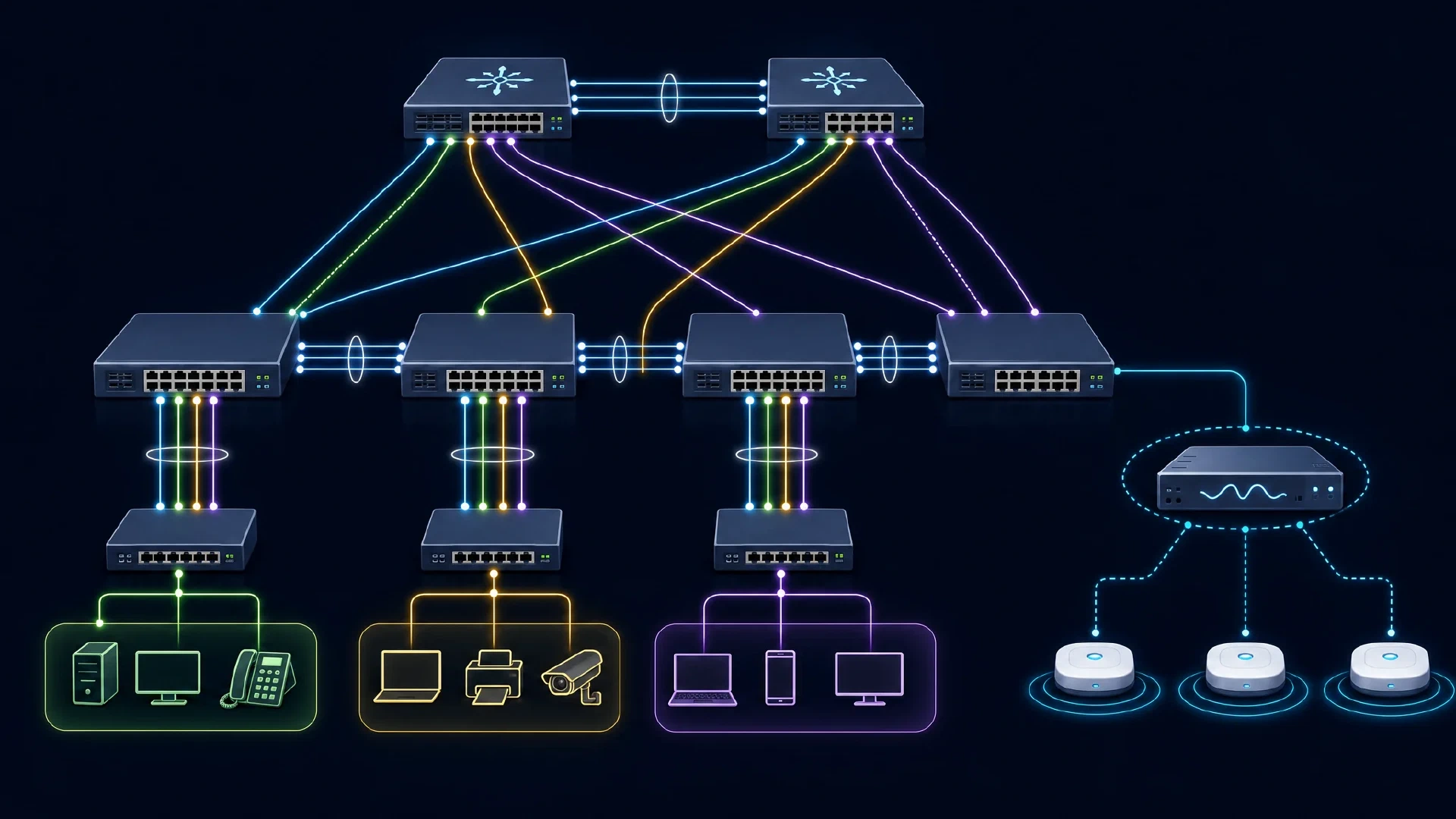
Table of Contents
Click Here to Return To the Cisco CCNA Course Page
Network Access is 20% of the Cisco CCNA (200-301) exam. This module covers VLANs, trunking, EtherChannel, spanning tree, and wireless access. These are the configuration skills interviewers love to test on a live switch.
This domain ties the most hands-on configuration to the exam. You build VLANs, connect switches with trunks, bundle links, and keep the topology loop-free.
VLANs and Access Ports
A VLAN splits one physical switch into separate broadcast domains. You assign an access port to a single data VLAN and often a voice VLAN for IP phones.
! Create a VLAN and assign an access port
Switch(config)# vlan 10
Switch(config-vlan)# name SALES
Switch(config)# interface g0/1
Switch(config-if)# switchport mode access
Switch(config-if)# switchport access vlan 10
The default VLAN is VLAN 1, and best practice moves user traffic off it. Verify your work with show vlan brief.
Trunking and Discovery
A trunk carries many VLANs between switches using 802.1Q tagging. The native VLAN rides untagged, so match it on both ends.
! Configure an 802.1Q trunk
Switch(config-if)# switchport mode trunk
Switch(config-if)# switchport trunk native vlan 99
Layer 2 discovery protocols map neighbors. CDP is Cisco-proprietary, and LLDP is the open standard.
| Protocol | Scope |
|---|---|
| CDP | Cisco devices only |
| LLDP | Vendor-neutral (IEEE 802.1AB) |
EtherChannel
EtherChannel bundles links into one logical connection for more bandwidth and redundancy. LACP negotiates the bundle and is the standard option.
! Bundle two ports with LACP
Switch(config-if-range)# channel-group 1 mode active
Spanning Tree
Rapid PVST+ prevents Layer 2 loops by blocking redundant paths. Know these roles and states:
| Term | Meaning |
|---|---|
| Root bridge | Switch with the lowest bridge ID |
| Root port | Best path toward the root bridge |
| Designated port | Forwarding port on each segment |
| PortFast | Skips listening and learning on edge ports |
The switch with the lowest bridge ID (priority plus MAC) becomes the root. Set priority manually so the right switch wins.
Wireless Access
Cisco wireless architectures centralize control in a WLC that manages lightweight access points. The WLC connects through trunk ports and can use a LAG for redundancy. You reach the WLC GUI over HTTPS or SSH, and authenticate admins with TACACS+ or RADIUS. In the GUI you create a WLAN, set security, and apply a QoS profile for client connectivity.
Next Steps
Route between your VLANs in IP Connectivity , then secure access in Security Fundamentals . Review the foundations in Network Fundamentals and return to the Cisco CCNA Course .