Local AI Coding on a 16GB GPU: Strata, OpenCode, and Qwen3.8
Table of Contents
A local coding agent on a 16GB GPU is a practical option for bounded development tasks. Strata and OpenCode combine local inference with file editing, shell commands, and test execution. A reported Qwen3.8-Flash-Next run on an RTX 4060 Ti completed an application, subsequent changes, and a racing-game prototype without paid inference calls.
Replacing a subscription requires a broader test. The published results demonstrate a working setup on one machine. They do not establish parity with paid coding services across languages, repositories, or difficult debugging tasks. The hardware also includes 64GB of system RAM, which carries much of the model.
Key Takeaways
- 16GB describes GPU memory, not the total memory needed for the reported configuration.
- Prompt reuse matters because coding agents repeatedly submit overlapping conversation history.
- Reasoning needs a budget so planning leaves space for code and tool calls.
- Passing generated tests is partial evidence, with Docker and gameplay requiring separate checks.
- Zero API spend excludes ownership costs, electricity, and maintenance time.
Prerequisites: A compatible computer, enough free storage for the selected model, Git, Node.js with npm, and familiarity with terminal tools. Match the reported IQ3_S setup with 64GB of RAM. Use the current Strata installer to check other configurations.
Time and difficulty: Intermediate. Allow time for large model downloads and installation before evaluating task completion speed. The reported task timings exclude setup.
The Tested Configuration
| Component | Reported configuration |
|---|---|
| GPU | NVIDIA RTX 4060 Ti, 16GB VRAM |
| CPU | Intel Core i5-11600K |
| System memory | 64GB RAM |
| Storage | NVMe SSD |
| Model | Qwen3.8-Flash-Next, 125B MoE, IQ3_S |
| Inference engine | Strata |
| Coding agent | OpenCode |
| Configured context | 65,536 tokens |
| Configured output limit | 16,384 tokens |
NetworkCoder’s published configuration and results supply these figures. The test repository reports loading 46.84GiB of expert weights in 28 seconds, with 4,431 experts occupying 8.45GiB of GPU memory. These measurements describe the tested run, not a guaranteed allocation on another engine version.
Current compatibility is broader than this test. As checked on October 6, 2026, the Strata project documents selected NVIDIA and AMD cards with at least 12GB of VRAM, plus smaller model options for 32GB RAM systems. Those options do not reproduce the 16GB GPU, 64GB RAM, IQ3_S experiment. Check the exact GPU, model variant, and runtime support before buying hardware.
Where the Model Lives
Mixture of experts, or MoE, activates a subset of a model’s expert networks for each token. This reduces the active computation compared with using every parameter on every step. The remaining weights still need storage and a route into computation.
Strata’s hybrid execution keeps frequently used experts on the GPU while retaining the expert collection in system RAM. The CPU computes uncached experts in place while the GPU handles cached experts. Storage also supports model files and lookup data. The system does not squeeze the entire 125B model into 16GB of VRAM.
GPU memory has competing uses. Runtime allocations, attention state, and the expert cache share a limited resource. More room for context changes the remaining expert-cache capacity. Current Strata versions also support KV-cache streaming, so the exact placement differs from an older configuration. Consult the technical documentation for your engine version.
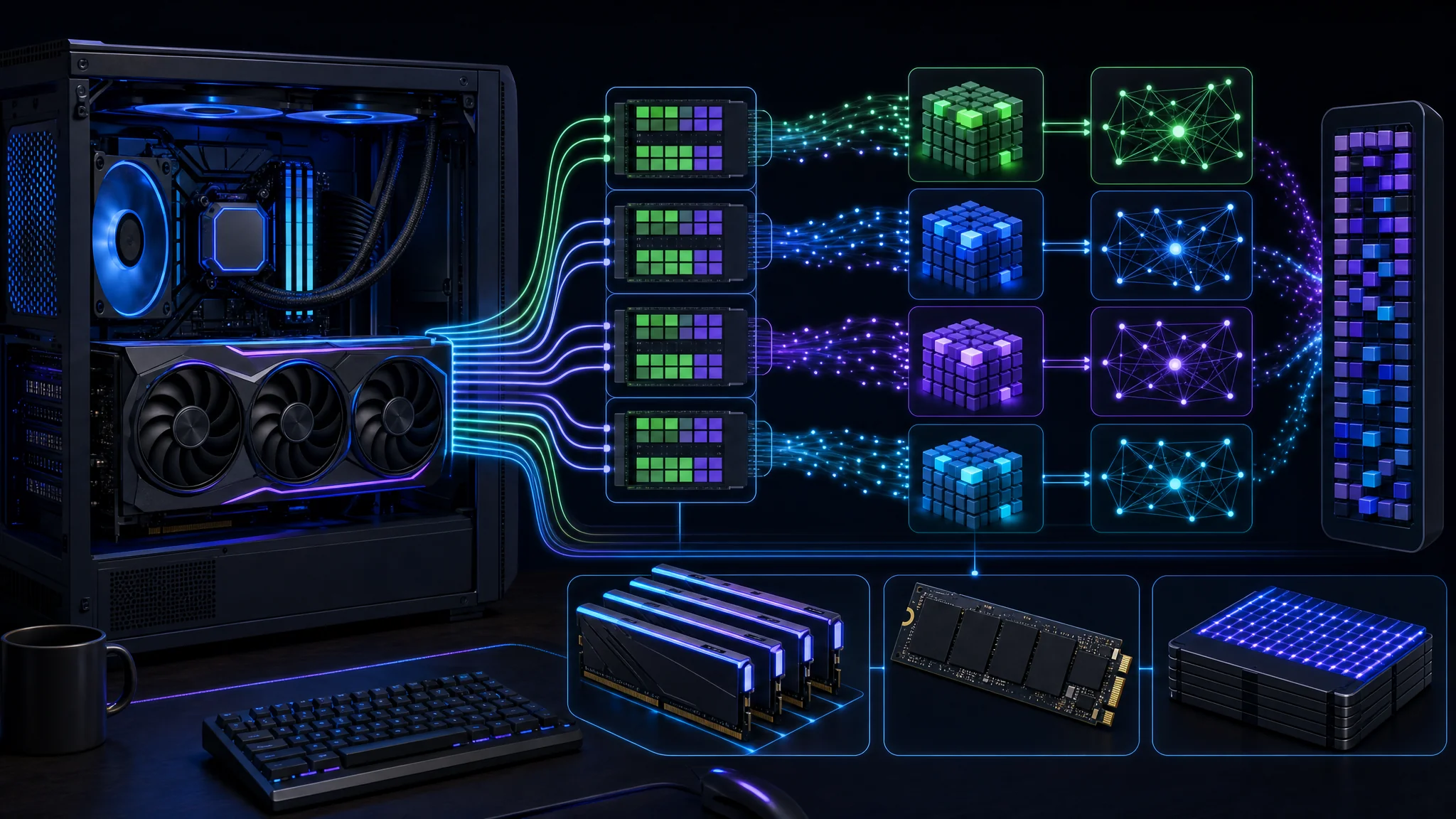
The GPU is one part of the inference system, alongside CPU execution, system RAM, and storage
Prompt Reuse Changes Speed
A coding agent runs a loop: read the task, request a tool action, receive its result, and decide the next action. File contents, errors, and test output accumulate in the conversation. Agents also compact or select context, so not every implementation resends an unchanged full history forever.
Prefill processes input tokens before generation. Decode produces the response. A system with fast decode but slow repeated prefill still leaves you waiting between tool calls.
The reported 44K-token timing used prefix reuse. Strata reused previously processed conversation content, with the growing prompt ready in roughly one to three seconds. This is useful evidence for a continuing agent session. It is not evidence of processing 44,000 entirely new tokens from scratch in one second.
| Measurement | What to record |
|---|---|
| Cold prompt | Time for new content without reusable prefix state |
| Warm continuation | Time after appending a tool result to existing context |
| Generation speed | Tokens per second during the response |
| Task duration | Planning, generation, tools, tests, and retries together |
Two caches serve different purposes. The expert cache keeps frequently used weights near GPU computation. Prefix reuse avoids repeating work on earlier input. A high expert-cache hit rate does not prove a prompt-cache hit.
What the Tasks Demonstrated
| Task | Reported time | Reported outcome |
|---|---|---|
| Build task manager | 3m 38s | Express API, interface, 5/5 tests |
| Fix editing and add dates | 4m 58s | Changes completed, 6/6 tests |
| Add export/import and packaging | 3m 48s | 7/7 tests, Docker build unverified |
| Racing game, first attempt | 6m 35s | Output exhausted during reasoning, no code |
| Racing game, budgeted retry | 4m 51s | Game generated, JavaScript syntax checked |
The published results file records output speeds of 48–52 tokens per second for the first task, 40–43 for the second, and 37–44 for the third. “Up to 52” is a peak within these observations, not a sustained rate for every task.
The first three tasks extend one application. The 5/5, 6/6, and 7/7 counts describe successive test suites. Adding them does not establish 18 independent capabilities. Tests written by the same agent also need review for coverage and meaningful assertions.
Environmental recovery was part of the work. The agent recovered from an inappropriate shell command and identified a stale application server during testing. These are useful behaviors, though terminating an existing process deserves deliberate permissions in a shared development environment.
Docker remained unverified. The agent wrote a Dockerfile but lacked a running Docker engine for the build. Application tests passing outside the container do not establish a working image. The game retry likewise checked syntax and opened a browser, while the agent lacked direct visual confirmation of gameplay.
Reserve Space for Output
{
  "reasoning_budget_tokens": 8000
}
Merge this setting into the existing strata-iq3_s.json configuration, preserving its other fields, then restart the selected Strata model. It is a Strata setting, not a replacement OpenCode configuration file. Verify the active budget in startup output.
Strata documents a hard reasoning budget which ends the thinking phase and transitions toward an answer. A request-level value overrides the configured default. The setting is different from a general reasoning-effort instruction such as low or high.
The first game attempt exhausted its 16,384-token allowance while planning. The retry applied an 8,000-token thinking budget and delivered code. This supports using a bounded reasoning phase for this workload. It does not establish 8,000 as the best setting for every task.
The remaining output allowance is a maximum, not a reservation guarantee. If an 8,000-token cap were fully consumed under a 16,384-token total limit, roughly 8,384 tokens would remain before other overhead. The result log reports 11,054 tokens written on the retry without a complete reasoning-versus-code breakdown. Do not interpret it as 8,000 reasoning tokens plus 11,054 code tokens under the same limit.
Use a smaller budget for narrow edits, then test larger budgets for tasks needing more analysis. Inspect complete file output, finish status, and test results. More planning time is useful only when it improves the delivered change.
Connect Strata and OpenCode
git clone https://github.com/Niko1221/Strata.git
cd Strata
./setup.sh
This is the Linux setup entry point. Review the current installation instructions and use START-HERE.bat for the documented Windows path. Select the original Qwen3.8-Flash-Next IQ3_S variant and a 65,536-token context to approximate the reported configuration. Save the engine version and selected model files with your benchmark notes.
npm install -g opencode-ai
Install OpenCode using its
official instructions
. In a separate terminal, define STRATA_BASE_URL as the local API base printed by Strata, including its /v1 suffix. Keep inference bound to the local machine for this setup.
{
  "provider": {
    "strata": {
      "npm": "@ai-sdk/openai-compatible",
      "name": "Strata local",
      "options": {
        "baseURL": "{env:STRATA_BASE_URL}",
        "apiKey": "local"
      },
      "models": {
        "qwen3.8-flash-next-iq3_s": {
          "name": "Qwen3.8-Flash-Next IQ3_S",
          "limit": { "context": 65536, "output": 16384 }
        }
      }
    }
  },
  "model": "strata/qwen3.8-flash-next-iq3_s"
}
Merge the provider block into ~/.config/opencode/opencode.json, preserving existing settings. This adapts the
published example configuration
by loading the local endpoint from an environment variable. OpenCode documents
custom providers
and
environment substitution
.
local is a placeholder credential, matching the example’s unauthenticated local setup. It does not secure a server. If your Strata instance enables authentication, supply its configured credential through the appropriate local secret mechanism.
Start opencode in a disposable project copy and select the configured model. Verify the selected provider before sending code. The client-side context declaration does not increase the server’s configured context, and a 65,536-token window does not leave 65,536 tokens for input when output space is also needed.
Local Inference and Permissions
{
  "permission": {
    "edit": "ask",
    "bash": "ask"
  }
}
Merge these initial permissions into OpenCode’s configuration while evaluating the agent. The permission documentation explains the available controls. File changes and shell execution affect your machine regardless of where inference runs.
Local inference does not make every tool local. Package downloads, web tools, external integrations, and optional sharing still involve network services. Review enabled tools before handling private repositories. “The model runs locally” is a narrower claim than “nothing leaves the computer.”
Troubleshooting the First Run
| Symptom | Check first |
|---|---|
| Provider unavailable | Strata is running and the environment variable reaches the OpenCode process |
| Model missing from selection | Provider ID and model ID match the saved configuration |
| Context-limit error | Prompt length plus requested output fits the server’s active window |
| Planning without code | Reasoning budget, total output limit, and finish status |
| Slow continuation | Prefix reuse, memory pressure, expert-cache behavior, and competing processes |
| Docker command fails | A functioning engine is available, rather than only its command-line client |
Change one setting at a time and repeat the same task from a saved starting state. This separates a configuration improvement from a different prompt or an easier test.
Does It Replace a Subscription?
| Local setup is worth testing | Keep another option available |
|---|---|
| Existing compatible hardware | Purchasing hardware solely for an untested workload |
| Bounded application changes | Large unfamiliar repositories and difficult migrations |
| Repeatable acceptance tests | Tasks without reliable ways to check correctness |
| Time for runtime maintenance | Work requiring minimal setup and support overhead |
Zero API spend is meaningful, especially when hardware is already available. It excludes electricity, hardware depreciation, storage, and time spent maintaining the environment. The displayed zero-cost field also does not meter those expenses.
A subscription comparison needs matched tasks. Run the same starting repository, instructions, and acceptance checks through both systems. Record retries and human corrections alongside elapsed time. Include the failed first game attempt when evaluating the full workflow rather than reporting only the successful retry.
A useful local agent does not need universal superiority. If it reliably handles your routine edits and leaves a small set of difficult tasks for another tool, it already changes which paid services you need. Decide from accepted work on your own projects.
Demonstration and Next Steps
Further viewing: The 125B local coding-agent demonstration . The reported measurements above belong to the published test, not an independent benchmark performed for this article.
- Reproduce one small task with fixed acceptance criteria and a saved starting revision.
- Measure cold and warm turns instead of treating prefix reuse as cold prefill speed.
- Verify packaging separately with a successful image build, startup, and container-level checks.
- Inspect the generated tests and add cases the implementation did not anticipate.
- Compare completed work against your current coding tool before changing subscriptions.
For hardware planning, read the local AI model and GPU context guide . For hosted-model behavior, see OpenRouter provider routing and costs .

Related Posts