

Privacy.com Virtual Cards: How Payment Privacy Works
Table of Contents
A virtual card does one specific thing: it changes what the merchant receives, not what your bank knows. This is the entire mechanism, and understanding it explains both the protection you get and the protection you do not.
Most coverage treats virtual cards as a general privacy tool and skips the technical detail. This article covers what is stored on a card, why the magnetic stripe is the weak point, and how Privacy.com’s card types behave in practice.
The practical payoff is narrow and real: a stolen number becomes useless to a thief, because it only works at the merchant it was issued for.
The Short Answer
| Question | Short Answer |
|---|---|
| What does a virtual card change? | The number the merchant stores. Your real card details never reach them |
| Is the transaction private? | No. Your bank, the network, and the issuer still see it |
| What stops a breach hurting you? | A merchant-locked or single-use number, which fails anywhere else |
| What is the weakest part of a physical card? | The magnetic stripe, which stores the full track data unencrypted |
| Does it build credit? | No. These are not credit accounts and no credit pull occurs |
| Who qualifies for Privacy.com? | US citizens or legal residents, 18+, with a US bank or credit union checking account |
What Is on a Payment Card
Three things authorise a card-not-present transaction: the primary account number, the expiry date, and the verification value.
| Element | Length | Where It Comes From |
|---|---|---|
| Primary Account Number (PAN) | Up to 19 digits | The issuer, with leading digits identifying the scheme and bank |
| Expiry | Four digits as MM/YY | The issuer |
| CVV or CVC | Three or four digits | Derived from the PAN, expiry, and a key only the issuer holds |
| Cardholder name | Up to 26 characters | Appears only on Track 1 of the magnetic stripe |
The PAN is not a random string. The first digit identifies the scheme, the next several identify the issuing bank, and the remainder identifies the account. The structure means a card number is checked for plausibility without contacting anyone, and why the Luhn check digit catches a single transposed digit.
The CVV is what proves someone physically held the card when it was issued. It is not stored on the magnetic stripe, which is exactly why a skimmer copying the stripe never obtains it.
Inspect all of this yourself with the Magnetic Stripe Decoder and Encoder , which parses Track 1 and Track 2, decodes the service code digits, and re-encodes the result. It runs entirely in your browser, which matters because this is the full contents of a payment card.
Why the Magnetic Stripe Is the Weak Point
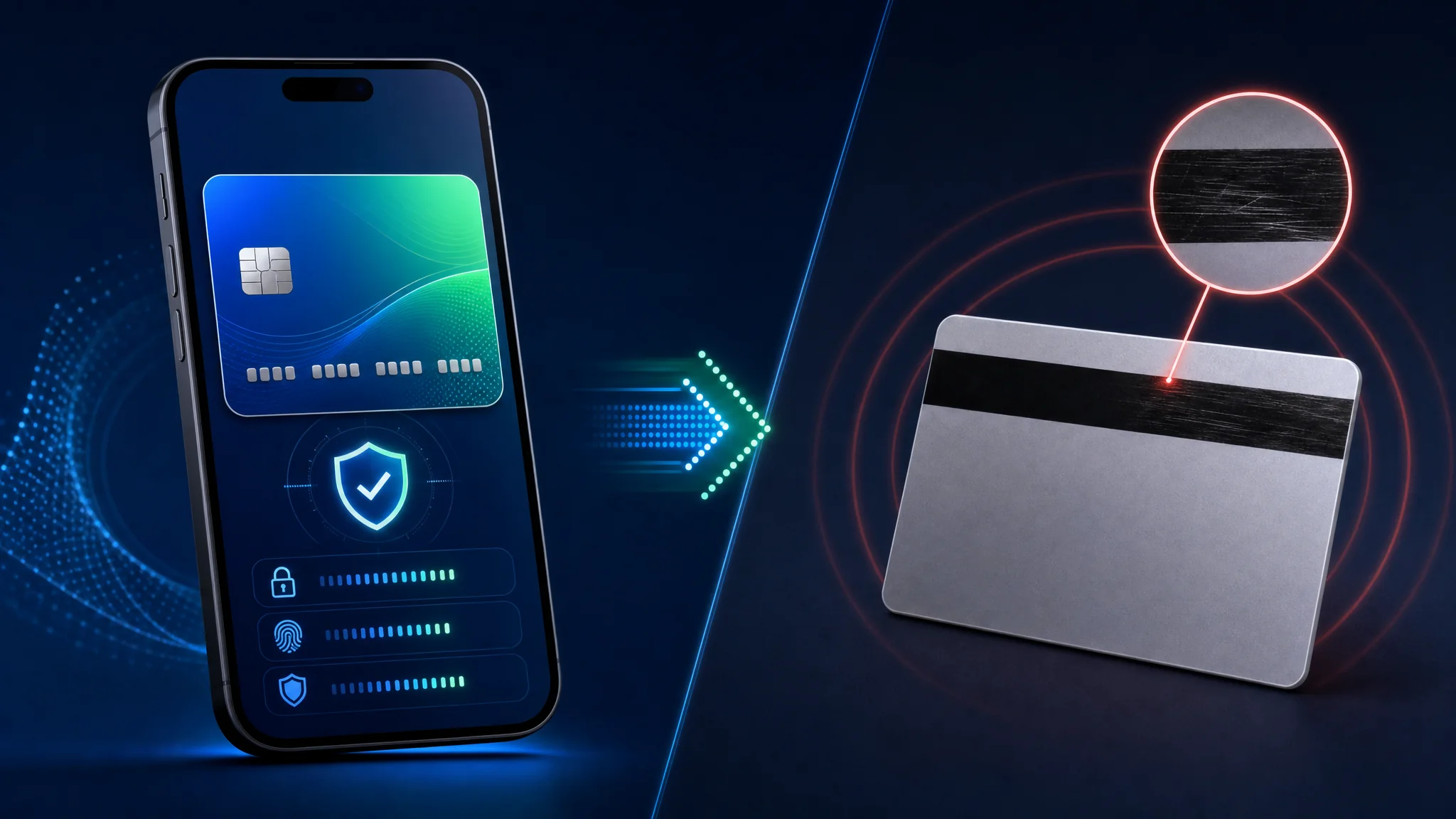
The stripe stores account data in plaintext, and any compatible reader reads it.
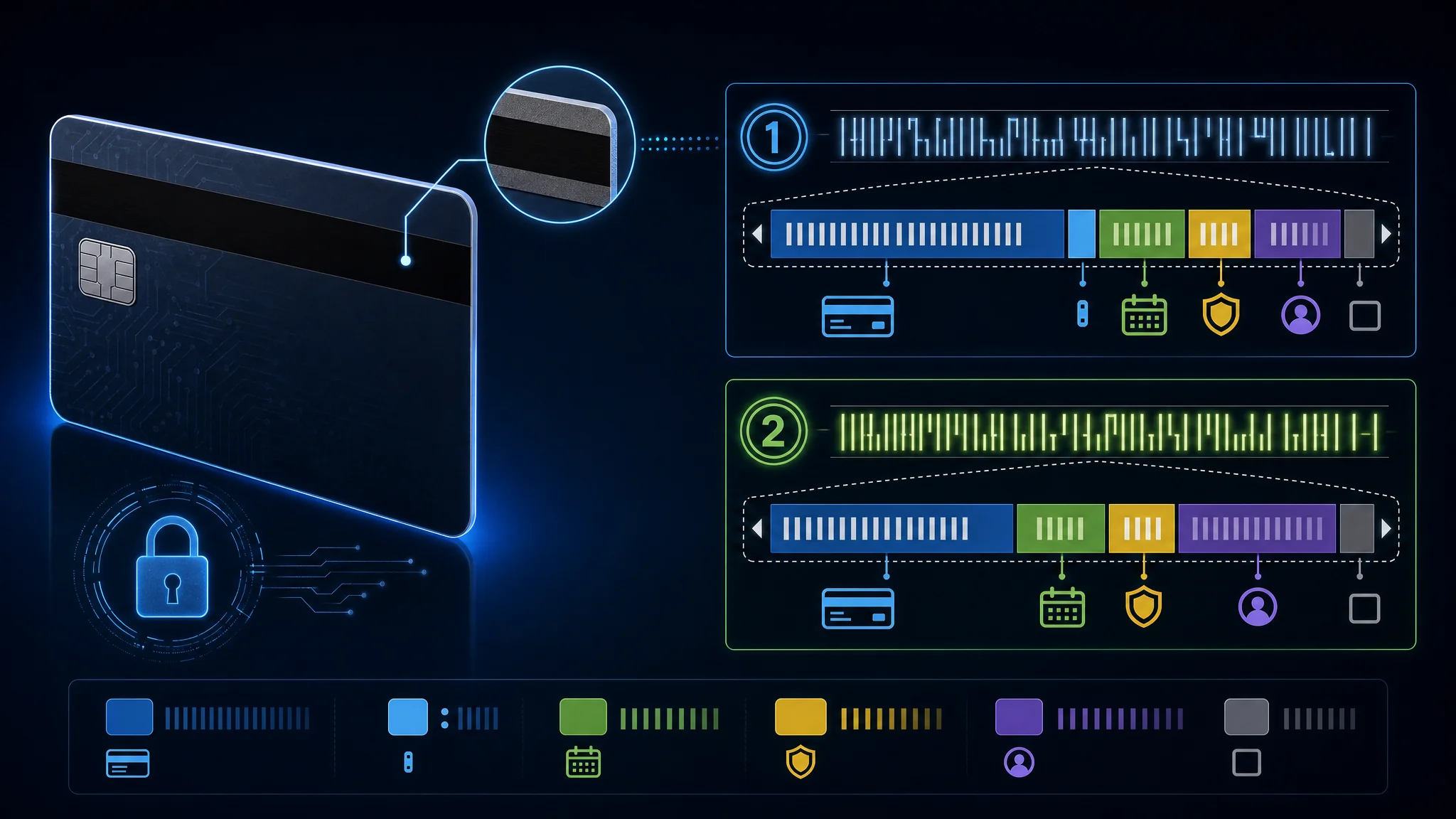
A magnetic stripe holds up to three tracks. Track 1 carries the PAN, the cardholder name, the expiry, and a three-digit service code, and it is the only track holding alphabetic text. Track 2 carries the PAN, expiry, and service code in a denser numeric encoding, and Track 2 is what almost every point-of-sale terminal reads. Track 3 is effectively unused by the major networks and is often not present on the card at all.
The service code is worth understanding, because it describes the card’s permitted use. Digit one covers interchange rules, digit two covers authorization handling, and digit three covers the range of services. A card coded 201 permits international interchange, needs no special authorization path, and carries no service restrictions.
The history explains why the stripe lasted so long. In 1969 an IBM engineer named Forrest Parry tried to attach magnetic tape to a plastic card and failed to get it to adhere without damaging it. His wife suggested using a clothes iron, and the heat bonded the tape to the card. The improvisation became the standard for over half a century.
Two developments are ending it:
| Milestone | Status |
|---|---|
| Mastercard announced the stripe’s removal | By 2033, no Mastercard credit or debit cards will carry one |
| Europe | Stripes began disappearing from Mastercard cards in 2024 |
| United States | Banks to stop issuing them starting 2027 |
The stripe was replaced by chip and contactless payment because copying one requires no skill beyond owning a reader. Our magnetic stripe tool shows how little data is needed to reconstruct a working track.
How to Read Track Data
A magnetic-stripe string is a sequence of fields, not a second card number. The reader finds the start sentinel, separates fields, reads the expiry and service code, then checks the end sentinel and LRC.
| Track | Start | Main fields | End | Character set |
|---|---|---|---|---|
| Track 1 | % | Format code, PAN, name, expiry, service code, discretionary data | ? plus LRC | Six-bit ALPHA, so it carries letters |
| Track 2 | ; | PAN, expiry, service code, discretionary data | ? plus LRC | Four-bit BCD, so it carries digits and a small punctuation set |
The optional sentinels identify the physical record boundaries. A decoder often omits them when it displays the fields, but a physical encoder needs the complete record format expected by the reader.
Track 1 Example
This is a synthetic example. It uses the standard test PAN from the tool and fake name, expiry, service code, and discretionary data. It is not a Privacy.com card and it is not valid payment data.
%B4111111111111111^TEST/USER^2912501000000000?
Read it from left to right:
| Segment | Value | Meaning |
|---|---|---|
| Start sentinel | % | Track 1 record begins |
| Format code | B | Financial-card format B |
| PAN | 4111111111111111 | Synthetic primary account number |
| Field separator | ^ | PAN ends and name begins |
| Name | TEST/USER | Surname, separator, first name |
| Field separator | ^ | Name ends and transaction fields begin |
| Expiry | 2912 | December 2029 in YYMM form |
| Service code | 501 | National interchange, normal processing, no restrictions |
| Discretionary data | 0000000 | Issuer-defined filler in this example |
| End sentinel | ? | Track 1 data ends before the LRC |
The real encoded record also carries an LRC character after the end sentinel when the reader expects it. The visible text form is useful for studying structure. The bit-level representation also carries odd parity for each character.
Track 2 Example
Track 2 removes the name and format code. The same synthetic values become:
;4111111111111111=291250100000000?
| Segment | Value | Meaning |
|---|---|---|
| Start sentinel | ; | Track 2 record begins |
| PAN | 4111111111111111 | Synthetic primary account number |
| Separator | = | PAN ends and transaction fields begin |
| Expiry | 2912 | December 2029 in YYMM form |
| Service code | 501 | Same synthetic service code as Track 1 |
| Discretionary data | 0000000 | Issuer-defined filler in this example |
| End sentinel | ? | Track 2 data ends before the LRC |
Track 2 is shorter because it has no cardholder name. Many terminals read Track 2 for ordinary swipe transactions, while Track 1 provides the name field when a reader requests it.
Service-Code Digits
The three service-code digits describe terminal and authorization behavior. They do not contain the CVV, and changing them on a real card without issuer authorization produces a malformed or misleading payment credential.
| Digit | Values | What it describes |
|---|---|---|
| First | 0, 1, 2, 5, 6, 7, 9 | Interchange rules and chip preference |
| Second | 0, 1, 2, 4 | Authorization path |
| Third | 0 through 7 | PIN, cash, goods-and-services restrictions |
First digit covers interchange and chip preference:
| Value | Meaning |
|---|---|
0 | National use |
1 | International interchange OK |
2 | International interchange, use IC (chip) where feasible |
5 | National interchange only except under bilateral agreement |
6 | National interchange only except under bilateral agreement, use IC where feasible |
7 | No interchange except under bilateral agreement (closed loop) |
9 | Test |
Second digit covers authorization handling:
| Value | Meaning |
|---|---|
0 | Normal authorization |
1 | Normal authorization |
2 | Contact issuer via online means |
4 | Contact issuer via online means except under bilateral agreement |
Third digit covers service restrictions:
| Value | Meaning |
|---|---|
0 | No restrictions, PIN required |
1 | No restrictions |
2 | Goods and services only (no cash) |
3 | ATM only, PIN required |
4 | Cash only |
5 | Goods and services only (no cash), PIN required |
6 | No restrictions, use PIN where feasible |
7 | Goods and services only (no cash), use PIN where feasible |
For example, 201 means international interchange with chip use where feasible, normal authorization processing, and no service restrictions. The decoder exposes each digit separately so you do not have to memorize the table.
LRC and Parity
The LRC is a check character, not another field to invent. The encoder XORs the data value of each character from the start sentinel through the end sentinel. It converts the result back into the track’s printable character range and reports the encoded odd-parity bits separately.
Track 1 uses a six-bit ALPHA character set. Its data value is the ASCII code minus 0x20. Track 2 uses a four-bit BCD character set. Its data value is the low nibble of the ASCII code. Applying the Track 1 mapping to Track 2 produces the wrong LRC.
The decoder’s Include calculated LRC option adds the printable LRC character to the output. Its breakdown also shows the LRC bit pattern with odd parity. Use this to learn how a reader checks the record, not to bypass an issuer’s controls.
Writing Synthetic Cards for Testing
Use the decoder to write test strings, not live payment cards. The tool accepts fields, rebuilds Track 1 and Track 2, adds optional sentinels, and calculates the LRC. It runs locally in the browser.
- Open the Magnetic Stripe Decoder and Encoder .
- Select Load Test Card. This fills the tool with the synthetic PAN
4111111111111111, the nameTEST/USER, expiry2912, service code201, and test discretionary data. - Enable Include start and end sentinels to display the physical record boundaries.
- Enable Include calculated LRC to append the calculated check character.
- Enable Split discretionary data into PVKI, PVV and CVV only to see how a nine-digit synthetic field is displayed. Those labels are issuer conventions, not a universal Track 1 or Track 2 layout.
- Change the name, expiry, service code, or synthetic discretionary data. The output updates as you type.
- Compare the decoded fields with the generated strings. Clear the fields when finished.
For a synthetic Track 1 exercise, use:
PAN: 4111111111111111
Surname: TEST
First name: USER
Expiry: 12/29
Service code: 201
Discretionary data: 000000000
For a synthetic Track 2 exercise, use the same PAN, expiry, service code, and a numeric discretionary field. The generated Track 2 string omits the name because Track 2 has no name field.
Do not copy a live Privacy.com PAN, expiry, CVV, or discretionary value into a writable card. Privacy.com describes its product as virtual card numbers created through its website or app. Its official page does not present the service as a magnetic-stripe-writing system, while a virtual card number is not proof of an issuer-authorized physical stripe record. A writable test card containing a live credential creates a duplicate payment instrument and violates issuer terms or payment rules.
The safe boundary is simple: use the tool’s built-in synthetic sample, use a lab card with dummy values, and use an issuer-approved physical card when you need to pay in person. Do not attempt to turn a Privacy.com virtual card into a physical swipe card.
What a Virtual Card Changes
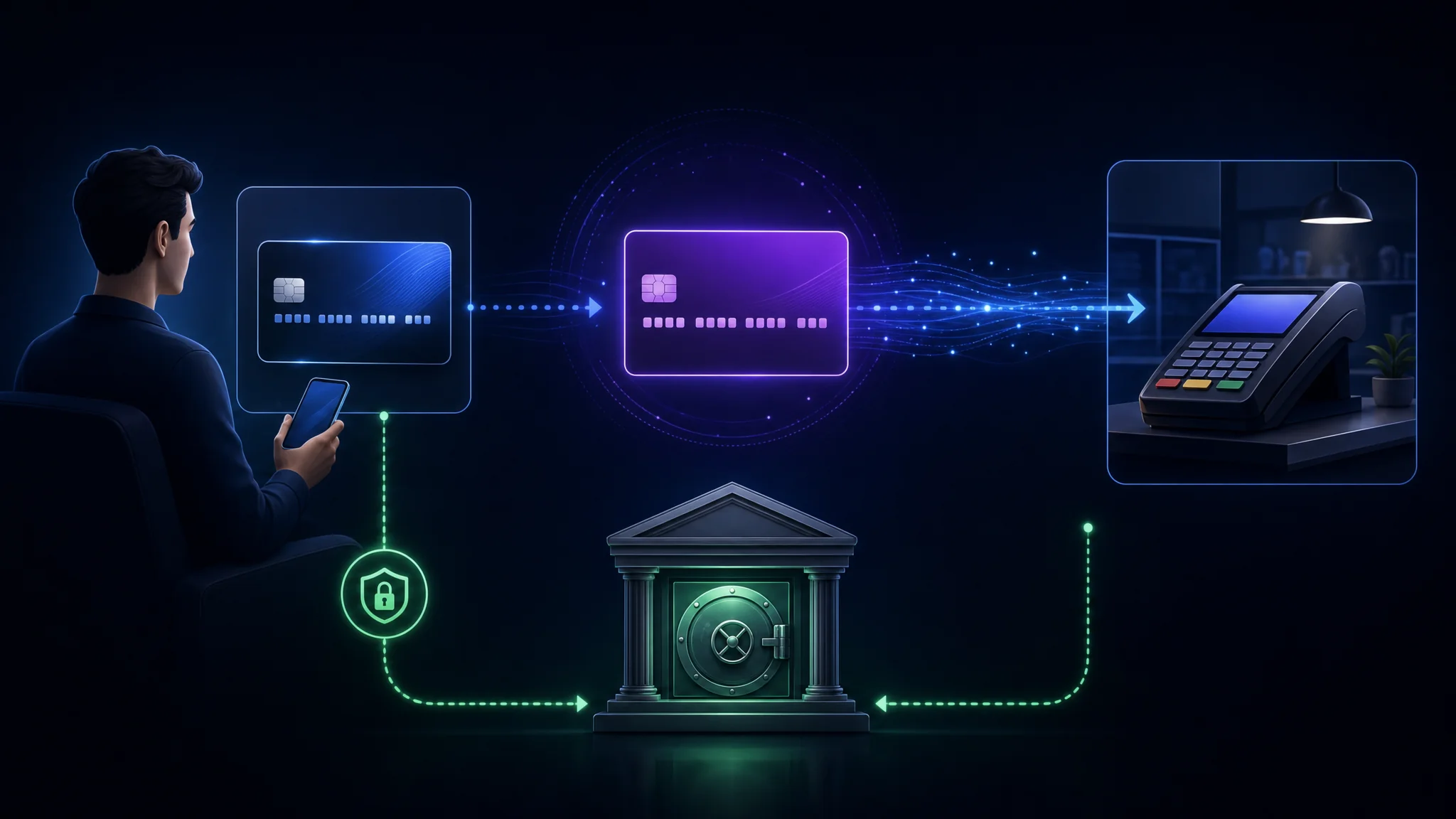
A virtual card is a second number standing in front of the first one.
When you pay with a virtual card, the merchant receives a number, an expiry, and a CVV belonging to the virtual card. Your real PAN never reaches them. Practically, the change shows up after a breach:
| Scenario | With Your Real Card | With a Merchant-Locked Virtual Card |
|---|---|---|
| Merchant database leaked | The number is valid everywhere it is accepted | The number fails at every other merchant |
| Subscription you cancelled | Charging continues until you dispute it | You close the card and the charge fails |
| Trial converting silently | Unwanted charge on your statement | The limit or closure stops it |
| Card details sold on a forum | Usable for card-not-present fraud | Usable at one merchant only, if at all |
What it does not change matters as much. Your bank still sees the transaction. The card network still processes it. The issuer still holds your identity, because anti-money-laundering rules require verification. A virtual card reduces merchant-side exposure. It is not a way to spend anonymously.
The distinction trips people up constantly. If your threat model includes the issuer or the network, a virtual card changes nothing about it.
What the Merchant Still Sees
A virtual card masks the funding account and the original PAN. The change does not erase checkout data.
Privacy’s support documentation lists the card data shared with a merchant: the 16-digit card number, expiration date, CVV, and billing address entered at checkout. The merchant also sees the name you provide. Read the official explanation of merchant-visible data before treating a virtual card as an identity shield.
| Layer | Data still visible or retained |
|---|---|
| Merchant | Virtual card number, expiration, CVV, billing address entered at checkout, name entered at checkout, order data, and merchant-account data |
| Privacy.com | Identity data, funding source, card records, transaction data, and device data under its privacy policy |
| Funding bank | Transaction date, amount, and a descriptor containing Privacy.com or PWP*, with the exact display set by the bank |
| Payment network and issuer | Authorization, settlement, fraud, and dispute records needed to process the payment |
The practical boundary is simple. A virtual card reduces reuse of card credentials. Your name, shipping address, merchant account, browser session, and other details submitted outside card fields stay visible to the merchant. Separate merchant accounts and email aliases help limit cross-site identity linkage. A virtual card alone does not provide this separation.
The Three Kinds of Card-Shaped Thing
The terminology is used inconsistently, and the difference matters when you are choosing what to hand a merchant.
| Type | Card Number | Physical Version | Typical Use |
|---|---|---|---|
| Digital card | Same as your physical card | Yes | Adding your existing card to a mobile wallet |
| Virtual card | Different from any physical card | No | Online purchases, subscriptions, one-off merchants |
| Digital-first card | Different, with an optional linked physical card | Optional | Fintech accounts where the physical card carries no printed details |
A mobile wallet uses a fourth mechanism entirely. When you add a card to a wallet, the wallet stores a device-specific token rather than your PAN, and the merchant receives the token. This is called tokenization, and it is why paying with a phone is safer than handing over the plastic even without a virtual card.
Network tokenization and virtual cards solve overlapping parts of the same problem. Tokenization protects the number in transit and at rest. A virtual card protects you from what the merchant retains afterwards.
Privacy.com Card Types
Privacy.com offers four card behaviours, and they are not interchangeable.
| Card Type | Behaviour | Best For |
|---|---|---|
| Single-Use | Closes automatically after one transaction | One-off purchases and unfamiliar merchants |
| Merchant-Locked | Locks to the first merchant to charge it and fails elsewhere | Everyday online shopping |
| Category-Locked | Restricted to a spending category | Containing a whole class of spend |
| Everywhere | A physical card with the same protection model | In-person purchases |
Merchant locking is the mechanism carrying most of the value. A locked card fails at any merchant other than the one it was first used with, which means a breach at the merchant yields a number useless anywhere else.
Single-use is the stronger option where it applies. A card closing after one charge cannot be replayed at all, and it removes the need to remember to close it later.
Two operational details worth knowing:
- Shared cards lock to the first merchant they are used with, so sharing one with a family member or employee still carries the merchant restriction.
- A card is paused rather than closed. Pausing is reversible, which is useful when you want to stop a subscription temporarily without losing the card details.
Spend Limits and Controls
Every card carries a spend limit, which is a separate control from merchant locking.
| Control | What It Prevents |
|---|---|
| Per-transaction limit | A single charge larger than you authorised |
| Monthly limit | Accumulating charges over a billing period |
| Pause | Any charge at all, reversibly |
| Close | Any future charge, permanently |
Set both a per-transaction and a monthly limit on any card tied to a subscription. A merchant quietly raising its price hits the limit rather than your balance, and you notice it from a failed charge instead of missing a statement line.
Our Personal Finance Security module places this alongside credit freezes and card tokenization as the three controls limiting what a single compromised merchant reaches.
Recurring Charges and Authorizations
Card controls act at authorization time. Privacy describes a pending transaction as permission for the merchant to debit an agreed amount. A $0 authorization checks whether a card is active. A $0 authorization is not a completed purchase. Bank-funded transactions add a settling stage before the debit finishes. See the official transaction-state guide .
| Event | What happens | Control boundary |
|---|---|---|
| Card added to a service | The merchant sends a $0 authorization to check the card | A valid card check does not prove a paid order |
| Purchase authorized | Privacy records a pending amount and grants permission for the merchant to collect the agreed amount | Available funds and later approvals reflect the pending transaction |
| Purchase settled | The funding source is debited after merchant processing | Order changes or an added tip produce a final amount different from the first authorization |
| Card paused or closed after authorization | Future authorizations stop | An earlier authorization still follows payment-network rules |
| Spend limit changed after authorization | The new limit applies to future attempts | The earlier authorization keeps its existing status |
A card limit is not a prepaid balance. Privacy’s card-specific guide says the limit blocks authorization attempts above the chosen amount. The funding source is debited as transactions complete. Its rolling windows include 24 hours for daily limits, 30 days for monthly limits, and 364 days for yearly limits, with a six-day buffer for some subscription billing cycles. The official spend-limit guide documents those rules.
For subscriptions, set a recurring limit before the first charge, review pending and settling entries, and cancel with the merchant separately. Closing a card blocks future authorizations. The action does not cancel an authorized purchase or create a refund. Privacy’s pause and close guide states the same boundary.
Plans and What Each Unlocks
Privacy.com runs a free tier alongside three paid plans. Prices and feature boundaries change, so confirm current terms before subscribing.
| Plan | Price | Notable Additions |
|---|---|---|
| Personal (free) | $0 | Virtual cards, merchant locking, spend limits, no fee on domestic transactions |
| Plus | $5/mo | Category cards, card notes for organising spend |
| Pro | $10/mo | Cashback on qualifying purchases, Everywhere physical cards |
| Premium | $25/mo | Everything in Pro, with the monthly card creation limit raised to 60 |
The free tier covers the core security benefit. Merchant locking, single-use cards, and spend limits are the mechanisms reducing exposure, and they are available without paying. The paid tiers add organisation and convenience rather than additional protection.
Foreign transaction fees differ by tier. The free tier charges 3% on foreign transactions with a $0.50 minimum, while the paid tiers do not.
This plan snapshot was checked on October 10, 2026. Pricing, eligibility, card availability, and limits are provider-controlled. Read the current Privacy.com terms before subscribing.
What Privacy.com Does Not Do
Being clear about the limits is more useful than a feature list.
| Limitation | Detail |
|---|---|
| It does not make you anonymous | Your identity is verified at signup and the issuer holds it |
| It does not hide the transaction from your bank | Your bank sees the funding transfer, and the network sees the charge |
| It does not build credit | These are not credit accounts, and no credit pull occurs |
| It is US-only | Requires US citizenship or legal residency and a US bank or credit union account |
| It requires identity verification | Know Your Customer checks are mandatory under anti-money-laundering rules |
| It does not cover every merchant | Some merchants block prepaid and virtual card ranges |
The merchant-blocking point matters in practice. Some subscription services and airlines reject card ranges they associate with virtual or prepaid cards, and no amount of configuration fixes the problem. Keep a real card available as a fallback for those cases.
The honest summary: a virtual card is a containment control for merchant-side exposure, not an anonymity tool. If you need anonymity, this is a different problem with different tools.
Who Issues the Card and Why It Matters
A virtual card is still a real card, issued by a real bank, under a real scheme licence.
| Detail | Value |
|---|---|
| Issuing bank | Patriot Bank, N.A., Member FDIC |
| Scheme licences | Mastercard and Visa |
| Where it is accepted | Anywhere Mastercard and Visa are accepted |
| Funding | Transferred from your linked US checking account |
This is why the protection is genuine. The card carries the same scheme protections as any other Mastercard or Visa product, which means chargeback rights and fraud dispute processes apply normally. It is not a gift card or a closed-loop store credit.
Two certifications are worth naming because they are independently verifiable rather than marketing claims:
- PCI-DSS compliance, which is the payment card industry standard for handling cardholder data
- SOC 2 Type II, which is an audited report covering security controls over a period of time rather than a point-in-time assertion
On the business model: the company states it earns interchange from merchants and does not sell customer data to advertisers or third parties. This is the same revenue model as every other card issuer, which is worth understanding rather than treating as unusual.
The practical reason to check the issuing bank is verification. Anyone claims to run a card programme, and the issuer name on the card is what you confirm against the bank named in the paperwork.
Inspect the scheme and bank from the PAN prefix using the Magnetic Stripe Decoder , which reports the major scheme range and validates the Luhn check digit.
Account Recovery and Provider Dependency
Account access is a separate control from card isolation. Privacy’s guidance for unrecognized activity says to contact the merchant, check 2FA and shared cards, review new-device login codes, reset the password, and contact support. The account-security guide lists those steps.
Keep the recovery email and US phone number current. Privacy requires confirmation when either detail changes, according to its account-details guide . Enable 2FA, and keep merchant names and card last-four values in a password manager. Do not place a full PAN or CVV in an ordinary notes app.
Closing your account does not erase all records. Privacy’s policy, last updated June 8, 2026, states retention periods of at least five years for identity-verification and payment-card data, six years for funding-bank information and ACH transactions, and three years for audit logs. Read the Privacy Policy retention section before treating account closure as deletion.
Privacy remains dependent on its funding bank, Plaid, ACH, card networks, and its own account systems. Bank funding uses ACH through Plaid. Privacy says unsupported banks have a debit-card funding alternative, yet eligibility still depends on a US bank or credit union and a US phone number. Its bank-connection guide and eligibility guide describe those requirements.
Funding problems affect payment operations. Privacy documents temporary account pauses when the service fails to debit a funding source, including an insufficient balance or a closed account. Its support page also states a funding-source removal does not stop transactions already authorized against the source. Read the unsettled-transaction guide and funding-source removal guide before removing a bank or debit card.
| Dependency | Failure mode | Practical response |
|---|---|---|
| Funding bank or Plaid | Unsupported, closed, or out-of-date connection | Keep an eligible fallback source and review account status |
| Privacy account | New identity review, lost recovery channel, or account suspension | Keep 2FA and recovery details current |
| Merchant | Virtual or prepaid range rejected, or a recurring capture continues | Keep a real card for exceptions and cancel with the merchant |
| Network or issuer | Authorization, settlement, refund, or dispute delay | Keep receipts, statements, and transaction records |
Privacy’s terms describe separate services from the company and its financial-service partners. The terms also allow additional identity information requests and account restrictions. Treat provider access and account records as part of the threat model. Do not route every essential bill through one card provider.
Using Virtual Cards Well
The controls only help if you configure them. Six habits carry most of the benefit.
- Lock every card to a merchant unless there is a reason not to. The lock is what makes a leaked number useless.
- Use single-use for anything unfamiliar, including trials and one-off purchases from smaller sites.
- Set both spend limits on subscription cards, so a price increase fails rather than charges.
- Name each card after the merchant, so a transaction list is readable and an unexpected charge stands out.
- Pause rather than close when you plan to resume a service, and close when you will not.
- Keep one real card for merchants rejecting virtual ranges, so a blocked checkout does not become an emergency.
Common Mistake: treating a virtual card as a substitute for noticing your statements. Merchant locking stops one class of harm. It does not detect a compromised account at your bank, an unauthorised transfer, or a fraudulent charge on the real card behind it.
Current Control Boundaries
Privacy.com’s current support documentation states that a card-specific spend limit blocks authorization attempts above the limit. Its spend-limit guide also describes rolling time windows. The developer card documentation lists merchant-locked cards and spend-limit fields.
| Control | Helps with | Does not solve |
|---|---|---|
| Merchant-locked card | Reuse of a number at a different merchant | A compromised Privacy.com account or a fraudulent transaction at the intended merchant |
| Spend limit | Unexpected authorization amounts and recurring billing drift | A charge made before you change the limit or a compromised funding account |
| Closing a virtual card | Future authorizations on that number | A refund, dispute, or merchant record already created |
| Separate card per service | Fast identification and revocation | Provider outages, identity checks, or bank-side records |
Review the funding account, account recovery methods, alerts, and card list as one control set. A virtual number changes the number shared with a merchant. It does not hide the transaction from the issuing bank, the card provider, the merchant, payment networks, tax records, or a court with lawful authority. It also does not turn a debit card into a credit line or guarantee a dispute outcome.
Key Takeaways
- A virtual card changes the number the merchant stores. Your real PAN never reaches them, which is the whole mechanism.
- It does not make the transaction private. Your bank, the network, and the issuer still see it, and identity verification is mandatory.
- Merchant locking is the highest-value feature, because a leaked number then fails everywhere else.
- The free tier includes the security controls. Paid plans add organisation and convenience rather than protection.
- The magnetic stripe stores card data in plaintext and is being removed by 2033, with US banks stopping issuance in 2027.
- The CVV is not on the stripe, which is why a skimmer copying tracks still lacks what many online merchants require.
- Some merchants reject virtual card ranges. Keep a real card as a fallback.
- Verify the issuing bank rather than trusting a card programme claim, and check the PAN prefix yourself.
Next Steps
- Inspect your own card’s track data and see exactly what a stripe carries: Magnetic Stripe Decoder and Encoder
- Freeze your credit if you have not already, which is the stronger control for new-account fraud: Personal Finance Security
- Apply the tiering discipline to decide how much effort this deserves for your situation: Prioritized Personal Security Checklist
- Review the Privacy.com plans and current terms before subscribing: Privacy.com
- Check whether your details already appear in a breach before assuming you are unaffected: Have I Been Pwned
- Read the payment security checklist for the organizational counterpart: Incident Response Checklist
References
- Privacy.com - what virtual cards are, merchant locking, and spend limits
- Digital card - Wikipedia, covering digital versus virtual cards, magnetic-stripe tracks, service codes, parity, and LRC
- ISO/IEC 7813:2006 - identification cards, financial transaction cards, tracks 1 and 2 data structure
- ISO/IEC 7813 - track field layout in detail, including sentinels and service codes
- PCI Security Standards Council - cardholder data environment requirements
- Consumer Financial Protection Bureau - credit reports and scores
- ANSI/ISO ALPHA data encoding, the Track 1 character set and parity table
- Magnetic card ISO characters, the Track 1 and Track 2 sets side by side
- Reading magnetic card data, a practical walkthrough with a live card scan
- Privacy developer documentation - card types, states, and spend limits
- Privacy support - information shared with merchants
- Privacy support - card-specific spending limits
- Privacy support - transaction states and authorizations
- Privacy support - pausing and closing cards
- Privacy support - bank statement descriptors
- Privacy support - connecting a bank account through Plaid
- Privacy support - account activity and recovery checks
- Privacy support - updating account email and phone
- Privacy support - account eligibility
- Privacy support - unsettled transactions
- Privacy support - removing a funding source
- Privacy.com Privacy Policy
- Privacy.com Terms of Service

Related Posts


This article refers to other articles we've written:
- Magnetic Stripe Decoder and Encoder - SimeonOnSecurity
Decode and re-encode magnetic stripe Track 1 and Track 2 data. Parse the PAN, cardholder name, expiry, service code and discretionary data, edit any field, and get updated track data with correct sentinels and LRC. Runs entirely in your browser, so card data never leaves your machine.
- Personal Security Checklist 2026: Where to Start and What to Skip
Prioritize personal security actions by attack impact, from account protection and backups to privacy and recovery planning.
- Module 10: Personal Finance Security
Protect financial accounts with alerts, recovery checks, US credit freezes, payment choices, dispute records, and a dated yearly review using official routes.
