

Field IT Tidbits: Beyond the Mini Data Center

Table of Contents
The parts breaking a field deployment are rarely the parts anyone planned for. A perfectly sized UPS and a well-chosen enclosure still fail a mission if nobody packed a spare Ethernet cable or wrote down the admin password. This final part of the series is a grab bag of smaller habits, gear, and lessons applying well beyond compact edge compute, because good field discipline transfers to almost any hands-on IT work.
This is part four of a four-part series on compact, rapidly deployable server and network hardware. Part one covered enclosures and compute, part two covered power and environmental resilience, and part three covered connectivity and data security.
Build a Spares Kit and Use It
A field deployment with no spares is a single failed cable away from a wasted trip. A spares kit does not need to be large. It needs to cover the parts most likely to fail or go missing.
- A spare patch cable of every length used in the build, since a bad cable is one of the most common and most avoidable field failures.
- A spare SFP module if the build uses fiber or 10G copper transceivers, since these parts stay small, go missing easily, and offer no field improvisation.
- A spare power brick or DC connector for every voltage used in the case.
- A small assortment of screws, standoffs, and zip ties, because the one you drop into the case interior at 11pm is never findable.
Restock the spares kit immediately after a deployment, not right before the next one. The gap between “I’ll do it later” and the next trip is exactly when a spare goes missing.
Documentation Travels With the Hardware
A network diagram living only on someone’s laptop back at the office does not help anyone standing in front of the case in the field.
- Print a laminated one-page reference covering IP addresses, admin credentials location (never the credentials themselves), and a basic troubleshooting flowchart, and tape it inside the case lid.
- Label every port and cable with what it connects to, not only a color code, so anyone on the team traces a connection without calling you on the phone.
- Keep a paper backup of anything needed to bootstrap connectivity (VPN config, initial admin password reset procedure) stored somewhere independent of the deployment already having working internet.
A documentation strategy assuming the network is already working is not a bootstrap strategy. It is a nice-to-have failing at the exact moment it matters most.
ESD and Handling Discipline in the Field
Electrostatic discharge does not care about a rushed schedule or a dusty floor standing in for an anti-static mat. Field conditions, especially dry climates and synthetic clothing, raise ESD risk compared to a climate-controlled office.
- Carry a wrist strap and a portable anti-static mat in the spares kit, and use them when swapping drives or memory in the field.
- Touch the case chassis before handling any internal component if a proper ground strap is not available, as a minimum precaution.
- Store spare components in anti-static bags, not loose in a pocket of the case, even for short-term storage between deployments.
Formal ESD control programs follow ANSI/ESD S20.20 , the industry standard for protecting electronics from electrostatic discharge. A one-person field kit does not need a certified program, but the standard’s core practices, grounding, wrist straps, and static-dissipative packaging, scale down cleanly to a spares kit riding in a case.
Firmware and Configuration Discipline
Field hardware is the worst possible place to run into a firmware bug or an untested configuration change.
- Update and test firmware before the deployment, never in the field where a failed update bricks a device with no easy recovery path.
- Keep a known-good configuration backup for every device in the build, stored outside the case, so a factory reset in the field becomes a recovery option instead of a disaster.
- Freeze the configuration once the mission starts. Resist the urge to tweak settings mid-deployment unless something is genuinely broken.
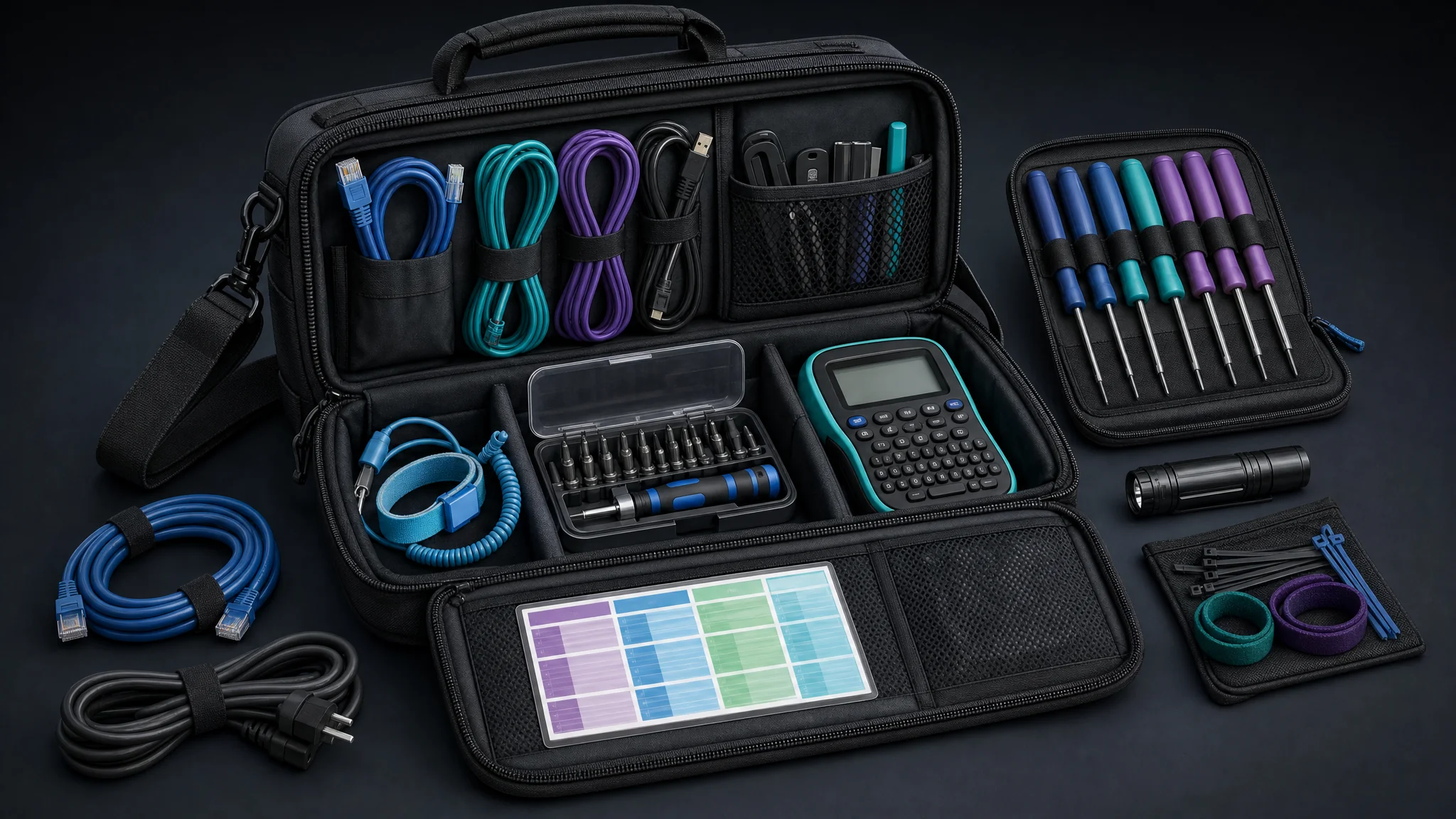
The Personal Toolkit Worth Carrying
A field deployment kit differs from a personal every-day toolkit, but the two overlap more than people expect. A well-stocked personal kit fills the gaps a shared team kit always seems to have.
- A compact multitool or a small screwdriver set covers the odd fastener the team kit lacks a bit for.
- A headlamp or small flashlight matters more in the field than in an office, since equipment closets and vehicle interiors are rarely well lit.
- A portable battery pack for phones and laptops keeps communication and documentation devices alive independent of the main deployment’s power plan.
- Our recommended everyday carry (EDC) guide covers general-purpose gear, knives, flashlights, and bags useful well outside a field IT context.
None of this replaces the team’s shared spares kit. It closes the gap for the small stuff never making it onto an official packing list.
Travel and Customs Logistics for Hardware
Carrying networking and compute hardware across borders or through security checkpoints raises questions a normal laptop bag does not.
- Check airline and customs rules for lithium batteries before packing UPS battery packs or large power banks, since many carriers restrict watt-hour ratings in checked versus carry-on baggage.
- Carry a simple equipment manifest listing serial numbers and approximate values, which speeds up customs declarations and insurance claims if something is lost or damaged.
- Photograph the packed case before every trip. A dated photo showing the contents and condition is useful evidence for both insurance and troubleshooting what changed between deployments.
- Research import and export restrictions on encryption-capable hardware for the specific countries on the itinerary, since regulations vary and change over time.
Insurance and Loss Planning
A field case eventually gets dropped, drowned, or stolen, and the real question is whether the day it happens costs you the hardware or the hardware plus the mission. Insurance planning belongs in the same packing checklist as spare cables.
- Confirm whether general business insurance covers equipment in transit and in the field at all, since many standard policies exclude off-premises equipment or cap the payout well below replacement cost.
- Cyber insurance and equipment insurance are not the same policy. Cyber insurance typically covers data breach and incident response costs, not the physical replacement of a stolen case. Carry both if the deployment risks both kinds of loss.
- Keep the equipment manifest from the travel section current and attached to the policy, so a claim after a loss has serial numbers and values ready instead of a scramble to reconstruct them from memory.
Our cyber insurance guide covers what a policy typically does and does not include, and applies directly to the data-loss side of a field deployment even though it was not written with field IT specifically in mind.
Software Licensing in a Disconnected Environment
A license server phoning home for validation is a liability the moment the node loses its uplink. Field software licensing needs the same offline-first thinking as everything else in this series.
- Activate offline license modes and generate any needed offline activation files before departure, not after arriving at a site with no connectivity to complete the process.
- Track license expiration dates on the same laminated reference card covered earlier, since a license quietly expiring mid-deployment is functionally the same failure as a hardware fault.
- Prefer open-source tooling wherever it meets the mission’s requirements. Software with no license server dependency removes an entire category of field failure.
Test every licensed tool’s offline behavior on the bench before the first real deployment. A tool silently degrading or locking out functionality without connectivity is a bad surprise to find for the first time in the field.
Firmware and Boot Media Integrity Checks
A firmware image or bootable USB drive coming from an untrusted download link, or sitting unverified in a shared kit for a year, carries supply chain risk into every deployment using it.
- Verify checksums or cryptographic signatures on every firmware image and OS installer before writing it to media, comparing against the value published on the vendor’s official site.
- Store known-good, verified images in the spares kit itself, not only on a laptop back at the office, so a field recovery does not depend on connectivity to re-download and re-verify a clean image.
- Re-verify checksums periodically for images sitting in long-term kit storage, since bit rot on flash media silently corrupts a stored image between deployments.
A field recovery using an unverified image trades one problem for a potentially worse one. Verifying checksums takes thirty seconds and confirms the image is what it claims to be before it touches production hardware.
Small Habits Preventing Big Field Failures
A few habits do not fit neatly under hardware, power, or connectivity, but they show up repeatedly in after-action reports from field deployments of every kind.
- Test the entire kit end to end before it leaves the shop, not only each component individually. Components working fine alone sometimes fail once assembled together.
- Assign one person as the single point of accountability for the case during a deployment, even on a larger team, so nothing falls through the gap between “someone else has it.”
- Debrief after every deployment and write down what broke, what was missing, and what worked well, while the details stay fresh.
- Rotate spare batteries and consumables on a schedule, not only when they turn up dead, since a quietly expired spare is not a spare at all.
Most of these habits generalize far beyond edge compute. They apply to any equipment leaving a controlled environment and needing to work correctly the first time, on arrival, with no fallback plan.
Field IT Tidbits Checklist
- Spares kit restocked immediately after the last deployment, not before the next one
- Laminated reference card taped inside the case with bootstrap and troubleshooting info
- ESD wrist strap and anti-static bags included in the kit and used every time
- Firmware updated and tested before departure, configuration frozen for the mission
- Firmware images and boot media checksums verified against the vendor’s published values
- Software licenses activated for offline use with expiration dates tracked
- Personal toolkit gaps covered (multitool, light source, independent battery pack)
- Battery watt-hour ratings and customs manifest checked before any border crossing
- Equipment insurance coverage confirmed for off-premises and in-transit loss
- Post-deployment debrief completed and filed for the next trip
Wrapping Up the Series
A field-deployable mini data center is a system, not a single purchase. Get the enclosure and compute right, get the power and environmental protection right, get the connectivity and security right, and then cover the small stuff never making it onto the spec sheet. Skipping any one of those four legs is how a well-funded build still fails in the field.
- Part One: Hardware and Enclosure Selection
- Part Two: Power and Environmental Resilience
- Part Three: Connectivity and Data Security for Edge Nodes
- Part Four: Field IT Tidbits Beyond the Mini Data Center (this page)
If a mobile pfSense firewall build is the next step for your kit, our budget-friendly 10g pfSense build with the HP t740 is a concrete, tested starting point. For general homelab hardware selection applying equally well to a bench build or a field kit, see The Best Homelab Hardware .

Related Posts
This article refers to other articles we've written:
- Field-Deployable Edge Compute: Hardware and Enclosure Selection
A guide to field edge-compute hardware and enclosures, including compute, racks, cooling, storage, management, cabling, and power compatibility.
- Field-Deployable Power and Environmental Resilience
A guide to field edge-compute power and environmental resilience, including UPS sizing, solar, batteries, time sync, ratings, grounding, and surge protection.
- Field-Deployable Connectivity and Data Security for Edge Nodes
A guide to connecting and securing field edge-compute nodes with cellular, satellite, LoRa, VPN, MFA, segmentation, logging, encryption, and theft response.
- Recommended Every Day Carry (EDC)
SimeonOnSecurity's Recommended EDC is a comprehensive guide to the best and most essential tools for everyday carry. This guide includes recommendations for knives and blades, flashlights, watches, and pens, with different price points for each category. The list also includes extra items such as bags and backpacks, cases, sleeves, and protection, ensuring that you are fully prepared for anything that life may throw your way. Whether you're looking for a budget-friendly option or a high-end premium product, this guide has you covered.
- Cyber Insurance: What You Need to Know Before You Buy
Compare cyber insurance coverage, exclusions, limits, incident response terms, and security requirements before choosing a policy for your business.
