

Field-Deployable Power and Environmental Resilience

Table of Contents
A field-deployable server is only as reliable as its power source. The best enclosure and the fastest compute in the world are useless the moment the site loses power and nothing catches the load. Power planning is not an accessory to the build. It is the part of the build most likely to fail first.
This is part two of a four-part series on compact, rapidly deployable server and network hardware. Part one covered enclosures and compute. This part covers keeping this hardware powered and protected against heat, dust, water, and electrical surprises. Part three covers connectivity and data security, and part four rounds up the smaller details.
Sizing a UPS for Field Use
A UPS (uninterruptible power supply) bridges the gap between a power failure and either shutdown or a backup source taking over. Sizing one for field use starts with a simple calculation.
- Add up the wattage of every device in the case (compute, switch, access point, storage).
- Multiply the total by 1.5 to 1.6 to leave headroom for inrush current at power-on.
- Divide the UPS’s rated watt-hour capacity by your total load wattage to estimate runtime in hours.
Battery capacity degrades with age and temperature, so treat the manufacturer’s runtime figure as a best case, not a guarantee. Plan for shorter real-world runtime, especially in hot environments where batteries lose capacity faster.
Schneider Electric / APC publishes detailed guidance on UPS sizing and battery behavior, and their core rule applies directly to field builds: plug the UPS straight into the wall or generator output, never into a surge strip, and put any extra outlets you need on a separate PDU downstream of the UPS instead.
| UPS type | Best for | Trade-off |
|---|---|---|
| Line-interactive UPS | Most field builds with wall or generator power available | Brief transfer time on power loss, usually under 10ms |
| Online (double-conversion) UPS | Sensitive gear on unstable or noisy power | Heavier and more expensive per watt |
| DC battery pack with built-in inverter | Ultra-compact builds where a traditional UPS will not fit | Lower efficiency converting DC to AC and back |
DC Power: Skip the Inverter
Every AC-to-DC conversion step wastes energy as heat. Running compute hardware directly from DC power, when the hardware supports it, removes a conversion stage and a failure point.
- 12V systems suit small builds (single-board computers, a thin client, a small switch) and match common automotive and marine battery voltage.
- 48V systems suit larger builds and match the voltage standard used in telecom power plants, which means telecom-grade DC gear is often available secondhand at low cost.
- Many network switches and access points already ship with PoE or DC input options, so check the spec sheet before assuming you need an inverter at all.
A DC-native build runs longer on the same battery capacity than an AC build with an inverter in the middle, because the inverter’s own losses disappear.
Solar and Generator Hybrid Power
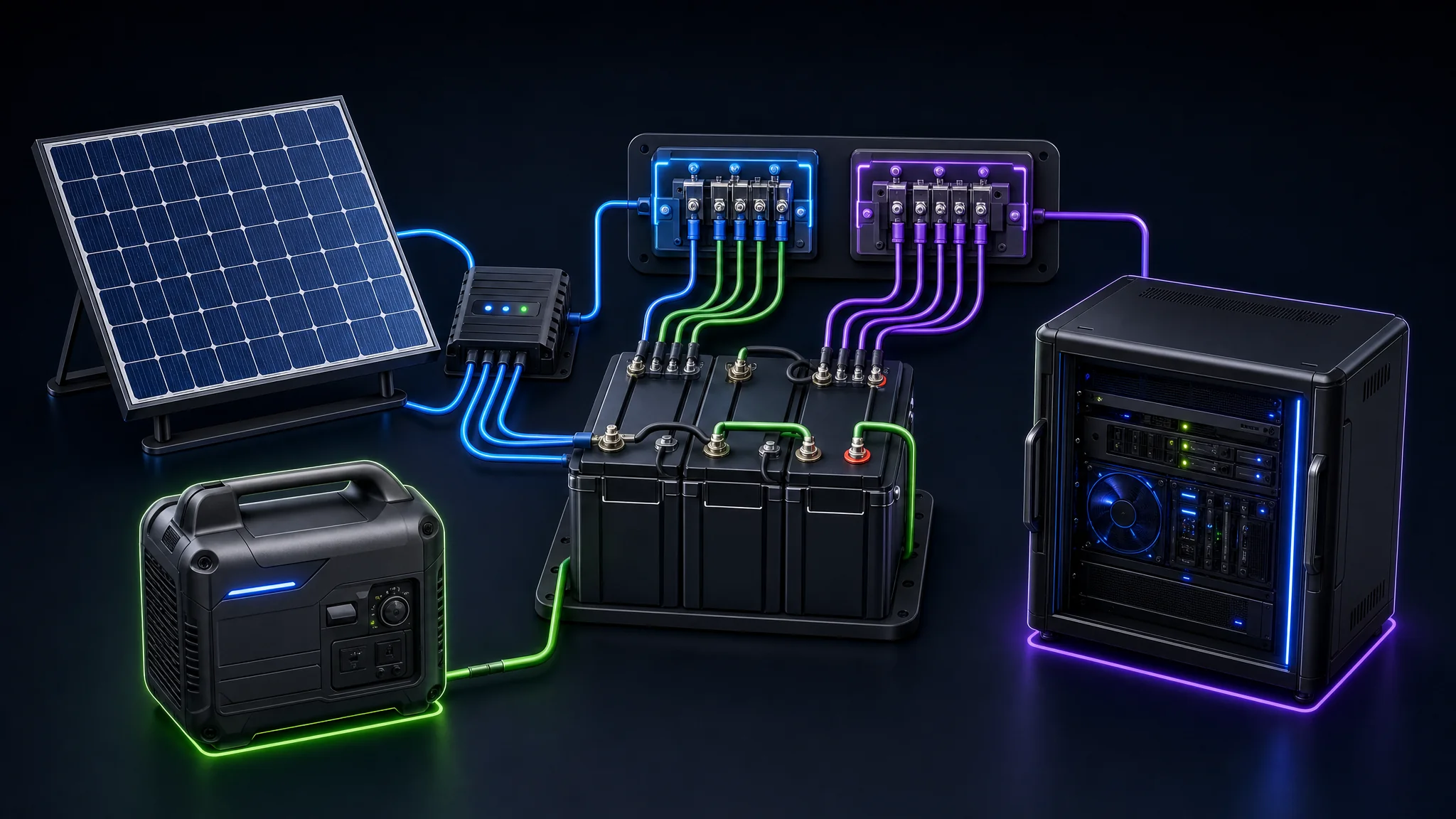
For deployments longer than a single battery pack covers, pair a battery bank with a charging source.
- Portable solar panels with a charge controller work well for daytime-recharge, overnight-battery cycles in sites with reliable sun.
- A small inverter generator provides a fast, weather-independent recharge but adds fuel logistics and noise, a real problem for covert or noise-sensitive deployments.
- A hybrid setup, solar as the primary source with a generator as backup, covers the gap when weather ruins the solar budget for a few days.
Size the battery bank for at least one full day of autonomy without any charging source. A charging plan built on uninterrupted sun or fuel resupply is not a resilient plan.
Battery Chemistry for Field Packs
Not every battery pack is a good fit for a case getting shaken, baked, and frozen on a rotating schedule. The chemistry inside the pack matters as much as the watt-hour number printed on the label.
| Chemistry | Best for | Trade-off |
|---|---|---|
| LiFePO4 (lithium iron phosphate) | Most field builds, longest cycle life, safest failure mode | Heavier per watt-hour than other lithium chemistries |
| Lithium-ion (NMC/NCA) | Weight-sensitive builds where every gram matters | Less tolerant of heat and deep discharge, shorter cycle life |
| Sealed lead-acid (AGM/gel) | Low-budget builds or as a stopgap on hand already | Heavy, lower usable capacity, shortest cycle life of the three |
Battery University’s comparison of secondary battery chemistries lays out the cycle life and specific energy trade-offs behind this table in more depth. LiFePO4 is the outlier here: it tolerates heat, abuse, and a full discharge far better than the other two chemistries, which is exactly the profile a case gets subjected to in the field.
Heat is the chemistry killer regardless of which pack you choose. Battery University’s research on lithium-ion capacity loss documents real-world capacity loss well above the manufacturer’s lab rating once heat and fast charge cycles enter the picture, which is the same reason this series already tells you to plan for shorter-than-rated runtime in hot climates.
Powering Devices Over USB-C PD
Many of the thin clients, access points, and peripherals in a compact build now accept power over USB-C using the USB Power Delivery (USB PD) specification , simplifying a field kit considerably.
- One USB PD power bank replaces several device-specific power bricks, cutting the number of cables and adapters riding in the case.
- Confirm the wattage the device negotiates in practice, not only the cable’s rated maximum, since an underpowered PD source silently throttles or fails to charge a device under load.
- Carry a PD-capable cable rated for the highest wattage in the kit. A cheap charge-only cable rated for 60 watts bottlenecks a 100-watt device without any obvious warning.
USB-C PD does not replace the UPS and battery bank sizing covered above. It is a convenience layer for smaller peripherals, not the primary power architecture for the case.
Monitoring the UPS Instead of Guessing
A UPS silently switched to battery an hour ago is not protecting anything if nobody finds out until the battery runs dry. Most UPS units expose their status over USB or a network card, and a field build should read it, not assume it.
- Network UPS Tools (NUT) is an open-source project supporting well over a thousand UPS models and provides a common set of monitoring and control tools regardless of the specific vendor protocol underneath.
- Trigger an automatic, graceful shutdown of compute at a defined battery threshold rather than letting the UPS run to zero and pull the plug on a live filesystem.
- Log battery health and runtime trends over time, not only the current charge percentage, since a battery quietly losing capacity gives no obvious symptom until the day it fails completely.
A UPS without monitoring is a battery with a mystery expiration date. Wiring up NUT or the equivalent vendor tool takes an afternoon once and removes the mystery for every deployment after.
Time Synchronization Without Internet
Accurate time matters more in the field than most builds account for, affecting log correlation, certificate validity, encrypted tunnel handshakes, and any timestamped evidence the deployment produces.
- A local NTP server inside the case, synced to a GPS receiver or a stratum-1 source when internet access exists, keeps every device in the build agreed on the same clock even during connectivity gaps.
- GPS-disciplined clocks work with no internet connection at all, which matters for the mesh and satellite-fallback scenarios covered later in this series.
- A clock drifting even a few minutes breaks TLS certificate validation and VPN handshakes, turning what looks like a network failure into a time problem nobody thought to check first.
The NTP version 4 specification, RFC 5905 , defines the protocol most of this tooling implements, and its dynamic server discovery scheme is why a small NTP server inside the case serves every other device in it with minimal configuration.
Environmental Ratings: IP and NEMA
Two rating systems tell you whether an enclosure or device survives the environment you are sending it into. Neither rating is a synonym for “rugged.” Both are specific, testable numbers.
The IP (Ingress Protection) code , defined by IEC standard 60529, uses two digits: the first for solid particle protection (dust), the second for liquid protection (water).
| IP rating | What it means |
|---|---|
| IP54 | Protected against dust and splashing water from any direction |
| IP65 | Dust-tight, protected against low-pressure water jets |
| IP67 | Dust-tight, protected against temporary immersion up to 1 meter |
| IP68 | Dust-tight, protected against continuous immersion beyond 1 meter (manufacturer-specified depth and time) |
The NEMA enclosure rating system , common in North American industrial gear, uses type numbers instead of digit pairs. NEMA 3R suits general outdoor weather exposure, NEMA 4X adds watertight and corrosion-resistant protection for coastal or washdown environments, and NEMA 6P covers temporary submersion.
Match the rating to the actual threat at the deployment site, not to the highest number available. An IP68 case for a desert deployment with no water exposure is money better spent on cooling or battery capacity instead.
Temperature, Vibration, and Humidity
Beyond dust and water, three environmental factors quietly kill field electronics.
- Temperature extremes shorten battery life and throttle or shut down compute hardware. Check the operating temperature range on every component’s spec sheet, not only the case.
- Vibration loosens connectors and fatigues solder joints over repeated trips. Rubber isolation mounts between the compute tray and the case absorb this before it reaches the hardware.
- Humidity and condensation form when a case moves from a cold vehicle into warm, humid air. Let a case acclimate closed for a few minutes before opening it in a big temperature swing, and consider a small desiccant pack inside sealed cases.
Grounding and Surge Protection
Field power sources, especially generators, are noisier and less predictable than utility power. A surge or a ground fault at a field site has no building electrician to catch it before it reaches your gear.
- Always establish a proper ground for the case and any metal rack rails before connecting power, using a grounding rod or the vehicle chassis ground as appropriate for the situation.
- Use a surge protective device rated for the actual power source, since generator power spikes in ways clean utility power does not.
- Keep the UPS between the raw power source and the equipment, never the other way around, so the UPS’s own surge suppression sees the dirtiest power first.
Skipping grounding to save five minutes of setup time gambles the whole case of hardware on the generator behaving perfectly.
Power and Environmental Checklist
- UPS or battery bank sized with 1.5 to 1.6x headroom over total load wattage
- At least one full day of runtime available without any charging source
- Enclosure IP or NEMA rating matched to the actual site threat, not over-bought
- Operating temperature range checked for every component, not only the case
- Vibration isolation in place for any long-distance or off-road transport
- Proper grounding established before connecting generator or field power
Next Steps
With power and environmental protection covered, the next question is how the deployment talks to the outside world and keeps its data safe while doing so. Continue to Part Three: Connectivity and Data Security for Edge Nodes .
If you have not read it yet, Part One: Hardware and Enclosure Selection covers the compute and case decisions this power plan needs to match. Part Four covers the smaller details worth keeping in mind on top of everything above.

Related Posts

This article refers to other articles we've written:
- Field-Deployable Edge Compute: Hardware and Enclosure Selection
A guide to field edge-compute hardware and enclosures, including compute, racks, cooling, storage, management, cabling, and power compatibility.
- Field-Deployable Connectivity and Data Security for Edge Nodes
A guide to connecting and securing field edge-compute nodes with cellular, satellite, LoRa, VPN, MFA, segmentation, logging, encryption, and theft response.
- Field IT Tidbits: Beyond the Mini Data Center
Practical field IT guidance covering spares, documentation, ESD, firmware, boot media, licensing, physical security, travel, and insurance.
- Securing Systems: The Pivotal Role of ECC Memory Against...
Discover ECC Memory's Protective Power in Safeguarding Your Data from Errors. Explore methods for reliable computing and error mitigation.