10 Claude Code Plugins, Skills, and MCP Tools: A Practical Guide
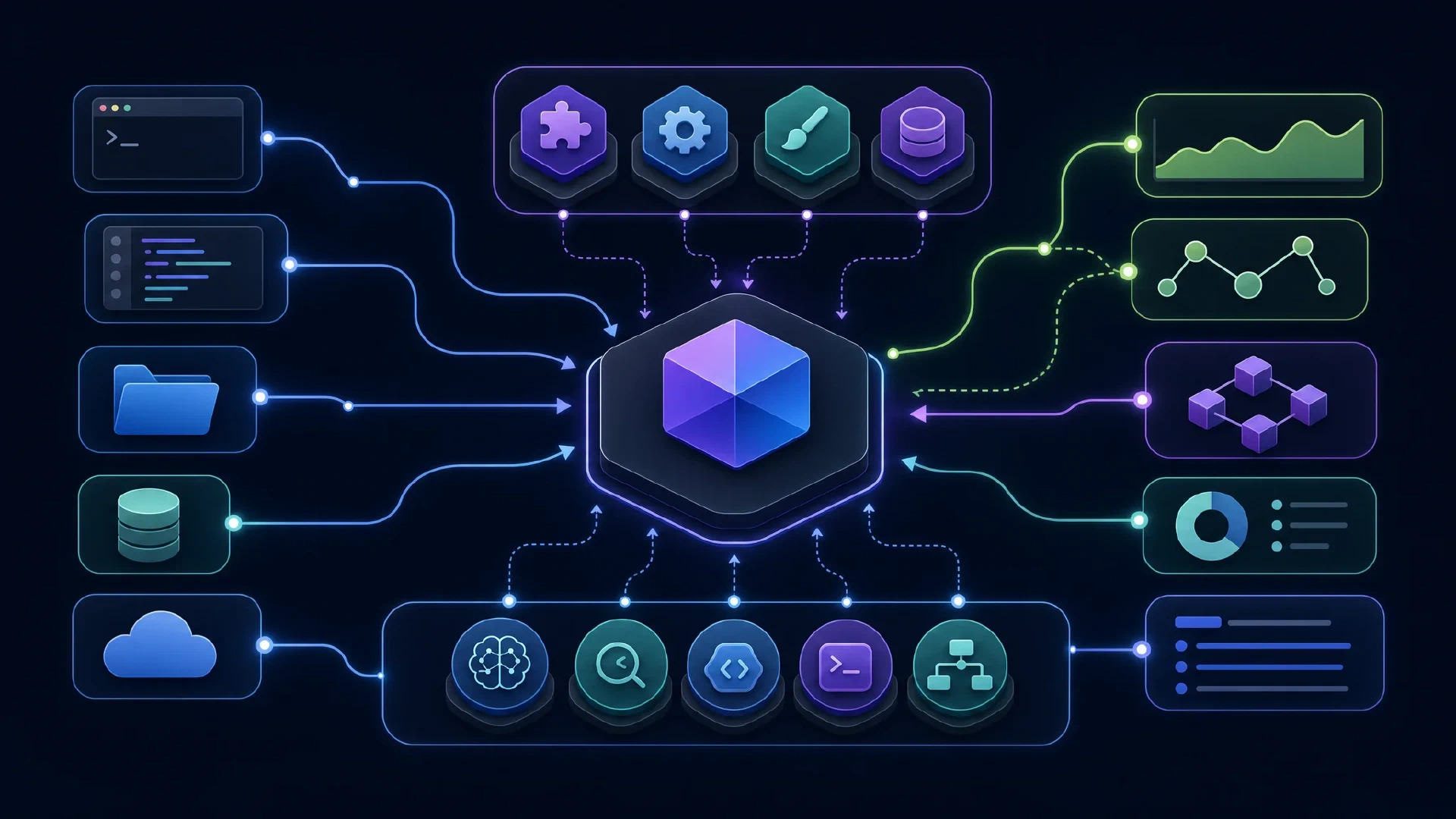
Table of Contents
Choose a Claude Code extension around a specific failure in your workflow. Unclear requirements need a planning conversation. Missed defects need review and tests. Repeated research needs traceable sources. Installing more tools only helps when their responsibilities are clear.
This guide compares ten projects across those jobs, with setup examples and a worked evaluation exercise. The analysis draws on current project documentation and the supplied Chase AI video. Recommendations are editorial judgments, not hands-on performance measurements or evidence of a tenfold productivity increase.
Key Takeaways
- Choose by output: a reviewed plan, a code map, and a generated image require different tools.
- Separate installation layers: instructions, executable programs, plugins, and service connections have different dependencies.
- Check current names: Graphify and grill-me-codex now have different canonical repository locations.
- Verify beyond agreement: two models accepting a plan does not establish correct implementation.
- Measure accepted work: include setup, service usage, failed attempts, and human corrections.
Before You Start
Prerequisites: a working Claude Code installation, a disposable project or branch, and permission to use the selected external services. CLI examples assume a terminal and the named package manager. Cloud integrations require their own accounts and authentication.
Estimated time: 15 minutes to read, then allow 30 to 60 minutes for one bounded trial. Difficulty: intermediate for CLI setup and service integration. Reading instruction skills requires less setup.
Documentation checked October 6, 2026. Commands and access rules reflect the linked sources. Recheck your installed version before following an older tutorial. This article focuses on extensions used from Claude Code, with host differences called out where relevant.
Know the Extension Type
| Type | Role | Example |
|---|---|---|
| Instruction file | Sets persistent project expectations | CLAUDE.md |
| Skill | Supplies a procedure for a selected task | grill-me |
| Plugin | Packages registered commands and integrations | Codex plugin |
| CLI | Executes commands from a terminal | Graphify |
| MCP server | Exposes callable tools to an agent client | n8n instance integration |
Model Context Protocol (MCP) connects an agent application to tools and data exposed by a server. A command-line interface, or CLI, runs executable commands. A skill often teaches the agent how to use either interface, but its presence does not establish a working connection.
Start with the missing capability. If your agent already has repository search, a new search procedure needs an observable benefit. If the agent lacks access to an automation platform, a prose instruction file alone will not supply authenticated access. The broader agent runtime guide explains the software surrounding model calls and tool execution.
Choose Your First Tool
| Problem | Tool | First acceptance check |
|---|---|---|
| Ambiguous requirements | grill-me / grill-with-docs | Explicit decisions and acceptance criteria |
| Repeated scope drift | Karpathy-inspired CLAUDE.md | Every edit serves the requested change |
| Risky implementation plan | Claudex Loop | Review findings resolved with evidence |
| Unreviewed code changes | OpenAI Codex plugin | Findings tied to code and failure cases |
| Unfamiliar repository | Graphify | Relationships agree with source files |
| Scattered project knowledge | claude-obsidian | Claims retain links to original evidence |
| Repeated source synthesis | notebooklm-py | Answers cite the intended source material |
| Confusing interface | Impeccable | Users complete the intended interaction |
| Missing visual assets | Higgsfield | Output fits the approved asset brief |
| Repeatable service workflow | n8n MCP | Test execution produces the expected result |
Recommended starting point: choose one row and save a baseline task before installation. Add a second tool only when the addition supplies a separate, measurable contribution.
Clarify the Work
grill-me and grill-with-docs
Matt Pocock’s skills help turn an underspecified idea into decisions. The current grill-me entry point invokes the shared grilling skill. grill-with-docs invokes grilling and domain modeling. The collection documentation describes shared terminology and architecture decision records alongside the interview.
Use the documentation variant when business terms affect implementation. For an illustrative CSV importer, settle whether an existing customer means the same email, the same external identifier, or both. Record the chosen definition before writing duplicate detection.
Keep the interview proportional. A useful session resolves material uncertainty. The interview should not ask you to restate answers already available in the repository. End with a plan, unresolved questions, and observable completion checks.
Karpathy-inspired CLAUDE.md
The Multica-maintained guidelines translate Karpathy’s observations into four themes: explicit assumptions, simple solutions, focused changes, and verifiable goals. The repository is a community implementation inspired by his observations. Calling the project Karpathy’s personally maintained plugin would misstate its provenance.
Merge useful guidance into existing project policy. Preserve build commands, content conventions, and deployment restrictions. A replacement instruction file which removes those details creates a new source of mistakes.
Example project rule: require an importer change to preserve existing duplicate handling and explain any intentional change with a fixture. This turns a general preference for caution into a check a reviewer understands. Instructions express expectations. Tests and runtime controls establish separate evidence.
| Planning artifact | Purpose |
|---|---|
| Requirement | Names the user-visible outcome |
| Glossary entry | Gives an overloaded term one meaning |
| Decision record | Preserves the reason for a consequential choice |
| Acceptance check | Establishes how completion will be assessed |
Review Plans and Code
grill-me-codex, now Claudex Loop
Claudex Loop is the current destination of the original grill-me-codex repository. Its documentation describes repository reconnaissance, requirements, review by the other provider, implementation, and independent inspection. The complete loop requires both CLIs and Python 3.10 or later.
Use Claudex Loop for consequential plans with assumptions worth challenging before implementation. The current workflow supports starting from either Claude Code or Codex. The workflow records findings and dispositions, and distinguishes permission to review from permission to build. The video’s older five-round description should not substitute for the installed workflow’s current round budget.
Ask for evidence with each objection. For the CSV importer, a review should identify a concrete duplicate or retry case and its expected behavior. Model agreement is a review outcome, not proof. Preserve unresolved findings when the review budget ends.
OpenAI Codex Plugin
/plugin marketplace add openai/codex-plugin-cc
/plugin install codex@openai-codex
/reload-plugins
/codex:setup
OpenAI’s Codex plugin for Claude Code adds code review and task delegation inside Claude Code. These are Claude Code commands, not shell commands. The official repository documents Node.js 18.18 or later and authenticated Codex access through ChatGPT or an OpenAI API key.
/codex:review --background
/codex:status
/codex:result
Use ordinary review for current changes or a branch comparison. Use /codex:adversarial-review for a focused challenge. Delegation commands such as /codex:rescue perform a different job from read-only review, so specify the intended authority.
Budget for Codex usage separately. The project lists ChatGPT Free among supported accounts, but usage limits still apply. Installing the plugin does not create unlimited access.
Selection rule: use a bounded plugin review for an existing patch. Choose the larger loop when requirements and plan revision need their own recorded process.
Preserve Useful Context
Graphify
uv tool install graphifyy
graphify install --project
graphify extract . --code-only
graphify query "show the authentication flow"
Graphify maps repository relationships into a queryable knowledge graph. Its
canonical repository
now lives under Graphify-Labs. The package name is graphifyy, with two trailing y characters. The executable remains graphify.
Code-only extraction uses local abstract syntax tree parsing, which reads the structure of source code. Document and media interpretation uses a separate model-backed path. Avoid extending the code-only privacy or cost claim to every mode.
Optional hooks rebuild the code graph after commits and branch switches. After a pull or merge, the documented workflow calls for graphify update .. Documentation changes need their own refresh. Obsidian export offers another view of the graph.
Use Graphify for relationship questions, then inspect the relevant source. A graph helps select files. Graph structure does not prove runtime behavior or replace tests. Measure any token savings against your own questions, including graph construction and maintenance.
claude-obsidian
claude-obsidian organizes source material into linked, source-cited Obsidian pages. Its repository describes ingestion, retrieval, knowledge maintenance, source retention, and records of support or contradiction. The vault remains ordinary local files.
Use claude-obsidian for durable project knowledge: design decisions, source documents, and research notes which need to survive individual conversations. The useful output is a maintainable record with provenance, meaning a traceable origin for each important claim.
Review the vault after ingestion. Choose a few claims and follow their citations back to the original material. Retain conflicting evidence instead of merging disagreement into a confident summary. Local storage alone does not establish local inference. Check the host and model configuration before providing sensitive documents.
| Context system | Best initial question |
|---|---|
| Graphify | Which source components are connected? |
| claude-obsidian | Which retained evidence supports this decision? |
| notebooklm-py | What do these selected research sources say? |
notebooklm-py
uv tool install "notebooklm-py[browser]"
notebooklm login
notebooklm auth check --test --json
notebooklm skill install
notebooklm-py provides a Python library, CLI, and agent skill for Google’s notebook research service. The project documents source imports, grounded questions, generated artifacts, and batch downloads. The browser extra supports its interactive login flow.
This is an unofficial integration. The library relies on undocumented Google interfaces and remains subject to breakage and rate limits. Do not present the library as a Google-supported public API.
Use notebooklm-py for a bounded research corpus, such as release notes and migration guides for one dependency. Check citations against the source text before incorporating findings into a plan. Protect stored authentication state as account access material.
Research offloading changes where work runs. Offloading does not eliminate orchestration tokens, service quotas, review effort, or data-handling obligations. Treat token savings as a measurement to collect, not an automatic property of installation.
Design and Generate Assets
Impeccable
/impeccable critique settings
/impeccable audit settings
/impeccable polish settings
Impeccable supplies a design vocabulary for focused interface work. Its documentation covers critique, layout, typography, accessibility checks, motion, and browser-based visual iteration. The examples above assume an installed skill and a project with a settings surface.
Start with an interaction problem. For the importer, ask why users miss validation errors or misunderstand the duplicate-handling choice. Review the proposed changes before applying a visual polish pass. Attractive spacing alone does not fix an ambiguous action.
Live iteration helps you compare alternatives in the browser. Verify the resulting keyboard navigation, mobile layout, error messages, and contrast. Command counts change between releases, so use the command list shipped with your installed version rather than memorizing the video’s count.
Higgsfield
Higgsfield’s MCP integration connects agents to its image and video generation service. Its official integration page lists Claude Code and CLI connection options alongside creative workflows. Use the current setup flow for your account and chosen interface.
Choose Higgsfield when the missing deliverable is media. For an illustrative product page, specify an asset’s aspect ratio, composition, brand constraints, and placement before generating variants. Keep the visual brief separate from the task of implementing the page.
Check service access and consumption first. An integration listing does not establish access to every model, unlimited generation, or a particular commercial usage right. Inspect the applicable account terms and selected model before committing to a production workflow.
Review the final file at its intended display size. Check visible text, unintended symbols, cropping, and consistency with the product. Generated terminal screens and diagrams should not serve as evidence of a successful test.
| Design deliverable | Completion evidence |
|---|---|
| Interface revision | Required actions work across target viewports |
| Image asset | Dimensions, crop, and content match the brief |
| Video asset | Timing, motion, and final export match the brief |
Connect Repeatable Workflows
n8n MCP
n8n’s built-in MCP server exposes workflow operations to connected clients. The current connection documentation covers Cloud and self-hosted instances. Building and editing workflows is documented from n8n 2.13.0. This article refers to n8n’s own server, not an unrelated community package with a similar name.
Use instance-level access for the integration described here. The MCP Server Trigger node has a different scope: tools exposed from one workflow. Check the tools reference against your deployed version.
Enable access deliberately. Existing workflows require MCP exposure for full access. Search previews have broader visibility within the user’s existing permissions. Workflow exposure is not a separate allowlist per client, although granted client permissions also govern operations.
Inspect execution mode. The documented execute_workflow default runs the published production version. Manual mode runs the current unpublished version. Verify inputs and downstream actions before execution.
A useful first trial: classify synthetic support requests and write results to a test destination. Confirm the workflow handles missing fields and retries. Self-hosting still requires compute, maintenance, and any paid downstream services.
Run a Controlled Trial
Illustrative exercise: add a CSV importer to a small application. The importer previews rows, reports invalid email fields, and prevents duplicate creation. No customer records or live external destinations are needed for this exercise.
# Evaluation worksheet, not a tool configuration file
task: "add CSV import preview"
inputs:
  - "valid rows"
  - "invalid email field"
  - "repeated customer identifier"
  - "same import submitted twice"
acceptance:
  - "preview creates no records"
  - "invalid rows receive useful messages"
  - "duplicate policy matches the written requirement"
  - "repeat submission creates no extra records"
record:
  - "source revision and selected skill version"
  - "model and service configuration"
  - "elapsed time and billed usage"
  - "failed checks and human corrections"
Establish the baseline first. Save the starting revision and ask the agent to complete the task with your existing workflow. Run independent acceptance checks and retain the result. Repeat from the same starting revision with one selected extension and the same requirements.
Match the experiment to the suspected problem. If duplicate handling is repeatedly misunderstood, trial a requirements skill. If the agent overlooks an existing validator, trial repository mapping. If users miss errors, trial interface critique. Loading all ten tools at once prevents attribution of any improvement.
Expected reasoning: a successful second attempt is useful evidence, but one run does not establish a general productivity multiplier. Repeated runs help separate tool value from model variability. Compare accepted results, including your review effort and failed attempts.
| Observation | Interpretation |
|---|---|
| Faster answer, failed tests | Lower response time without task completion |
| Longer run, fewer corrections | Possible benefit in total delivery effort |
| Two agreeing reviewers | Agreement requiring independent verification |
| Lower agent usage, new service charges | Cost moved across providers |
Create a retained decision record. Name the problem, selected tool, observed benefit, unresolved issue, and conditions for another trial. Keep a tool when its contribution survives this check. A large installed collection does not require a large active workflow.
Troubleshooting
| Symptom | Check next |
|---|---|
| Skill exists but command fails | Executable installation, PATH, and required sidecar files |
| Old tutorial names missing commands | Installed version and canonical upstream instructions |
| Graph misses recent changes | Graph freshness and separate document refresh |
| Reviewer repeats resolved objections | Exact plan revision, evidence, and review budget |
| Notebook authentication fails | Auth diagnostic, session validity, and upstream issues |
| n8n connection lacks expected operations | Deployed version, exposure settings, and granted permissions |
| Design looks better but works worse | Original acceptance criteria and interaction checks |
Check installation layers in order: files present, host discovery, dependencies ready, authentication working, and representative task verified. A successful installer establishes only part of this chain.
Inspect overlapping skills before adding another copy. Requirements interviews, planning suites, design tools, and review packages sometimes express competing defaults. Select one primary procedure for the job, then add supporting tools for named contributions. Preserve repository policy and the user’s requested scope.
Video Walkthrough
Chase AI’s walkthrough introduces the ten projects discussed here. Watch the original video for its demonstrations. Use the linked project documentation for current installation and behavior. The video’s title expresses a promotional claim, not a measured result established by this guide.
Next Steps
Choose one recurring failure and one acceptance test. Trial the matching extension on a disposable project, then retain the smallest combination which improves the result. Add knowledge management, media generation, or automation only when the work needs those outputs.
For related guidance, read the CLI coding-agent comparison when choosing the agent itself. Use the AI collaboration course for practical work on requirements, evidence, and review responsibilities.
References
- Graphify: code graphs and installation
- Matt Pocock: skill collection
- Claudex Loop: current grill-me-codex project
- OpenAI: Codex plugin for Claude Code
- claude-obsidian: source-linked knowledge management
- Multica: Karpathy-inspired coding guidelines
- Impeccable: design commands and installation
- Higgsfield: agent integration
- notebooklm-py: unofficial library, CLI, and skill
- n8n: official MCP connection guide

Related Posts